
FMCG
Manage cartons and pieces, check godown stock, and keep track of partially fulfilled customer orders.
Manage stock across godowns, fulfil orders in parts, generate GST invoices, and track customer dues - with purchases and accounting connected in Refrens.
When you purchase goods, your stock needs to be updated. When a customer places an order, you need to check availability, fulfil it, and track what's still pending. Then come dispatches, invoices, and payment collections.
With Refrens, your purchases, inventory, orders, billing, and accounts stay connected, so you can manage daily operations without entering the same details repeatedly.
Refrens is built for wholesalers, distributors, stockists, importers, and B2B traders who purchase and supply goods to retailers, dealers, businesses, and institutions.
It is not designed for retailers managing their own stores.
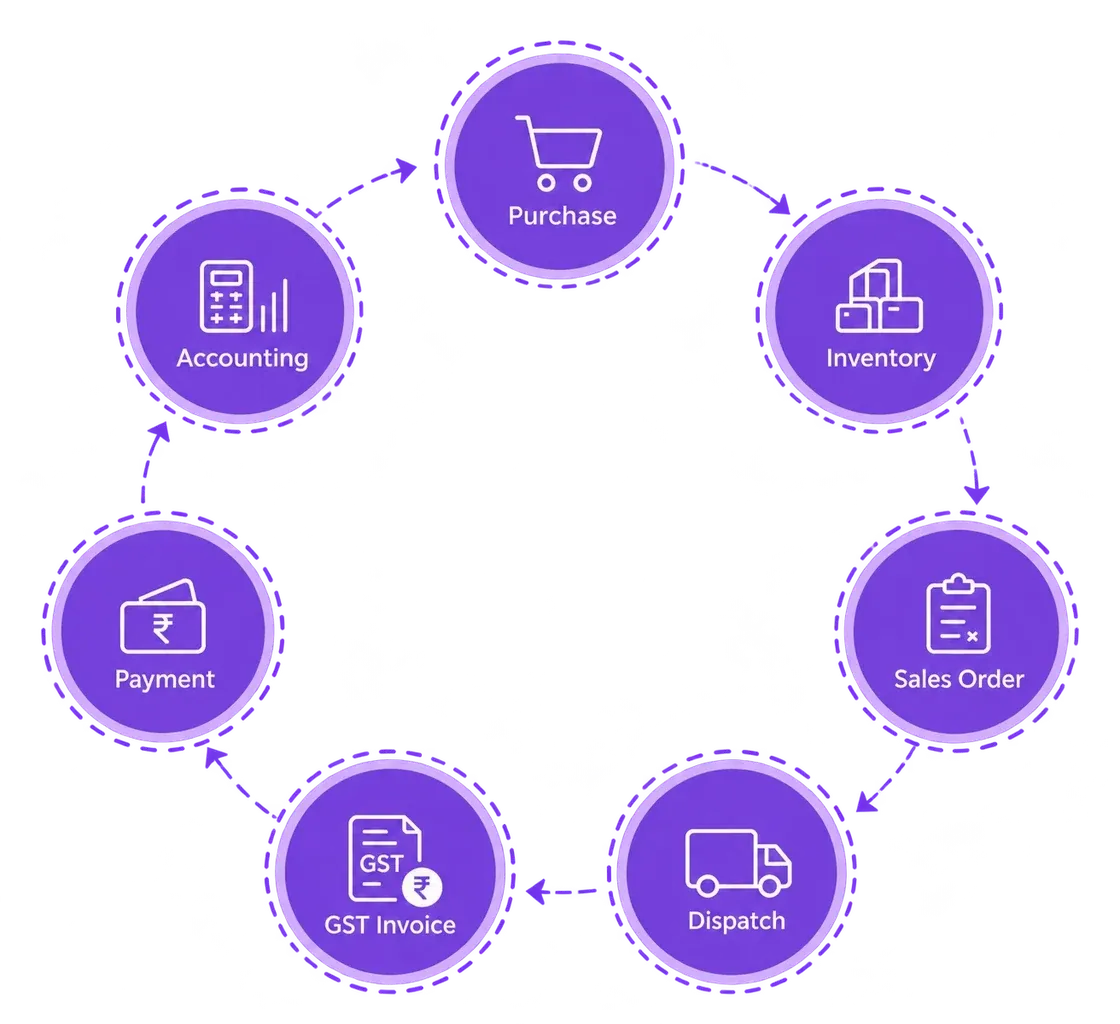
Whether you distribute FMCG products, industrial materials, or specialised goods, Refrens helps you manage the stock, orders, billing, and purchasing requirements of your business.
Manage cartons and pieces, check godown stock, and keep track of partially fulfilled customer orders.
Track batches and expiry dates, manage warehouse-wise stock, and record sales and purchase returns.
Check item-wise availability, track serial numbers where applicable, and monitor pending dispatches.
Buy and sell in different units, include freight in inventory costs, and prepare dispatch documents.
Check product availability across godowns, manage customer orders, and track stock movements and returns.
Manage quantities in different units, track orders and dispatches, and account for purchase-related freight costs.
From purchase and godown stock to part dispatches, GST invoices, and collections - see how Refrens connects the steps.
Create quotations and sales orders, convert them into delivery challans or invoices, and manage partial fulfilment when you can't supply the entire order at once.
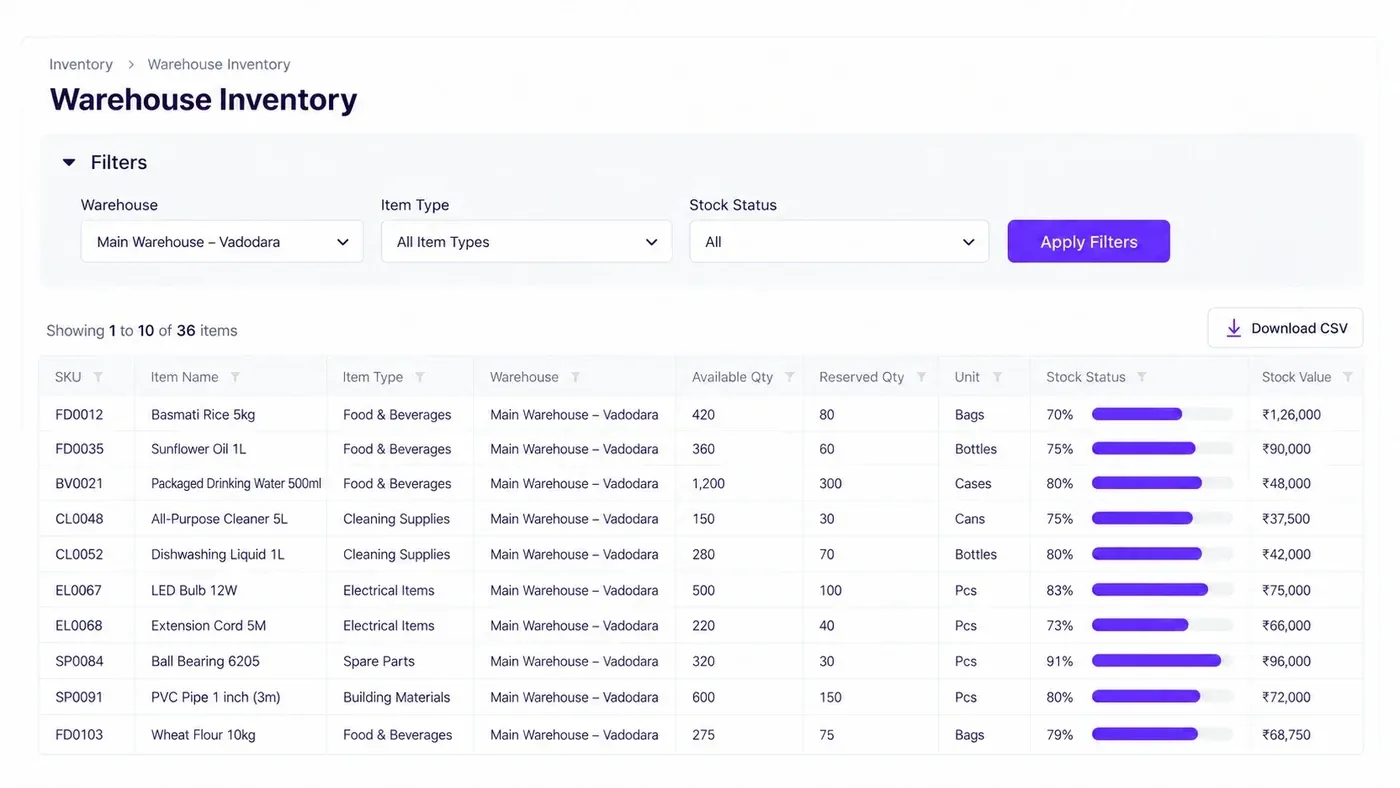
Manage inventory across multiple godowns, transfer stock between warehouses, and track products by batch, serial number, or expiry date.
Create purchase orders, request quotations from suppliers, and check purchases and outstanding payments for each vendor.
Add freight, loading, and other expenses to calculate landed costs. Keep track of when purchases are due and set up approvals before important orders move ahead.
Create delivery challans, GST invoices, e-invoices, and e-way bills using details from existing documents, without having to enter everything again. Simplify billing for distributors with connected sales documents.
Add HSN/SAC codes, customer PO and transport details, plus freight or packaging charges. Customise invoice fields and formulas; issue credit/debit notes for returns and adjustments.
Record full or partial payments, check customer outstanding amounts, and send reminders for overdue invoices.
Record bulk receipts, reconcile bank transactions, and keep accounts updated with sales and purchases. View financial statements, GST reports, and available customer GST compliance information.
Capture enquiries from IndiaMART and TradeIndia, track leads through your sales pipeline, and send quotations to potential customers.
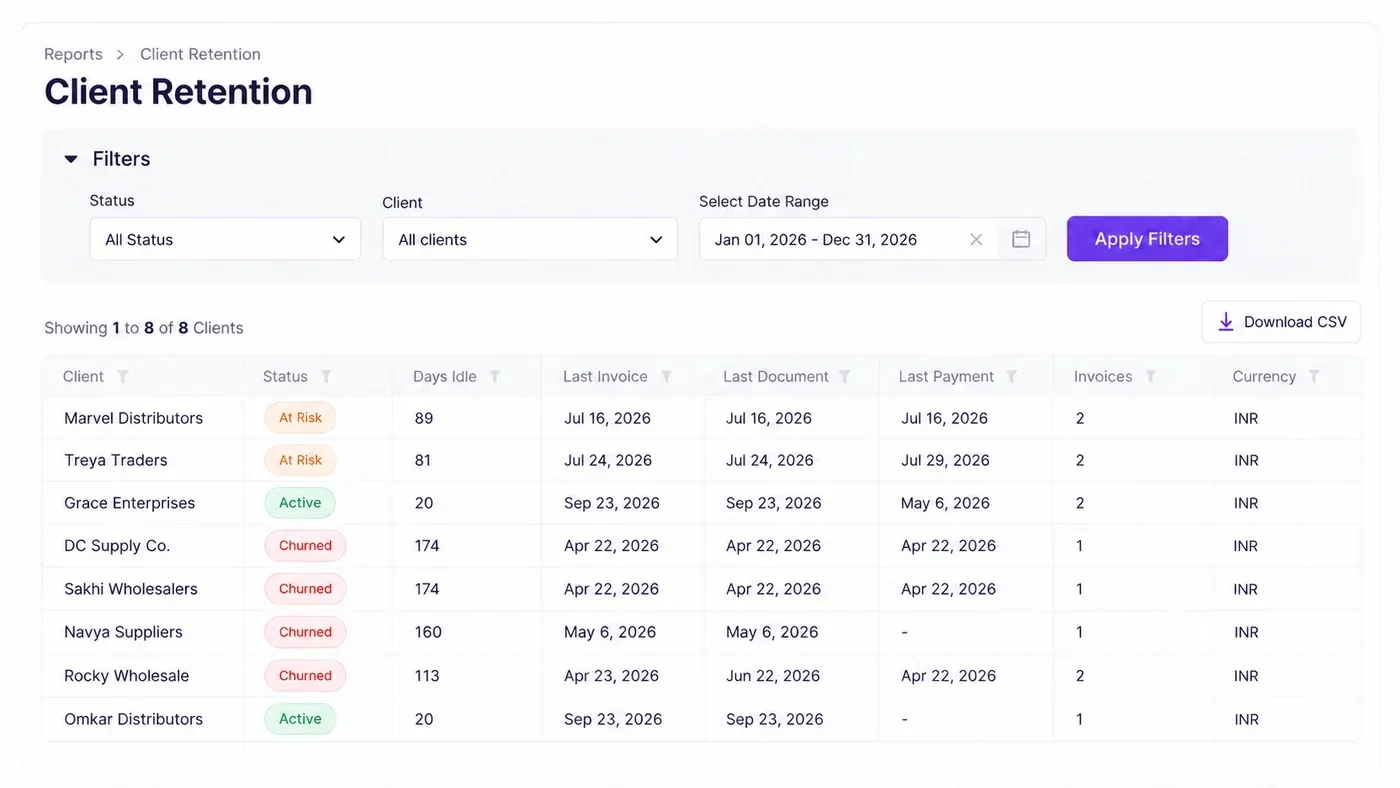
Keep customer details, past transactions, and follow-up history together, so you know who to contact, when to follow up, and where your next order could come from.
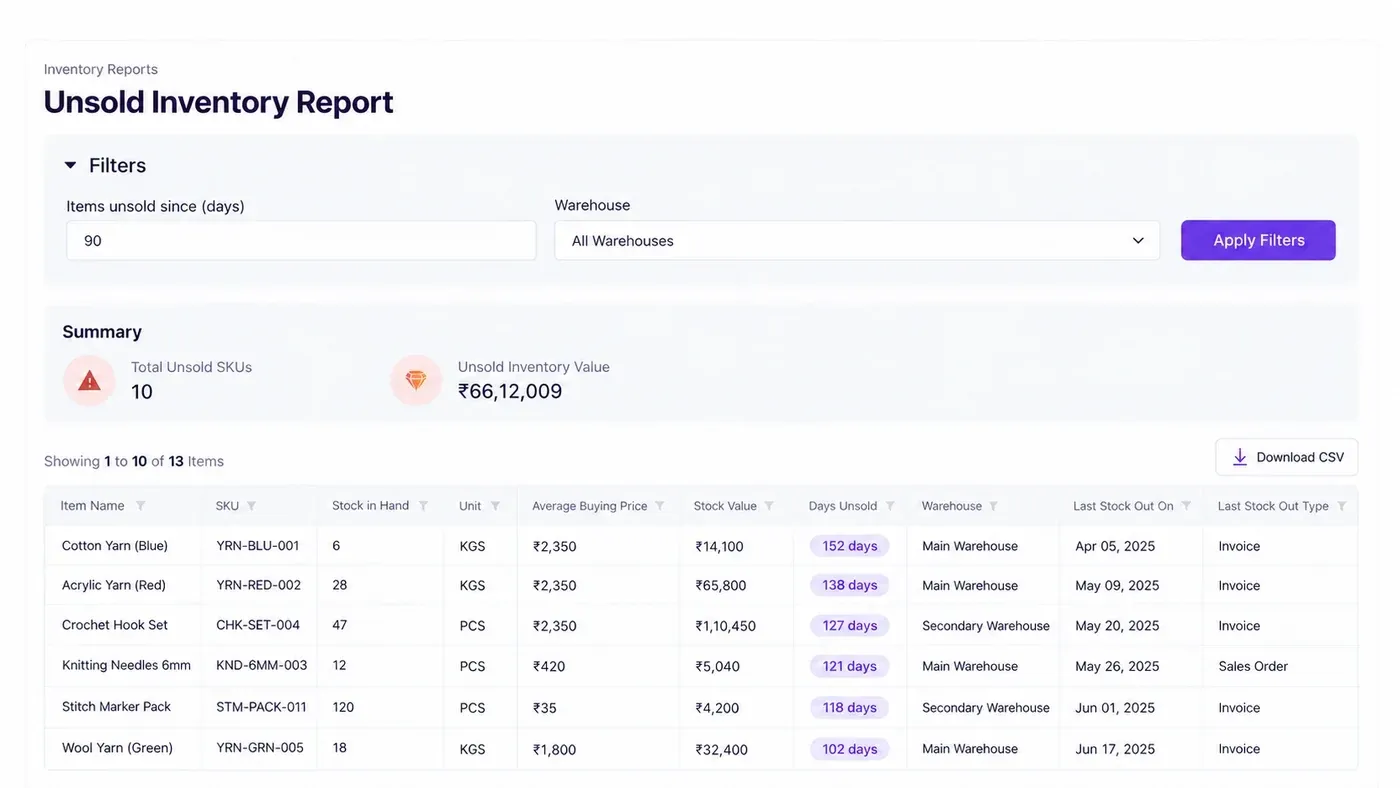
Check how your business is doing without having to ask your team for updates every time. See pending orders, stock levels, product margins, customer payments, and buying patterns through Refrens reports.
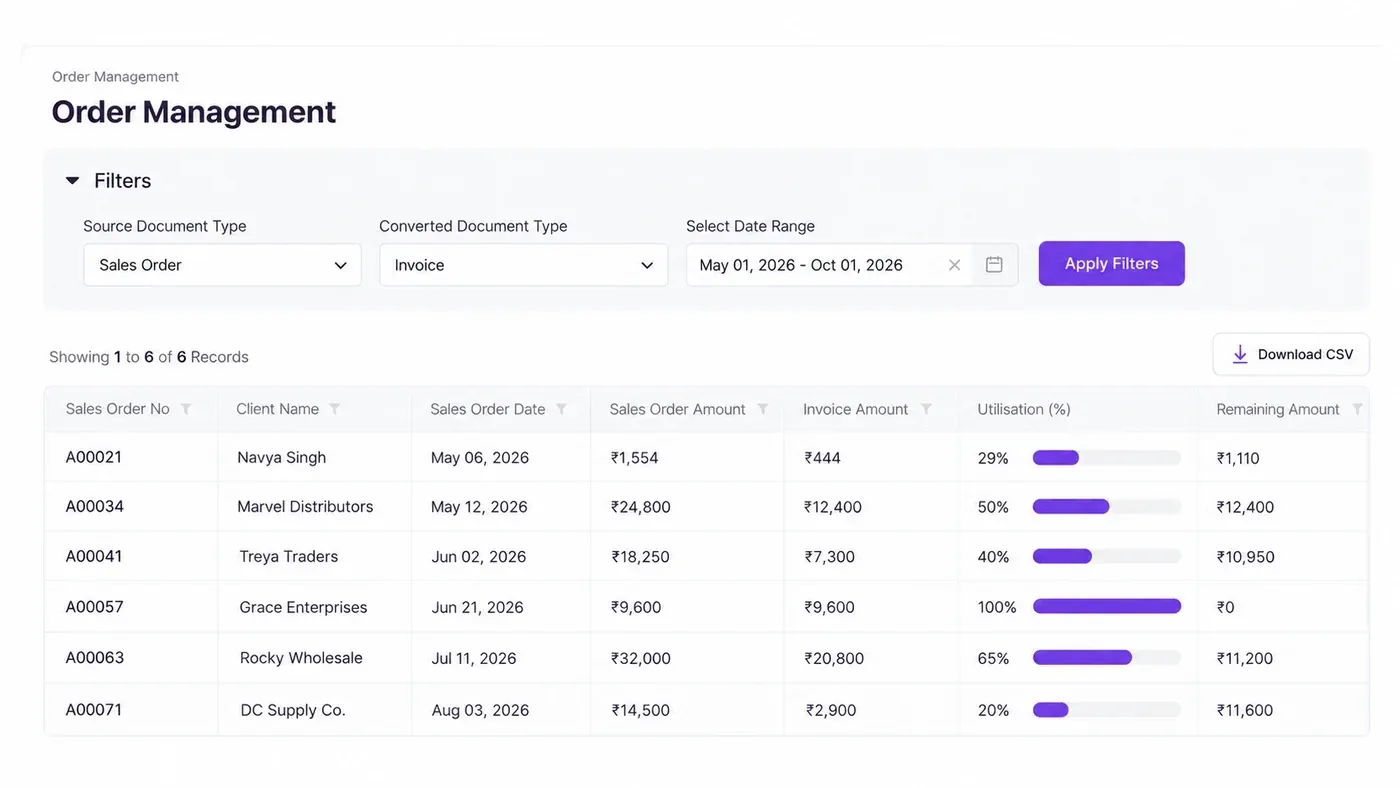
Track partially invoiced orders, utilisation, and the value still pending.
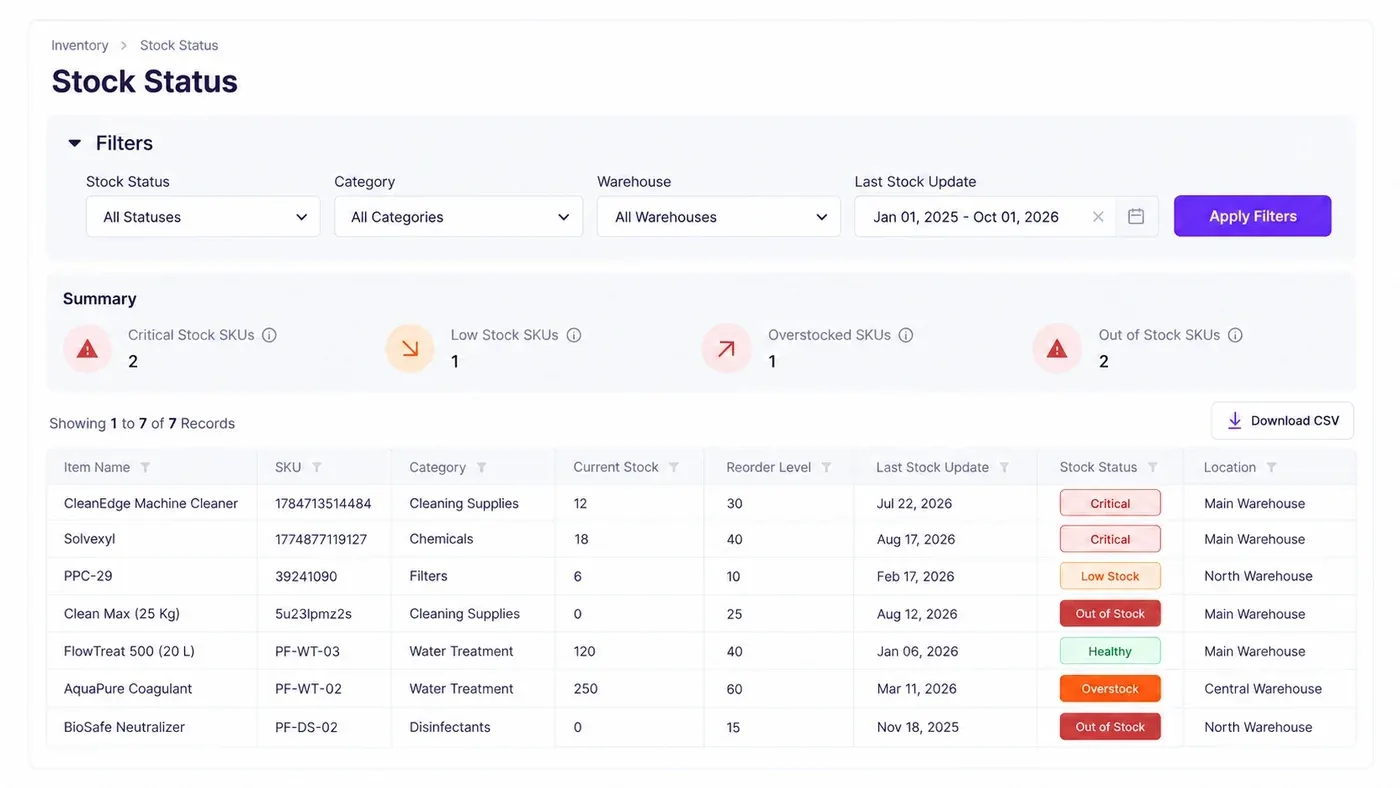
Find critical, low, healthy, out-of-stock, and overstocked items before they affect sales.
Check available quantities across godowns before confirming customer orders.
See unpaid invoices and customer dues so you know which collections need follow-up.
Identify which products generate profit and which are earning lower margins.
Find slow-moving products, their stock value, and how long they have remained unsold.
You can also build custom reports in Refrens, tailored to your business needs.
Make Everyday Distribution Operations Easier to Manage
When your sales, inventory, purchases, and accounts are in Refrens, you don't have to switch between different software just to get the information you need.
Create sales orders, delivery challans, and invoices from related documents instead of typing the same information repeatedly. This saves time and helps reduce manual errors.
Whether you're at the office, in a godown, or on the move, use Refrens on your phone or computer to check stock, orders, invoices, and payments.
Assign roles and permissions based on your team's responsibilities. Set up multi-stage approval workflows so the right people can review and approve important documents before they're processed.
Use Refrens APIs to connect your website, applications, or internal systems with supported invoicing, inventory, and CRM workflows.
Get assistance setting up your account, learning how to use Refrens, and migrating supported records from your existing software. If you need help later, the Refrens support team is available 24/7 through chat, phone, email, and WhatsApp.
Explore Refrens or speak with our team about getting your purchasing, inventory, orders, and accounting connected.
Refrens Eagle
AI Document Capture
Send supplier bills and expense receipts to Eagle through WhatsApp or email. It scans the documents, extracts the details, and prepares purchase or expense drafts for you to review and save.
Explore Refrens EagleFreya
AI Assistant
Want to know your revenue, expenses, or outstanding payments? Ask Freya and get answers from your accounting data without going through multiple reports.
Explore Freya AIRefrens MCP
WhatsApp/Claude/ChatGPT Integration
Connect Refrens with WhatsApp, ChatGPT or Claude to perform supported tasks like checking outstanding invoices, reviewing stock, creating invoices, recording payments, and transferring inventory.
Explore Refrens MCP
See how Refrens brings your daily distribution operations together, from purchase to payment.
Distribution management software helps wholesalers and distributors manage purchases, inventory, customer orders, dispatches, billing, and payments. It connects these activities so you can track your business operations from purchase to payment.
Refrens is suitable for wholesalers, distributors, stockists, super stockists, importers, and B2B trading businesses. Whether you deal in FMCG products, pharmaceuticals, electrical goods, or industrial materials, you can use Refrens to manage your daily distribution operations.
Yes. Refrens lets you check stock across different godowns, transfer goods between locations, and track products by batch, serial number, or expiry date. You can also set low-stock alerts.
Yes. You can create sales orders and convert them into delivery challans or invoices, even when an order is fulfilled in parts. The Order Management Report shows how much has been fulfilled and what's still pending.
Yes. Refrens lets you create GST invoices, record payments, track customer outstanding amounts, and send payment reminders. Your sales and purchase transactions also stay connected with accounting and financial reports.
Yes. Refrens supports GST e-invoicing and e-way bill generation for applicable transactions. You can generate these documents alongside your sales records, helping you manage GST compliance and goods movement documentation from one platform.
Yes. For example, if you purchase goods in cartons but sell them in pieces, you can set up alternate units and conversion factors in Refrens. This helps you keep stock quantities consistent.
With Refrens, you can manage purchases, inventory, sales orders, GST billing, accounting, and customer relationships in one place, without separate software for each activity. You also get business reports, AI-powered features, and 24/7 customer support.
Yes. You can bulk upload inventory items using the Refrens CSV template, including supported product details, opening stock quantities, and warehouse-wise stock. Review the import format before uploading your existing data.
Start by organising your product and stock records, then use the supported bulk-import tools to bring inventory data into Refrens. For other business records, review the available import options and migration steps with the Refrens team before switching.
Set up your business details, warehouses, and inventory items. Then configure the purchase, sales, billing, and accounting workflows your team uses. You can explore the platform or book a demo to review the setup for your business.