
















Partner Icon
Become a Refrens PartnerLearn More

Inventory Management Software for Trading Businesses

Keep your purchases, stock and sales in sync, item by item.

See live stock in every warehouse, buy in cartons and sell in pieces, and reorder before you run out. Every purchase and bill updates your stock as you work, on laptop or phone.

Book a demoStart for free

Free trial, no card needed.

image
  • 3,00,000+Businesses use Refrens
  • 4.8/5From 17,000+ reviews
  • ISO 27001ISO/IEC 27001:2022 certified

Backed by founders of India's best-known internet companies

  • Akash SinhaCashfree Payments
  • Anupam MittalShaadi.com
  • Vijay Shekhar SharmaPaytm
  • Dinesh AgarwalIndiaMART
  • Kunal ShahCRED

Businesses that run on Refrens

  • Nuvama
  • upGrad
  • RailTel
  • Pazcare
  • Bollant
  • C5i
  • AiSensy
  • Superfone
  • Emprada Mines and Minerals
  • Propacity
  • RSB Retail India
  • ClaimBuddy
  • Swift
  • HDU Healthcare
  • Luzo
  • Tecqubes
  • Admito
  • Simply Wellness
  • Loom Solar

How it works

Every Purchase and Sale Updates Your Stock

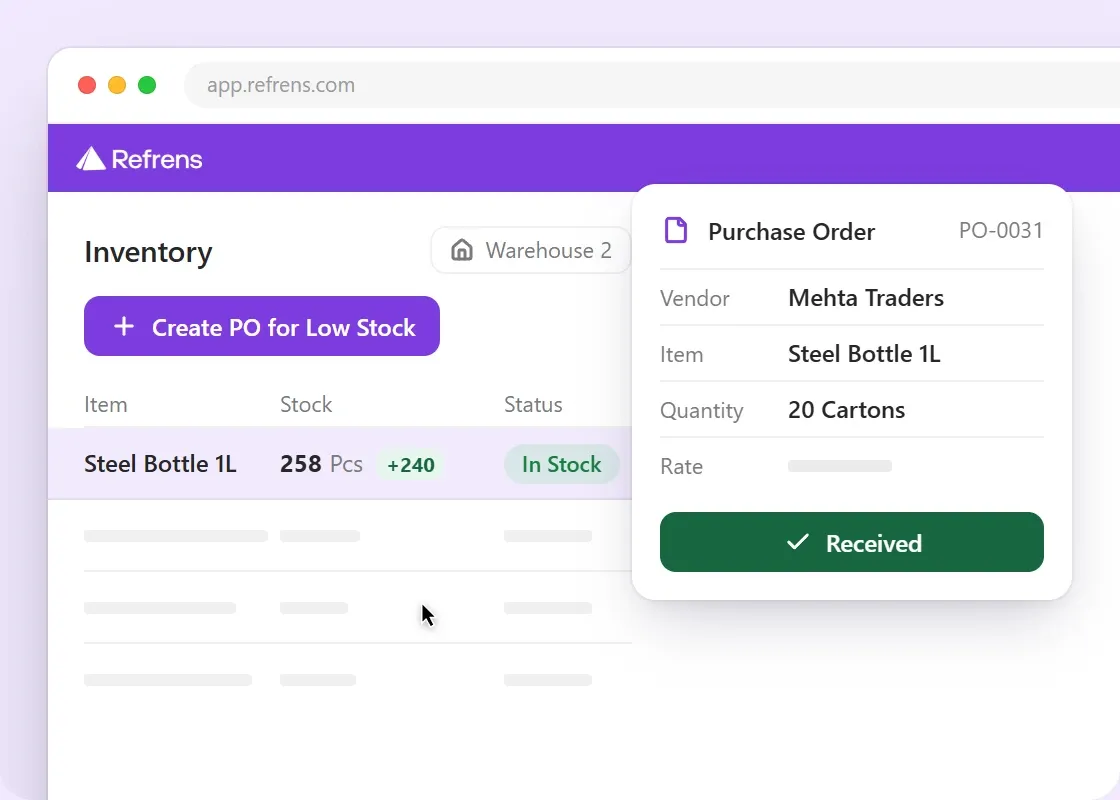
When goods come in, your stock goes up in the warehouse you choose. When you bill a customer, it gets deducted.

Refrens counts every step, so the number on screen matches what's on the shelf.

Who Is This Software Built For?

Refrens is built for Stockists, Dealers, Importers and B2B Traders who buy goods, keep them in one or more warehouses and sell them to other businesses. Distributing a brand to Retailers? See Inventory Software for Distributors.

  1. Purchase Order
  2. Goods Received
  3. Warehouse Stock
  4. Transfer
  5. Sales Bill
  6. Low Stock
  7. Reorder

What you get

Stock Management for Your Trading Business

Most Traders keep stock in their billing app and fix it in Excel when it drifts. In Refrens, every purchase, bill, return and transfer updates the stock in the right warehouse on its own.

See Live Stock in Multiple Locations

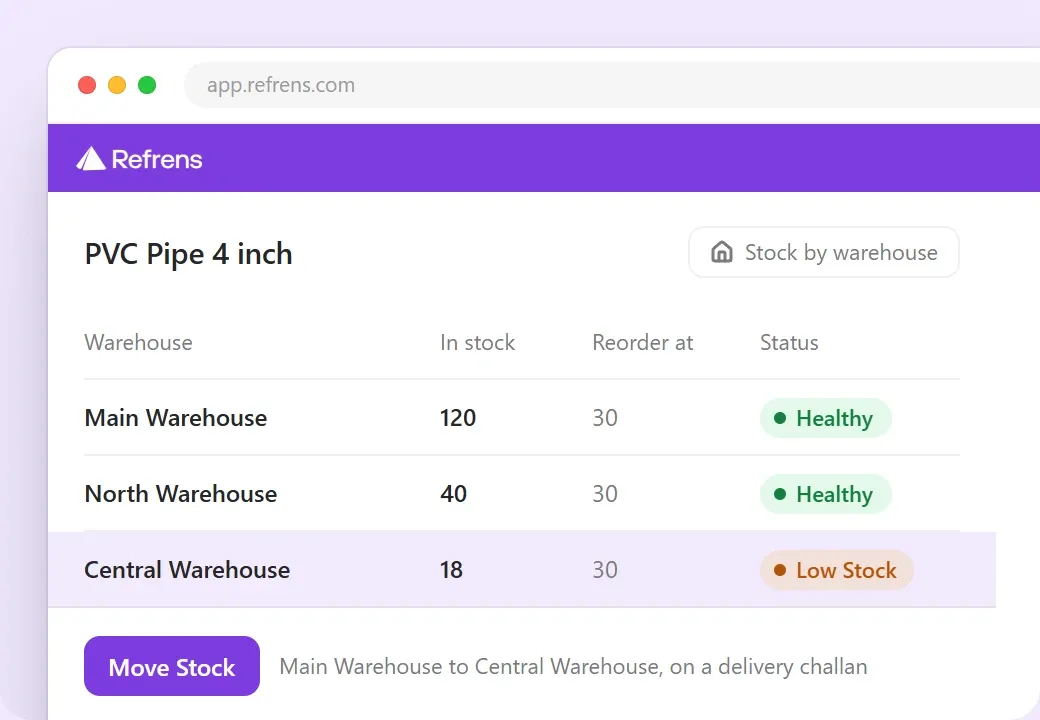
Refrens keeps live stock for every item in every warehouse or location you have, and every bill and purchase order carries the warehouse it belongs to. Transfers between warehouses run on a delivery challan, and both sides update on their own.

  • Reorder and overstock levels work per warehouse, not just per item.
  • Transfers go one item at a time or as a whole list in one go.
  • Every item keeps a full history of where its stock came from and where it went.
"GST billing, inventory management, reports, and ledger tracking work smoothly."
Photo of HARISH CHOUDHARY
HARISH CHOUDHARYRead the Review on Google Play
One item's stock in Refrens by warehouse: Main 120, North 40 and Central 18 against a reorder level of 30, Central marked low, and a Move Stock button for a transfer on a delivery challan

Manage Inventory in Multiple Units

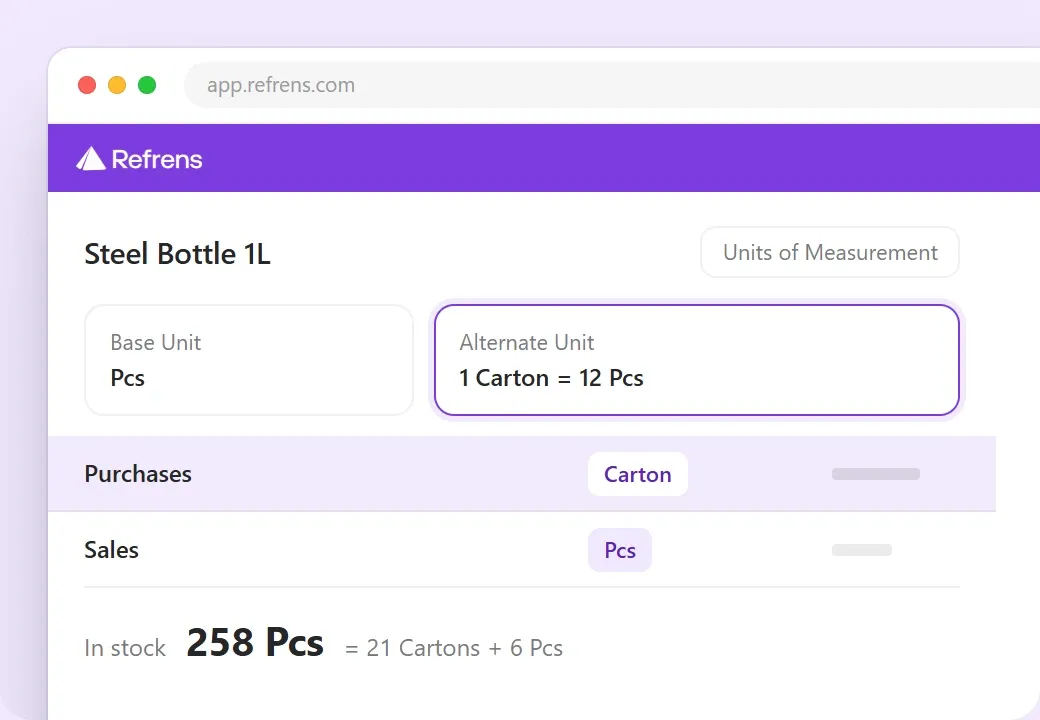
Refrens handles a different unit for buying and for selling, with the conversion built in: a carton of 12 bought, a piece sold, and the quantity and the rate converted on every bill while your stock stays in one base unit.

  • One product can sell in packs of 12, 24 or 36.
  • Every item remembers the last price you billed it at.
  • Returned goods come back into stock through a credit note.
An item's units of measurement in Refrens: base unit Pcs, alternate unit 1 Carton equals 12 Pcs, purchases in cartons and sales in pieces, with 258 Pcs in stock shown as 21 cartons and 6 pieces

Set Reorder Levels and Spot Slow-Moving Stock

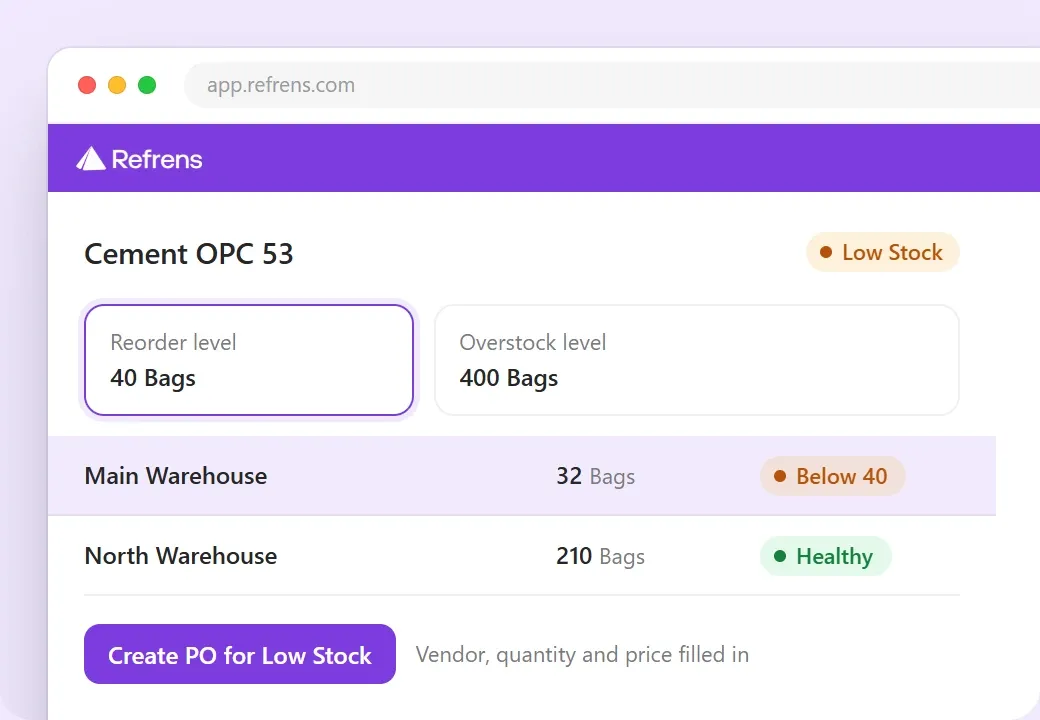
Every item carries a status against the levels you set: critical, low, well stocked or overstocked. The low-stock list turns into a purchase order in one step, and the unsold stock report shows what hasn't sold in 30, 90 or 180 days, and what it's worth.

  • Supplier quotes sit side by side, so the reorder goes to the best rate.
  • An overstock level per item keeps over-buying in view.
  • Slow-moving stock shows up with its value, so you can clear it before buying more.
"Payment tracking, GST, inventory and historical pricing are all much easier to manage now."
Verified Reviewer, TextilesRead the Review on Capterra
Reorder and overstock levels for an item in Refrens, 40 and 400 bags, Main Warehouse at 32 bags marked below 40, and the Create PO for Low Stock button

Track Batches, Expiry and Serial Numbers

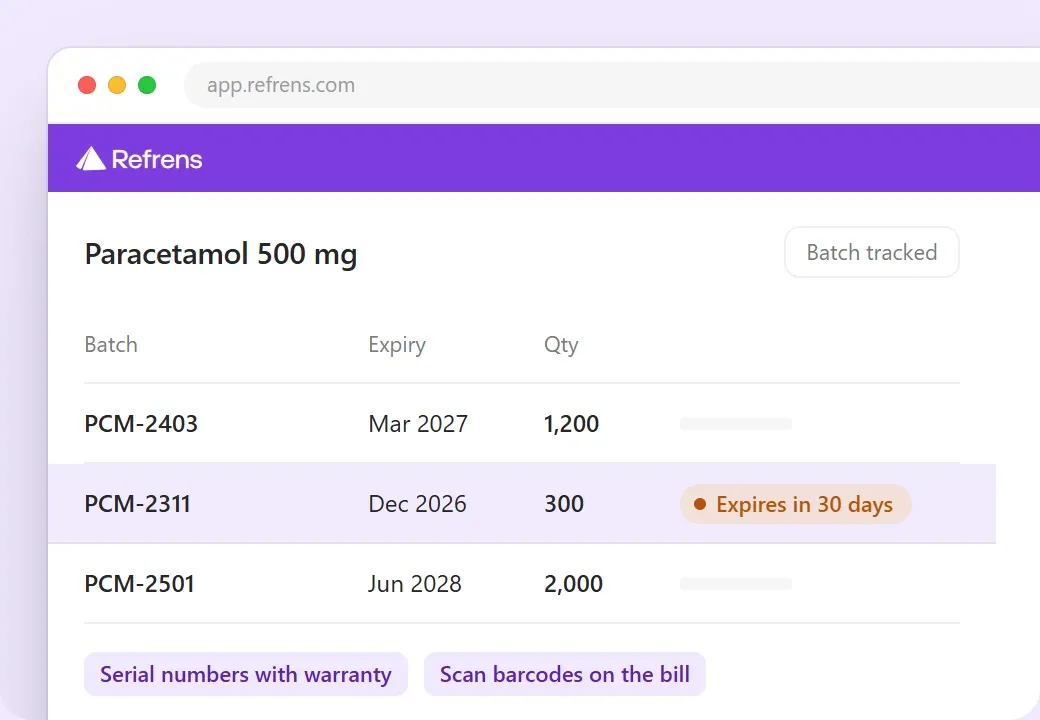
Refrens tracks every lot as a batch with its expiry date, down to the invoice line, and every serial number with its warranty. Barcodes scan straight onto bills.

  • Batches nearing expiry show up before they go bad.
  • A bill can reserve stock rather than take it out, for goods that haven't arrived yet.
  • Batches load in bulk, not one at a time.
Batches of one item in Refrens with expiry dates and quantities, one batch marked as expiring in 30 days, and serial numbers with warranty and barcode scanning named below

Count Your Stock and Adjust the Difference

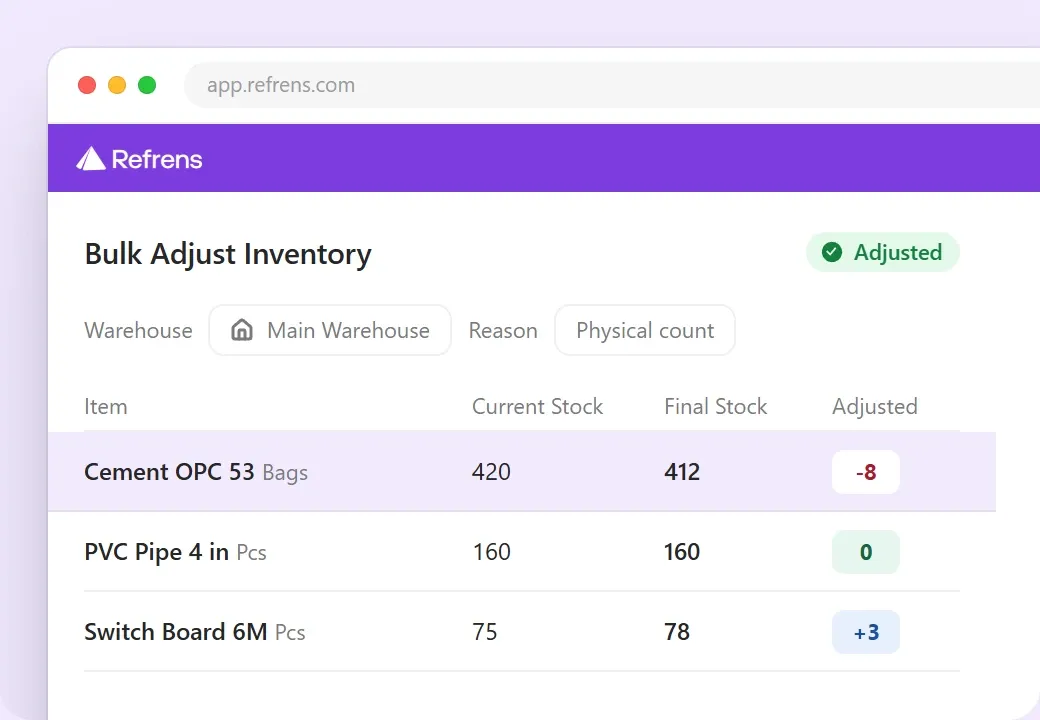
Refrens handles a physical stock count for your whole range at once: it takes the counted stock for every item, works out the difference against the books and records the adjustment with a reason.

  • A single item can be adjusted on its own when something breaks or goes missing.
  • Every adjustment stays on the item's history, with its reason.
  • Your stock value is available any time.
Bulk Adjust Inventory in Refrens for the main warehouse after a physical count: current stock, the counted final stock and the adjusted quantity for three items

Refrens AI

Three AI Helpers Built Into Refrens

One reads your supplier bills, one takes instructions from ChatGPT, Claude or WhatsApp, and one answers questions from your books.

Refrens Eagle

Forward a supplier's bill to your Refrens WhatsApp number or email, or upload it. Eagle reads the supplier, the bill number, the date, the tax and the line items, and fills in the purchase for you to check and save.

Learn About Refrens Eagle

Refrens MCP

Connect your Refrens account with ChatGPT, Claude and WhatsApp. Ask who owes you, check your stock, or create an invoice, a purchase order or a payment straight from the chat.

Learn About Refrens MCP

FREYA AI Assistant

Ask FREYA a question about your sales, expenses or dues, like "who owes me the most?", and it answers from your own books, right inside Refrens.

Learn About FREYA

Who it's for

Inventory Software for the Goods You Trade

If you buy goods and sell them to shops, Dealers or other businesses, Refrens keeps your stock the way your line needs it.

  • Steel and Metals

    Buy by the tonne and sell by the piece.

  • Textiles and Garments

    Keep each lot as its own batch.

  • FMCG and Groceries

    Sell older batches first, before they expire.

  • Pharma and Medical Supplies

    See expiry dates on every batch.

  • Electricals and Electronics

    Track every unit by serial number.

  • Auto Spare Parts

    Scan the barcode, so the right part goes out.

  • Building Materials

    Keep stock in more than one yard or warehouse.

  • Agricultural Products

    Buy in sacks and sell in bags.

  • Hardware and Tools

    Sell in packs of 12, 24 or 36.

Also in Refrens

More Tools That Work With Your Stock

Stock is one part of your day. These come with it, on the same live data, so you don't need another tool for them.

Android and iOS App

Check stock in every warehouse from wherever you are.

Roles and Approvals

Decide who sees what, and approve purchase orders before they go out.

E-Invoices, E-Way Bills and GSTR-1

Make e-invoices and e-way bills from the invoice, and get GSTR-1 from your sales.

Sell Items as a Pack

Bundle items that sell together into one line. The stock of each part still moves on its own.

Returns, Damaged and Scrapped Stock

When a serial-tracked item comes back, mark it reusable, damaged or scrapped. Reusable goes back into stock, and the rest stays on record.

Update Items in Bulk

Change prices, units and stock for many items at once with one CSV upload.

Reports

Stock Reports You Get Ready-Made

  • Stock Status
  • Warehouse Inventory
  • Unsold Inventory
  • Batch Expiry
  • Stock Value
  • Party Transactions
  • Order Management

Custom Reports, Built for Your Business

Need a report that isn't here? Refrens provides custom reports as per your business needs. Tell us the fields and columns you want, and the Refrens team builds that report for you.

Chat on WhatsApp

Switching over

Bring Your Stock Over to Refrens

You don't have to type your items again. Upload your item list with opening stock for each warehouse, and our team helps you with the move.

"The Mobile app syncs immediately so no need for carrying around the laptop."
Photo of Rory R.
Rory R., Director, WholesaleRead the Review on GetApp
  • Moving Your Items

    One CSV sheet carries opening stock for each warehouse, units, HSN codes and reorder levels.

  • Your CA

    Give your CA their own login with the access you choose.

  • Your Data

    Refrens is ISO/IEC 27001:2022 certified and backs up your data in the cloud.

Pricing

Get a Price for Your Setup

Every trading business is set up differently, so we quote for yours. Your price depends on three simple things.

  • How many people need a login.
  • How many warehouses or locations you run.
  • Which features you need.

Start with a free trial. You don't need a card.

Want a Price for Your Setup?

Tell us about your business, and we'll send a quote.

Get a Custom QuoteHide the Form

See the Standard Plans

Prefer to try first? Start for free

FAQ

Questions About Inventory Software for Traders

Here are answers to what Traders ask most about managing stock in Refrens. Still unsure? Book a demo and ask us.

What is inventory management software for a trading business?
It keeps track of the goods you buy, store and sell. In Refrens, stock goes up when you save a purchase and gets deducted when you bill. You see every item in every warehouse and know when to reorder.
Which inventory software is best for a trading business in India?
Pick one that updates stock from your bills, handles more than one warehouse and converts units. It should also make GST bills with e-invoices and e-way bills, and work on your phone. Refrens does all of this.
Can I manage stock across more than one warehouse or godown?
Yes. Each warehouse keeps its own stock, and you pick the warehouse on every bill and purchase. Transfers go out on a delivery challan, and both warehouses update.
Does stock update when I make a bill or add a purchase?
Yes. Saving a bill takes stock out, and saving a purchase adds it. Returns work the same way through credit and debit notes. If you bill first and send the goods later, you can set bills to reserve the stock instead, and you can ask Refrens to check the stock before a bill goes out.
Can I buy in one unit and sell in another?
Yes. For example, you can buy in cartons of 12 and sell by the piece. Set the units once on the item, and Refrens converts the quantity and the rate on every bill.
Will I know before an item runs out?
Yes. Set a reorder level for each item in each warehouse. Refrens marks the items that are running low, and you can make a purchase order from that list in one step.
Can I see how much money is stuck in unsold stock?
Yes. The stock value report shows what your stock is worth at any time. The unsold inventory report shows what hasn't sold in 30, 90 or 180 days, so you can clear it before you buy more.
Can I track batches, expiry dates and serial numbers?
Yes. You can track stock by batch with expiry dates, and by serial number with warranty. You can also scan barcodes to add items to a bill.
Can I check stock on my phone?
Yes. The Refrens app for Android and iOS shows the stock in every warehouse, along with every stock movement.
How do I move my stock from Tally, Busy or Excel?
Export your item list and closing stock, then upload them to Refrens in one CSV sheet, with opening stock for each warehouse. Our team helps you with the move.
How much does inventory software for a trading business cost?
It depends on how many users and warehouses you need, and which features you use. You can start with a free trial, and you don't need a card. For a price for your setup, use the quote form on this page.

See Your Stock Running in Refrens

Book a demo and we'll walk you through warehouses, units, reorders and stock counts with a setup like yours.

Book a demoStart for free

Free trial, no card needed.

Company
Payment Options


Made with and in Bengaluru.

Refrens Internet Pvt. Ltd. | All Rights Reserved
This site is protected by reCAPTCHA and the Google Privacy Policy and Terms of Service apply.
Refrens ISO Certificate