Partner Icon
Become a Refrens PartnerLearn More

Refrens vs TallyPrime: A Tally Alternative That Does More Than Accounting

GST accounting, sales, purchases and approvals in one set of live books, on your browser and phone.

Start for freeBook a demo

Free trial, no card needed.

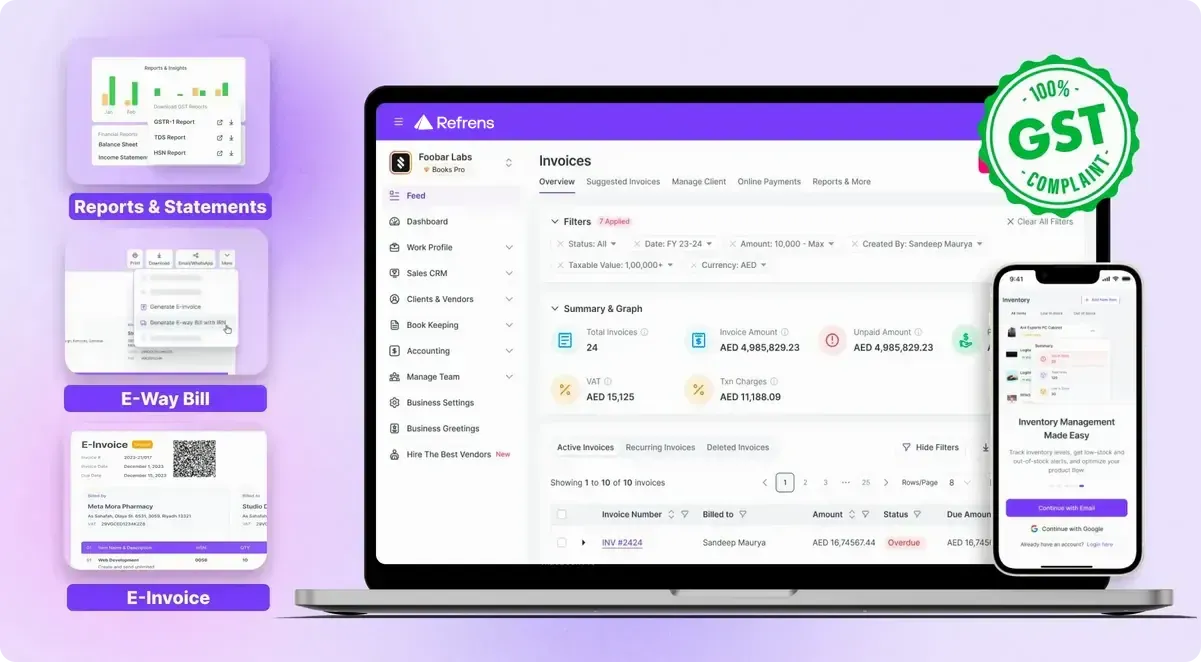
Refrens open on a laptop and a phone, showing the same invoice list with options to create an e-way bill and an e-invoice
  • The same books on your phone and your laptop
  • E-invoice and e-way bill straight from the invoice
  • 3,00,000+Businesses use Refrens
  • 4.8/5From 17,000+ reviews
  • ISO 27001ISO/IEC 27001:2022 certified
  • Mobile AppsAndroid and iOS, same live books

Backed by founders of India's best-known internet companies

  • Akash SinhaCashfree Payments
  • Anupam MittalShaadi.com
  • Vijay Shekhar SharmaPaytm
  • Dinesh AgarwalIndiaMART
  • Kunal ShahCRED

The short answer

Pick Based on How Your Business Actually Runs

Both cover accounting, GST, invoicing and inventory well. The real difference is how much of the business around your accounts each one handles.

Choose Refrens If

  • You want to send invoices, record payments, check stock and approve things from your browser or phone, on the same live books.
  • You need a proper Sales CRM, with IndiaMART, TradeIndia and Meta leads coming straight into your pipeline.
  • You'd like vendor checks, approvals and supplier bills from WhatsApp handled in the same system as your accounts.
  • You want to ask ChatGPT or Claude about your business and have it take supported actions for you.

Stay With TallyPrime If

  • You need to work offline, with your data kept on your own computer.
  • You run payroll with PF, ESI and professional tax, or you manufacture with BOM and job work.
  • You rely on a direct bank connection, cheque management and cash-flow projection.
  • Budgets, cost centres and management accounting controls are central to how your accountant works.

At a glance

Here's Where Each One Is Stronger

These are the twenty capabilities that decide it, checked by someone who uses both tools, sorted by who has what.

Refrens and TallyPrime compared on twenty capabilities, September 2026
CapabilityRefrensTallyPrime
Both Do ThisYou won't give up any of your everyday accounting or GST work by switching, because both tools cover it.
GST invoicingYesYes
Recurring invoicesYesYes
E-Invoicing & E-Way BillsYesYes
GST reportsYesYes
Accounting & financial statementsYesYes
Inventory managementYesYes
Bank reconciliationYesYes
AI OCR / document scanningYesYes
Only in RefrensThis is the work that happens around your accounts, from your phone and your sales pipeline to vendors, approvals and AI.
Android / iOS AppYesNo
Sales CRMYesNo
Vendor onboarding & verificationYesNo
RFQ / RFI workflowsYesNo
Native multi-stage approval workflowsYesNo
Automatic bill capture via WhatsApp / emailYesNo
Manage business on ChatGPT / ClaudeYesNo
Multi-period comparison of financial reportsYesNo
Only in TallyPrimeThese are real Tally strengths, and if your business depends on any of them, they should weigh heavily in your decision.
Offline / local operationNoYes
PayrollNoYes
Manufacturing BOM / Job WorkNoYes
Direct Bank Connection / Live BankingNoYes

Module by module

Refrens vs TallyPrime, Module by Module

Open the part of your business you care about. Each one tells you what Refrens does and what TallyPrime does.

Invoicing and Sales Documents

This is where most of your day goes, so it helps when a quote turns into an invoice without anyone retyping it.

  • You make GST invoices with HSN/SAC codes, transport details and extra charges, and you can set any invoice to repeat on a schedule.
  • Your customer can accept a quotation from a live link, and you turn it into a sales order, challan or invoice in one click.
  • You can bill a sales order in parts, or combine several orders from one customer into a single invoice.
  • Proformas, delivery challans, and credit and debit notes are all built in, with your own fields, formulas and templates.
  • You send any document on WhatsApp or email, and you can see whether it was delivered.

In TallyPrime: TallyPrime handles GST invoicing and recurring invoices too, and it also gives you different price levels for different parties, which Refrens doesn't do yet.

Everything here comes with every plan, starting from Lite.

Payments and Collections

Getting paid on time matters more than any report, and it's easier when the invoice itself does the chasing.

  • Customers pay through a link on the invoice by UPI, card, wallet or net banking, and the invoice is marked paid with a receipt made for you.
  • Reminders go out on WhatsApp or email on a schedule you choose, so you're not the one who has to remember.
  • You can record part payments, one receipt against several invoices, and advances that you set off against later bills.
  • You can offer an early-payment discount, and it shows on the invoice so the customer sees it.
  • You see who owes you, grouped by how long it's been pending, and you can share a statement with the party.

In TallyPrime: TallyPrime is stronger on the banking side, with cheque management and cash-flow projection, and it lets you set a credit limit for each customer, which Refrens doesn't.

Payment links and automated reminders come with every plan. Outstanding and ageing reports come with Pro.

Accounting and Reports

These are the same double-entry books you'd keep in Tally, except that you can open and read them yourself.

  • Your invoices, bills and payments post to the ledgers on their own, and you can still add manual journals and keep voucher books.
  • You get the trial balance, P&L, balance sheet, cash flow and day book from the same live books.
  • You can compare financial reports across periods side by side, and the P&L goes up to 24 periods with the % change shown.
  • Product-wise and project-wise P&L and your own custom reports show you where the profit actually comes from.
  • Bank reconciliation reads a CSV or PDF statement and suggests the matches for you to accept.

In TallyPrime: TallyPrime gives you full accounting and financial statements too, and it goes further on budgets, cost centres and management accounting controls. What it doesn't do is compare financial reports across periods side by side.

Product-wise and project-wise P&L come with every plan. The full books, including chart of accounts, journals, balance sheet, cash flow and bank reconciliation, come with Pro.

GST and Compliance

You don't trade down on compliance by switching, because the GST work you do every month is all here.

  • You generate e-invoices, in bulk if you need to, and e-way bills straight from the invoice.
  • GSTR-1 builds itself from your invoices and downloads as JSON or Excel, and you can see your GSTR-3B summary.
  • GSTR-2B reconciliation shows what matches, what partly matches and what's missing, and you can record a missing bill from the same screen.
  • When you enter a GSTIN, the party's details fill in, and the GST Trust Score shows their filing history before you deal with them.
  • TDS, TCS and reverse charge are covered, and your TDS payable and receivable reports are made for you.

In TallyPrime: This is one of TallyPrime's core strengths. GST, e-invoicing, e-way bills and statutory work are all well covered, so either tool will keep you compliant.

E-invoices, e-way bills, GSTR-1, GSTR-2B and GSTR-3B, GSTIN auto-fill and the Trust Score come with Plus. TDS comes with every plan.

Inventory and Warehouses

If you keep stock in more than one place, you'll want to know what's where before you promise a delivery.

  • You keep stock in several godowns and move it between them, one item or in bulk, with a delivery challan, and both ends update on their own.
  • You track batches, serial numbers and expiry dates, and a batch expiry report shows what needs to move first.
  • You can buy in one unit and sell in another, like cartons in and pieces out.
  • You set reorder and overstock levels for each godown, and you can raise a purchase order from the low-stock list with the vendor, quantity and price filled in.
  • Refrens won't let a sale go through if it would take your stock below zero, so your stock figures stay honest.

In TallyPrime: TallyPrime manages inventory too, and it's the better pick if you manufacture, because it handles BOM, job work and production, which Refrens doesn't.

Multi-godown stock and reorder levels come with every plan (2, 3 or 5 godowns by plan). Unit conversion comes with Plus. Batch, serial and expiry tracking and barcode scanning come with Pro.

Purchases and Expenses

Buying well starts before the bill arrives, with quotes you can compare and a purchase order that matches what you receive.

  • You raise a purchase order and turn it into a bill when the goods arrive, matched against the PO.
  • You send vendors an RFQ link, they quote in your format, and the quote you accept becomes a purchase order.
  • With an RFI link, vendors send their invoices in your format, and each one arrives as a suggested purchase for you to accept.
  • You can add freight, loading and other charges, so you know what the stock really cost you.
  • You record expenses, petty cash and employee reimbursements in the same place as your purchases.

In TallyPrime: TallyPrime records purchases and reads scanned bills with AI OCR, but it doesn't have RFQ or RFI workflows, and it can't pick up bills forwarded on WhatsApp or email.

Purchase orders and expenses come with every plan. RFQ and RFI links come with every plan too (1 on Lite, 3 on Plus, unlimited from Pro). Reimbursements come with Pro.

Vendor Management

A wrong bank account or an unchecked vendor is an expensive mistake, so it's worth catching before the first payment.

  • You share an onboarding form link, and new suppliers fill in their own contact, address, PAN, GST and bank details.
  • You verify a vendor's PAN and bank account in one click against official records, and a match score tells you how well they line up.
  • Each new vendor goes through approval before your team can buy from them or pay them.
  • Approved vendors show up on your vendor dashboard, ready for purchases and RFIs, and you can bring existing vendors in from a CSV file.

In TallyPrime: TallyPrime keeps your vendor ledgers, but it doesn't have vendor onboarding or verification, so those checks happen outside it.

Vendor verifications come with every plan, with an allowance that grows by plan. Onboarding forms and vendor approval workflows come with Enterprise.

Approvals and Controls

When sign-offs happen on WhatsApp, nobody can tell later who approved what, so it helps to keep them in the system.

  • Quotations, invoices, expenses, vendors and purchase orders can go through several approval stages, with a different approver at each one.
  • A super approver can clear any stage in one click, so things don't stall when someone's away.
  • Approvers get alerts and reminders, and anything left waiting too long escalates to the person you choose.
  • You can stop a document being edited, shared, converted or marked paid until its stage is cleared.
  • Roles decide who can create, edit, delete or only view, and the audit trail saves who changed what and when.

In TallyPrime: TallyPrime has user roles and an edit log, but it doesn't have native multi-stage approval workflows, so sign-offs have to be managed outside it.

Single-stage approvals come with Lite, and you get more approval workflows as you move up. Custom multi-stage approvals, super approvers, auto-escalation and stage-wise limits come with Enterprise.

Sales CRM

If your leads come from IndiaMART or Facebook, they shouldn't sit in a spreadsheet until someone remembers to call.

  • Enquiries from IndiaMART, TradeIndia, Facebook and Instagram land in your pipeline on their own.
  • You move leads through your own stages, each with an owner, notes and full history, and repeat enquiries go to the person who already owns them.
  • You get follow-up alerts, and you can book meetings with Google Calendar and Meet from the lead.
  • A form on your website sends every entry straight into the pipeline as a new lead.
  • You raise the quote from the lead and carry it through to the invoice and payment without switching systems.

In TallyPrime: TallyPrime doesn't have a Sales CRM, so your leads and follow-ups would need a separate tool or a spreadsheet.

IndiaMART, TradeIndia and Meta leads, lead forms and one pipeline come with Lite (3 on Plus, 5 on Pro, unlimited on Enterprise). Follow-up reminders and Google Calendar come with Plus.

Refrens AI

Most supplier bills already reach you on WhatsApp or email, so the fastest entry is the one you never have to type.

  • Forward a supplier bill on WhatsApp or email, and Refrens Eagle turns it into a purchase or expense draft for you to check.
  • Only senders you've allowed can send bills in, and nothing is saved until you've reviewed it.
  • You can also upload bills, or sales invoices, and scan many of them at once.
  • With Refrens MCP, you can check dues and stock, create invoices, orders and expenses, record payments and move stock from ChatGPT or Claude, within the permissions you choose.
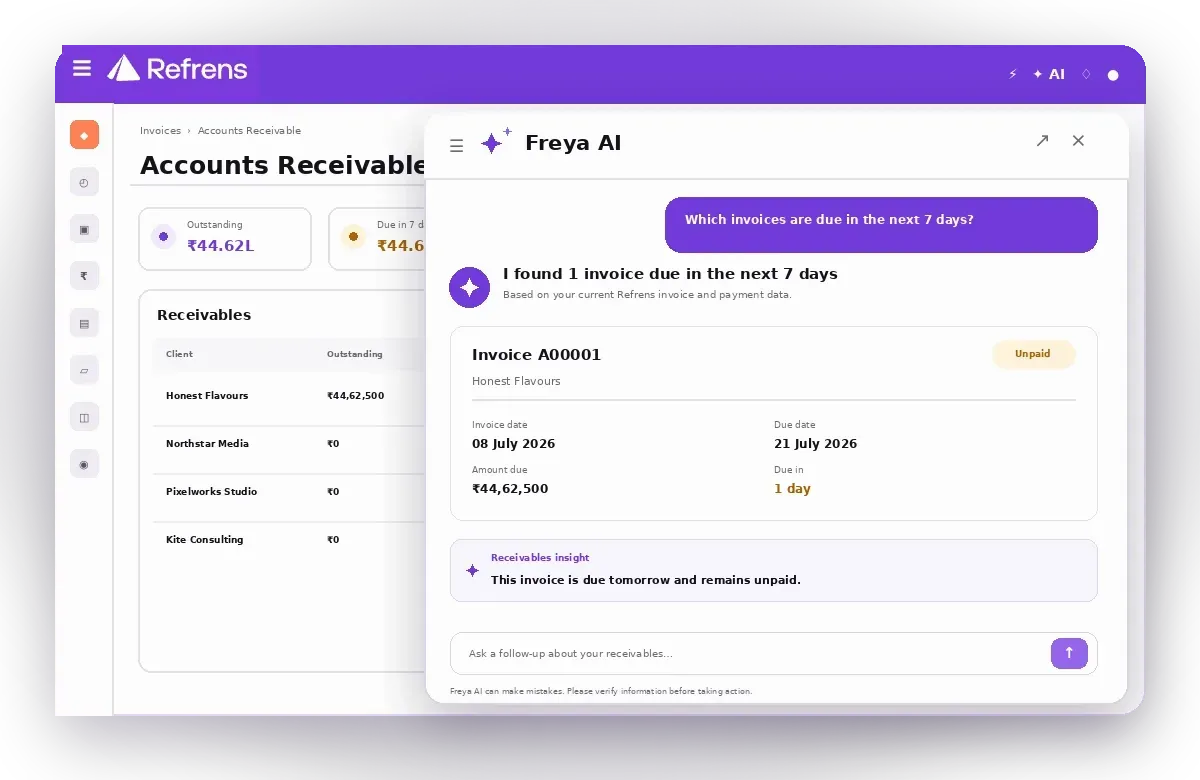
  • You can ask FREYA questions about your live books, like how much is overdue this week.

In TallyPrime: TallyPrime has AI OCR for scanning documents too, but it can't capture bills from WhatsApp or email on its own, and you can't run it from ChatGPT or Claude.

Eagle and AI scanning come with every plan, with a document allowance that grows by plan. Refrens MCP comes with Lite, and FREYA is included on Lite as an introductory feature.

Access, Mobile and Team

You shouldn't need to be at the office computer to check a number or approve a purchase order.

  • You work in your browser or the Android and iOS apps, and invoicing, payments, inventory, approvals and reports stay connected to the same live books.
  • There's nothing to install or host, and your documents are kept in secure cloud storage.
  • You invite your team by email and choose what each person can see and do.
  • You can run more than one business under the same login.

In TallyPrime: TallyPrime is offline and desktop-based, which means it keeps working without internet, but there's no Android or iOS app, and cloud access and data backups need additional effort.

Lite includes 2 users, Plus 3 and Pro 5, and you can add more. Advanced roles come with Plus, and extra businesses are an add-on.

Integrations and API

Refrens works with the places your leads and payments already come from, so you're not copying data between tools.

  • Cashfree is built in, so Indian customers can pay your invoices online.
  • IndiaMART, TradeIndia and Meta feed leads into your Sales CRM, and meetings sync with Google Calendar.
  • Shopify orders become invoices, and you can send them to different Refrens businesses by shipping state.
  • A public API lets you create invoices, e-invoices, items, stock transfers and leads from your own systems, and Pabbly Connect links Refrens to other apps.

In TallyPrime: TallyPrime connects directly to your bank for live banking, which Refrens doesn't, and other software can exchange data with it through XML, JSON or ODBC.

IndiaMART comes with every plan. API access is switched on for your business by the support team.

For the owner

Check Your Own Numbers Without Calling Your CA

With Tally, you're dependent on your CA or accountant every time you need a number. Refrens gives you, the owner, direct access to the numbers behind your everyday decisions, and your CA still works in the same books.

  • You open sales, dues, stock and reports in your browser or on the Android and iOS app, on the same live books your accountant uses.
  • You can ask FREYA something like "which invoices are due this week?" and get the answer straight from your books.
  • You add your CA as a user who can view documents and reports, so you're both looking at the same numbers.
"I am using this in mobile and it very fast while preparing invoice and I never miss the update of my business when I am on move…"
Photo of Rakeesh Ravi
Rakeesh RaviRead the review on Google Play
FREYA in Refrens answering which invoices are due in the next 7 days, with the receivables list beside it

Time to switch?

Signs Your Business Has Outgrown Tally

Tally keeps good books. But if a few of these sound like your week, you're working around your software instead of with it.

  • Your Systems Don't Talk to Each Other

    Leads sit in WhatsApp, quotes in Word, approvals in someone's inbox, and Tally only sees what finally gets typed in. In Refrens, your CRM, purchases, approvals and books are one system, so nothing gets entered twice.

  • You Sell Services, Not Stock

    Tally was largely made for product businesses, with stock items and godowns at its centre. If you bill for projects or monthly retainers, Refrens gives you quotes, recurring invoices, payment reminders and project-wise P&L that fit how you actually work.

  • You're Paying Extra Just to Work Remotely

    With Tally, working from home or a second office means paying for remote access on top of your licence. Refrens runs in your browser, so your books are wherever you are.

  • You Call the Office to Check a Number

    TallyPrime has no Android or iOS app of its own, so checking sales or dues on the move usually means a phone call. Refrens' apps open the same live books, right in your pocket.

  • Your Backup Is a Pen Drive

    On a desktop, Tally backups and cloud access take extra effort, and your books are only as safe as that one computer. Refrens keeps everything in the cloud, certified to ISO/IEC 27001:2022.

"This is a far better application for multi users and the application has a very good customer resource management. Amazing auto fill feature."
Nagendra R.Read the review on Capterra

Recognise two or more? You've outgrown Tally, and moving across takes less effort than you'd think.

Switching

Switch From Tally Without Starting From Zero

You export your data from Tally and bring it into Refrens with bulk CSV or Excel import, and the team helps you along the way.

What You Can Bring Across

  • Customers and vendors
  • Items
  • Ledgers and opening balances
  • Invoices and expenses
  • Your transaction history
"We moved from Tally to Refrens as this was on the cloud. Easy to use and login from mobile, laptop and login for accounts person too"
Nagaraj K.Read the review on Capterra
  1. 1

    Pick a Cut-Over Date

    Starting at the beginning of a month or quarter usually makes your opening balances easiest to match.

  2. 2

    Export From Tally

    Export your existing data from Tally, so you have your masters and transactions ready to bring across.

  3. 3

    Import and Map Once

    Upload it through bulk CSV or Excel import, map your columns once, and reuse that mapping next time.

  4. 4

    Invite Your Team and CA

    Add your team and your CA as users, and choose what each of them can see.

If you get stuck, the Refrens team helps with the migration, and support is on chat, phone, email and WhatsApp.

Had a demo already?

After Your Demo, Here's What to Do Next

You've seen how it works. These three steps get your own business into Refrens, at your own pace.

  1. 1

    Start Your Free Trial

    Sign up and try the premium features with your own invoices and stock. You don't need a card to start.

  2. 2

    Send Us Your Tally Export

    Export your customers, vendors, items, ledgers and opening balances from Tally and send them over, and the team will help you import them.

  3. 3

    Book an Onboarding Call

    Every plan comes with human support and a dedicated account manager, and Pro adds personalised onboarding to get you set up.

Pricing

Get a Price Built Around Your Setup

Refrens has four plans, Lite, Plus, Pro and Enterprise, and each one includes everything in the plan below it. What you pay depends on your users, warehouses, CRM pipelines, approvals and modules.

What a Tally Switcher Usually Needs
  • E-invoices, e-way bills and the GST returns come with Plus and above.
  • The full books, including the balance sheet, cash flow, bank reconciliation and ageing reports, come with Pro.
  • Custom multi-stage approvals, vendor onboarding forms and vendor approval workflows come with Enterprise.

Tell us about your team and what you need, and we'll send you a price for your setup.

Get a Custom QuoteHide the Form

Prefer to try it first? Start for free

FAQ

Straight Answers Before You Switch

Have a question that isn't here? Book a demo and we'll walk you through it.

What's the best alternative of Tally for a small business in India?
It depends on how your business runs. Among Tally alternatives in India, Refrens suits you if a lot of your work happens around the books, like leads, quotes, vendors and approvals, and you want it on your phone. If you mainly need simple billing, Vyapar or myBillBook may be enough, and Busy is the closest to Tally on a desktop. Try two before you decide.
Is there a free alternative to Tally?
Refrens has a free trial, and you don't need a card to start, so you can try the premium features before you pay anything. When you look at Tally alternatives for free, check what stays free as you add users, GST features and more documents, because that's usually where paid plans begin. If you want a price for your setup, the quote form is just above.
Can I use Refrens as a TallyPrime alternative, or alongside it?
You can do either. The simplest way is to pick a cut-over date, like the start of a month or quarter, and move your customers, vendors, items, ledgers and opening balances across with bulk CSV or Excel import. Some businesses keep Tally with their CA for the first year and run daily work in Refrens. If you run both, decide which one is the record for each period.
Is Refrens similar to Tally, or will my team have to relearn everything?
If you're looking for Tally similar software, the good news is that the ideas carry over: ledgers, vouchers, GST and the usual statements all work the way your accountant expects. What changes is how you get around, since Refrens runs in a browser and on your phone. The Refrens team helps with onboarding, and support is on chat, phone, email and WhatsApp.
Can I import my Tally data into Refrens?
Yes. You export your existing data from Tally and bring it into Refrens through bulk CSV or Excel import, with column mapping you can save and reuse. That covers customers, vendors, items, ledgers, opening balances, invoices, expenses and transaction history. If you'd like a hand, send your export to the Refrens team and they'll help you with the migration.
Will my CA be able to work in Refrens?
Yes. You add your CA as a user by email, and you can let them view documents and reports without editing anything. GSTR-1 downloads as JSON, so they can file from it the way they're used to. The bigger change is for you: with Tally you're dependent on your CA for your numbers, and Refrens gives you direct access to the numbers behind everyday decisions.
Can Refrens be a substitute for Tally for GST work?
Yes, for everyday GST work. You can make GST invoices, generate e-invoices and e-way bills, download GSTR-1 as JSON, see your GSTR-3B summary and reconcile GSTR-2B against your purchase bills. TDS, TCS and reverse charge are covered too. E-invoicing and the GST returns come with Plus and above. If you're comparing Tally substitute software, GST is where the two are closest.
Can I run my business from my phone with Refrens or Tally?
With Refrens, yes. The Android and iOS apps open the same live books as the browser, so invoicing, payments, inventory, approvals and reports stay connected wherever you are. TallyPrime doesn't have an Android or iOS app. It's offline and desktop-based, so it's built for working on a computer, and cloud access takes additional effort to set up.
Does Refrens work offline like Tally?
No. Refrens is cloud software, so it needs an internet connection in the browser and in the apps. That's the trade-off for having the same books on every device. If your internet is unreliable, or you want your data kept on your own computer, TallyPrime suits you better, because it runs offline and stores everything locally.
Does Refrens do payroll or manufacturing?
No, not today. Refrens doesn't have payroll, so PF, ESI and professional tax aren't handled, and it isn't built for manufacturing with BOM, job work and production. TallyPrime does both well. If either one is central to your business, Tally is the better fit, or you can use Refrens for sales, purchases and accounting alongside a separate payroll tool.
How does Refrens pricing compare with Tally's?
They're priced differently. Tally sells a licence, rental or lifetime, with a yearly renewal for its connected features. Refrens has four plans, Lite, Plus, Pro and Enterprise, and the price depends on your users, warehouses and the modules you need. There's a free trial with no card needed, and the quote form on this page gets you a price for your setup.
Is my accounting data safe in the cloud?
Refrens is ISO/IEC 27001:2022 certified, which is the international standard for information security, and your documents are kept in secure cloud storage you can reach from any device. You decide who sees what with user roles, and the audit trail shows who changed a document and when. With TallyPrime on a desktop, cloud access and data backups need additional effort.

See Your Business Without Waiting for a Report

Accounting is where everything ends up, but a lot happens before you get there, and Refrens handles both.

Start for freeBook a demo

Free trial, no card needed.

Company
Payment Options


Made with and in Bengaluru.

Refrens Internet Pvt. Ltd. | All Rights Reserved
This site is protected by reCAPTCHA and the Google Privacy Policy and Terms of Service apply.
Refrens ISO Certificate