Partner Icon
Become a Refrens PartnerLearn More

Interior Design Quotation Format for FREE

Download free interior design quotation templates in Excel and Word formats, or create your own customized interior quotation online in PDF for free.

Free Interior Quotation Format
Our Users Rate Refrens ⭐ 4.8/5 based on 11700+ Ratings

Interior Quotation Format in PDF(Add quote details, customize the template, and download the PDF.)

1
Quotation Details
2
Design & Share (optional)
1
Quotation Details
2
Design & Share (optional)

Interior Quotation Format in Word

Download interior design quotation template in Word for free
Interior Quotation Template
Quotation Format for Interior Work
Quotation Template for Interior Work
Interior Design Quotation Template
Interior Design Quotation Format
 Interior Design Quotation Format

Interior Quotation Format in Excel

Download interior design quotation template in Excel for free
Interior Quotation Format in Excel
Interior Design Quotation Template
Interior Design Quotation Format
Quotation Format for Interior Work
Quotation Format for Interior Work in Excel

More tools and templates by Refrens

Excel Quote Templates
Free Quotation Format
Modern GST Quotation Format
Create GST Quotation
Modern GST Quotation Format
Create Construction Quotation
Construction Quotation Format
Make Quotation Online
Create customizable quotation for free using Refrens quotation maker
Create GST Invoice
Print-friendly GST Bill Format
Create Proforma Invoice
Professional Proforma Invoice Template
Create Delivery Challan
delivery challan format
Create Purchase Order
Format of purchase order
Invoice Generator
Create customizable invoices for free using Refrens invoice generator
Create your first Interior quotation with our free Quotation Generator.Create Free Quote

Features of Refrens Interior Design Quotation

Customization of Columns
Customized TemplatesEasy to customize templates as per the requirement. No need to enter the details again and again. Add multiple custom columns and fields.
Customization of Quotation & Estimate
Quotation to InvoiceEasily convert your quotations to invoices with just one click. There is no need to create a new invoice from scratch. Simply use our quotation format to save your time and effort.
Manage your quotations
Keep RecordsNo need to search for the quotation on the computer. Easy to manage and track all your quotations in one place on Refrens.
Create invoice from quotation with one click
Logo CustomizationOur quotation templates allow you to add your business logo effortlessly. This feature ensures that your quotation looks professional and matches your brand identity.
Email and track quotation
Track Your QuotationsSend quotation via mail and check whether your client opened your quotation or not.
Quotation Management
Quotation ManagementKeep all your quotations organized in one place for easy access and management. Our platform allows you to store and retrieve your documents efficiently, ensuring that you can find any quotation format when needed.
Download and Print
Download and PrintEasily download your quotations as PDFs and print them directly from the platform. This feature ensures that you can quickly generate physical copies of your documents when needed.
Expense Reports
Expense ReportsGenerate and manage expense reports for comprehensive financial tracking. This feature helps you keep track of all business expenses, ensuring that you can maintain accurate financial records.
Client & Product Management
Manage Clients and ProductsManage auto stock updates and multiple firms seamlessly with the construction quotation maker by Refrens. Simplify your product and service management with ease.
Track Your Purchases
Invoice GeneratorCreate and print invoices effortlessly using Refrens construction quotation templates. Convert quotations into invoices and print them instantly, saving time and effort.
Delivery Challan Generator
Delivery ChallanCreate and print delivery challans effortlessly with Refrens delivery challan generator. Generate professional challans and print them instantly, saving time and effort
Accounting Management
Accounting ManagementManage multiple stores easily with Refrens construction quote maker, accessible across all your devices.

Why use Refrens cloud accounting software?

Running an interior design business involves more than creativity — it’s about managing multiple projects, vendors, and clients at once. Between collecting client payments, tracking material expenses, and managing GST compliance, manual bookkeeping can easily slow you down. That’s where Refrens cloud accounting software helps.

Refrens is built to simplify every financial task for design professionals from solo designers to full-service studios. Here’s why it’s perfect for interior design businesses:

1. Create and manage professional invoices

Generate beautifully branded invoices for your clients in seconds. Whether you’re billing for design consultation, furniture sourcing, or installation, you can customize your invoices with project details, GST rates, and payment terms.

2. Manage quotations and convert them instantly

You can create detailed quotations for interior projects, get client approval, and convert accepted quotes into invoices in one click. No more creating new documents from scratch every time.

3. Track expenses and project costs

Interior projects often involve multiple expenses like materials, labor, lighting, and decor. With Refrens, you can record every expense, categorize them under specific projects, and track how much profit you’re making per client or project.

4. Stay GST compliant automatically

Refrens automates GST billing , e-invoicing with IRN and QR codes, and eWay bill generation. You get accurate GSTR reports and easy reconciliation, which saves hours of manual work and helps avoid filing errors.

5. Real-time project profitability

The software helps you track your income, expenses, and margins in real-time. You’ll know exactly which projects are most profitable and where you’re overspending.

6. Easy team collaboration

If you work with a team, you can add users, assign roles, and control permissions. Your designer, accountant, and project manager can all work from the same dashboard without overlapping work.

7. Access anytime, anywhere

Since it’s cloud-based, you can check your finances, send invoices, or record expenses from your laptop or mobile, whether you’re on-site or meeting a client.

8. Secure and backed up automatically

All your project data, invoices, and reports are stored securely in the cloud. You never have to worry about losing your Excel files or system crashes.

Interior Design Quotation Template

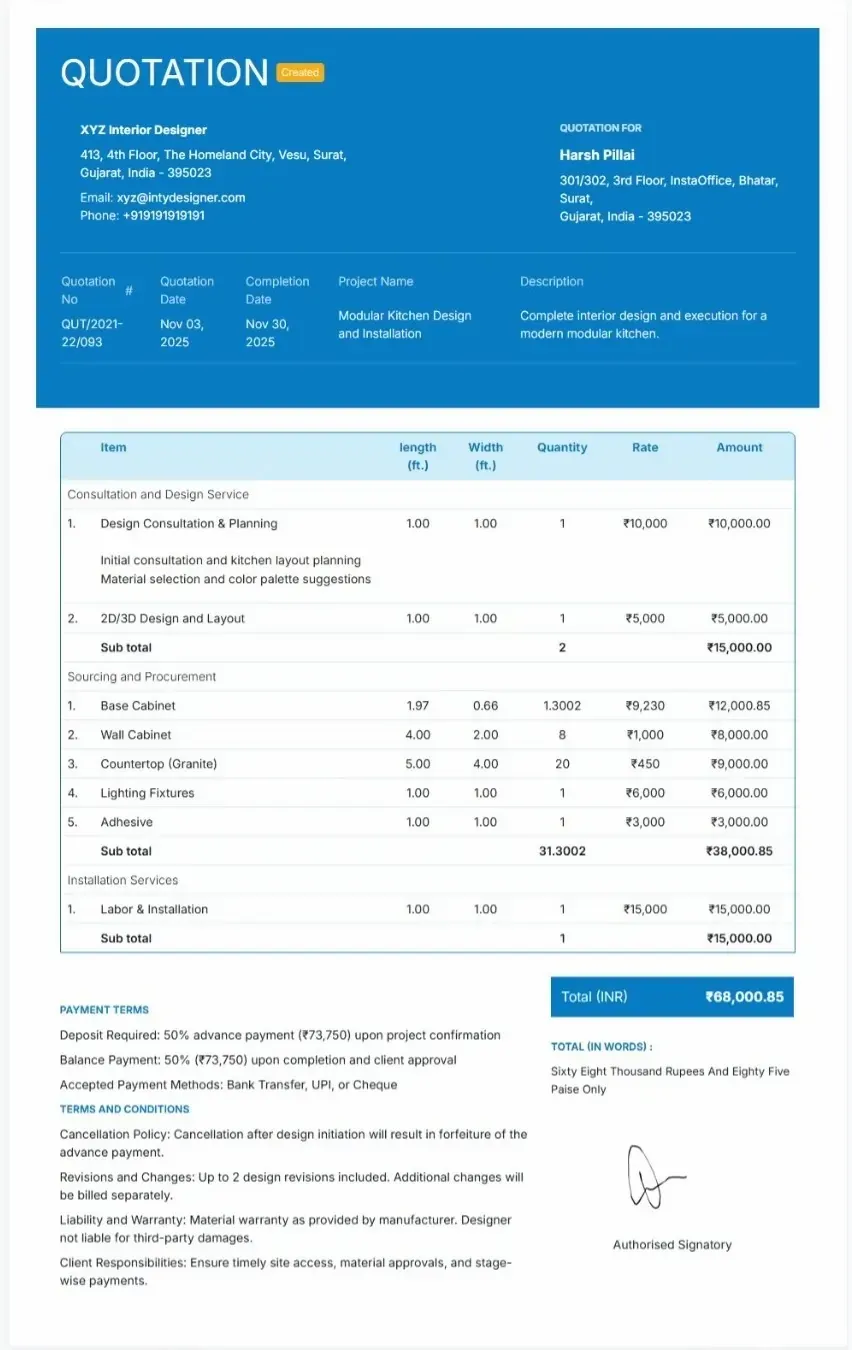
Here is the sample interior quotation template by Refrens

Sample Interior Quotation Template

Complete guide to interior design quotes: Key sections and details

Here’s a breakdown of the key sections you should include in your interior design quote, whether you’re using a template or creating quotations online.

1. Client Information

Start your quotation by adding your client’s basic details. This ensures both you and your client are aligned about the project scope and location.

Include the following:

Client Name

Contact Information: Phone number and email address

Client Address

Project Location: If it’s different from the client’s address

This section helps avoid confusion later, especially if the design project involves multiple sites or delivery addresses.

2. Project Details

This section outlines what the project includes and how long it will take. Be clear and detailed so your client knows exactly what services you’ll provide and what to expect.

Interior design projects usually fall into three main categories:

Residential Interior Design: Homes, apartments, villas, or any personal spaces.

Commercial Interior Design: Offices, retail stores, restaurants, or showrooms.

Specialized Interior Design Services: Custom spaces like studios, salons, clinics, or theme-based interiors.

Here’s what to include under project details:

Project Name: For example, “Living Room Design” or “Office Renovation.”

Project Start Date: The date when the project will begin.

Estimated Completion Date: The expected finishing date.

Project Description: A short summary explaining the scope of work. Mention the design style, key materials, and layout changes to give a clear overview.

3. Interior Design Services Included

This section defines exactly what services are part of the project. A clear list helps your client understand what they’re paying for and reduces confusion later.

Interior design services are usually divided into a few major categories:

Consultation Services:

This includes the initial meeting, understanding the client’s requirements, and space planning. You can also include design brainstorming sessions or site visits.

Design Services:

This covers the creative part. Developing mood boards, layout designs, and color palettes. You can also include 3D renderings or design presentations if applicable.

Sourcing and Procurement:

Involves finding and purchasing materials, furniture, fixtures, and finishes that match the design plan and budget.

Installation Services:

Includes supervising and coordinating the actual setup of furniture, lighting, decor, and other design elements on-site.

Project Management Services:

Focuses on managing contractors, timelines, budgets, and ensuring everything goes according to plan.

Additional Services (Optional):

These are value-add services like custom furniture design, decor staging, or maintenance support after project completion.

4. Cost Breakdown

Money talks and in interior design, it’s one of the first things clients want to understand. A transparent cost breakdown builds trust and helps avoid confusion later.

Here’s how you can structure this section in your quotation:

Design Fee:

This can be hourly or a flat project rate. It usually covers your consultation, design concepts, layouts, and creative work.

Furniture and Fixtures Costs:

List or estimate the cost of furniture, decor items, and fixtures. The total depends on the quality of materials chosen and the size of the project (measured in square feet).

Materials and Finishes:

Include flooring, paint, wallpaper, lighting, and other materials. Pricing here also varies based on the quality and scope of the work.

Labor Costs:

Covers the cost of contractors, carpenters, electricians, and installers. This can be charged per day or as a fixed project fee depending on your arrangement.

Miscellaneous Costs:

Don’t forget the small but important extras like shipping, delivery, packaging, permits, or any additional on-site expenses.

5. Total Cost Estimate

Once you’ve detailed all the individual expenses, it’s time to bring it all together. This section gives your client a clear snapshot of the total cost for the project.

Here’s what to include:

Subtotal:

The total amount before applying any taxes, delivery charges, or additional fees. This helps the client see the base cost of your design and materials.

Taxes or Additional Fees:

Add GST or any other applicable taxes, along with extra fees like transportation, packaging, or site supervision (if charged separately).

Discounts (if any):

If you’re offering a special discount or promotional rate, clearly mention it here. It helps the client feel valued and keeps pricing transparent.

Grand Total:

This is the final amount the client will pay after adding taxes and deducting discounts. Make sure it’s clearly highlighted and this is the number that matters most.

6. Payment Terms

Setting clear payment terms helps you and your client stay on the same page from the start. It avoids confusion later and keeps the project financially smooth.

Here’s what to include:

Deposit Required:

Mention how much you expect upfront, either as a percentage or a fixed amount. For example, many interior designers ask for 30–50% of the total project cost before starting work. This confirms the client’s commitment and covers your initial planning and design time.

Payment Schedule:

Break down how and when payments should be made. You can choose:

Upfront payment for smaller projects.

Milestone-based payments (for example, 30% on approval of design, 40% mid-way, and the remaining 30% after completion).

Final balance payment once the project is handed over. A clear schedule ensures steady cash flow and avoids last-minute payment issues.

Accepted Payment Methods:

List all the modes of payment you accept like bank transfer, credit card, UPI, or cheque. Mention your business account details if needed, so the client knows exactly how to make the payment.

Late Payment Penalties (Optional):

You can also include a short note about late payment fees. For example, “A 2% late fee will apply to invoices unpaid after 15 days.” It’s optional, but it adds a layer of professionalism and encourages timely payments.

7. Terms and Conditions

Every professional quote should include clear terms and conditions. This section protects both you and your client by outlining how the project will be managed from start to finish.

Here’s what to cover:

Cancellation Policy:

Explain what happens if either party needs to cancel the project. For instance, you can specify that cancellations must be made in writing and that the initial deposit is non-refundable once the design work has started. This helps avoid disputes and ensures your time and effort are respected.

Revisions and Changes Policy:

Interior design projects often evolve, and clients may request changes after seeing initial plans. Make it clear how you’ll handle these updates. For example, mention that one or two design revisions are included in the quote, and any additional changes will be billed separately based on time or scope. This keeps expectations realistic and avoids confusion later.

Liability and Warranty:

Clarify your responsibility for products or services. For example, you can state that warranties for furniture or fixtures will be as provided by the manufacturer, and that you won’t be liable for damages caused by third-party contractors or suppliers. A short, clear note here builds confidence and prevents misunderstandings.

Client’s Responsibilities:

Mention what you expect from the client during the project. This can include giving you timely access to the site, approving design drafts on time, and making payments as per schedule. Defining this upfront ensures smoother coordination throughout the project.

8. Signature Section

A legal section to confirm both parties agree to the terms of the quote.

- Client Signature

- Designer Signature

9. Additional Notes

A section for any extra notes or custom requirements.

- Client’s Special Requests or Preferences

- Attach images, PDFs, etc.

Refrens offers free interior design quotation templates in Word, Excel, and PDF formats. You can choose the format that suits your workflow best. The Word template is perfect if you want a neatly designed layout that’s easy to edit and personalize. The Excel format is ideal if you prefer automatic calculations for material costs, labor, and taxes. And if you want something quick, professional, and ready to share with clients, the PDF quotation is your best option.

You can also create your interior design quotation online using Refrens quotation management software. Just add your project details, customize colors, insert your logo, and download it in PDF format instantly. It’s free, simple, and made for professionals who want to save time and look more polished in front of clients.

Frequently Asked Questions (FAQ)

A quote template is a document created by the seller for the potential buyer describing the product or service details that they are going to offer with the price. It is a type of estimate document where the buyer adds all the details related to the product or service like product name, rate, description, applicable tax and discounts. Once the quote is accepted by the buyer, you can easily convert the quote to an invoice with one click.

Using Refrens quote template, you can easily create quotations in less than a minute. Here is the simple step to create quotes.

  1. Add your business logo to give more professionalism to quotes.
  2. In Quotation From section, add your business details like your business name or freelance name, email, phone etc.
  3. In Quotation For section, add your client's business details.
  4. In line item section, add the product or service name, description, rate, quantity, discount etc.
  5. In the last section, you can add terms & conditions, additional notes and a signature.

Quote template must include:

  1. Quote at the top of the document.
  2. Quote number and date.
  3. Logo of the company.
  4. Seller details with all relevant information.
  5. Buyer details with name and address, contact number.
  6. Product name, quantity, and rate.
  7. Terms and conditions.
  8. Accepted mode of payments.
  9. Signature.

In Refrens quote template, you can add the business logo, can add custom columns and fields if you want to add additional information on the quotation. There is also a feature to add custom formulas in case if you have multiple column calculations and also you can hide the totals on the quotations.

You can create a quotation in Word, Excel, or PDF format, depending on what works best for you.

1. Word Quote Template:

Word is easy to use and available on most systems. You can type your details into a simple document and share it quickly.

Pros:

  • Familiar and simple

  • Easy to edit or print

Cons:

  • Needs manual formatting

  • No automatic calculation

  • Errors are easy to miss

2. Excel Quote Template:

Excel gives more flexibility with numbers. You can add formulas for totals and tax.

Pros:

  • Built-in calculations

  • Good for price breakdowns

Cons:

  • Needs spreadsheet skills

  • Not very visually appealing

  • Easy to change by mistake

3. PDF Quote Template:

PDF is great for sharing. Once saved, no one can edit the file.

Pros:

  • Secure and fixed layout

  • Looks professional

Cons:

  • Hard to edit

  • Needs extra tools to create

- Why Refrens Is Better

Refrens gives you the best of all three without the extra work. You get free quote templates that are easy to fill, auto-calculate totals and tax, and can be downloaded in PDF format. You don’t need to design, format, or fix errors. Just enter your details, pick your style (like a freelance quote, service quote, or construction quote template), and send it. It’s faster, more accurate, and looks professional every time.



Made with and in Bengaluru.

Refrens Internet Pvt. Ltd. | All Rights Reserved
This site is protected by reCAPTCHA and the Google Privacy Policy and Terms of Service apply.
Refrens ISO Certificate