
Choosing Purchase Order approval software sounds simple until you start comparing products. You create a PO, somebody approves it, and the purchase moves ahead. What could be complicated?
Quite a lot.
Two products may both advertise “multi-level approvals” while handling completely different parts of the purchase. What happens afterwards varies too. In one system, approval may simply change the status of a document. In another, the purchase can continue into receiving, inventory, payables or accounting.
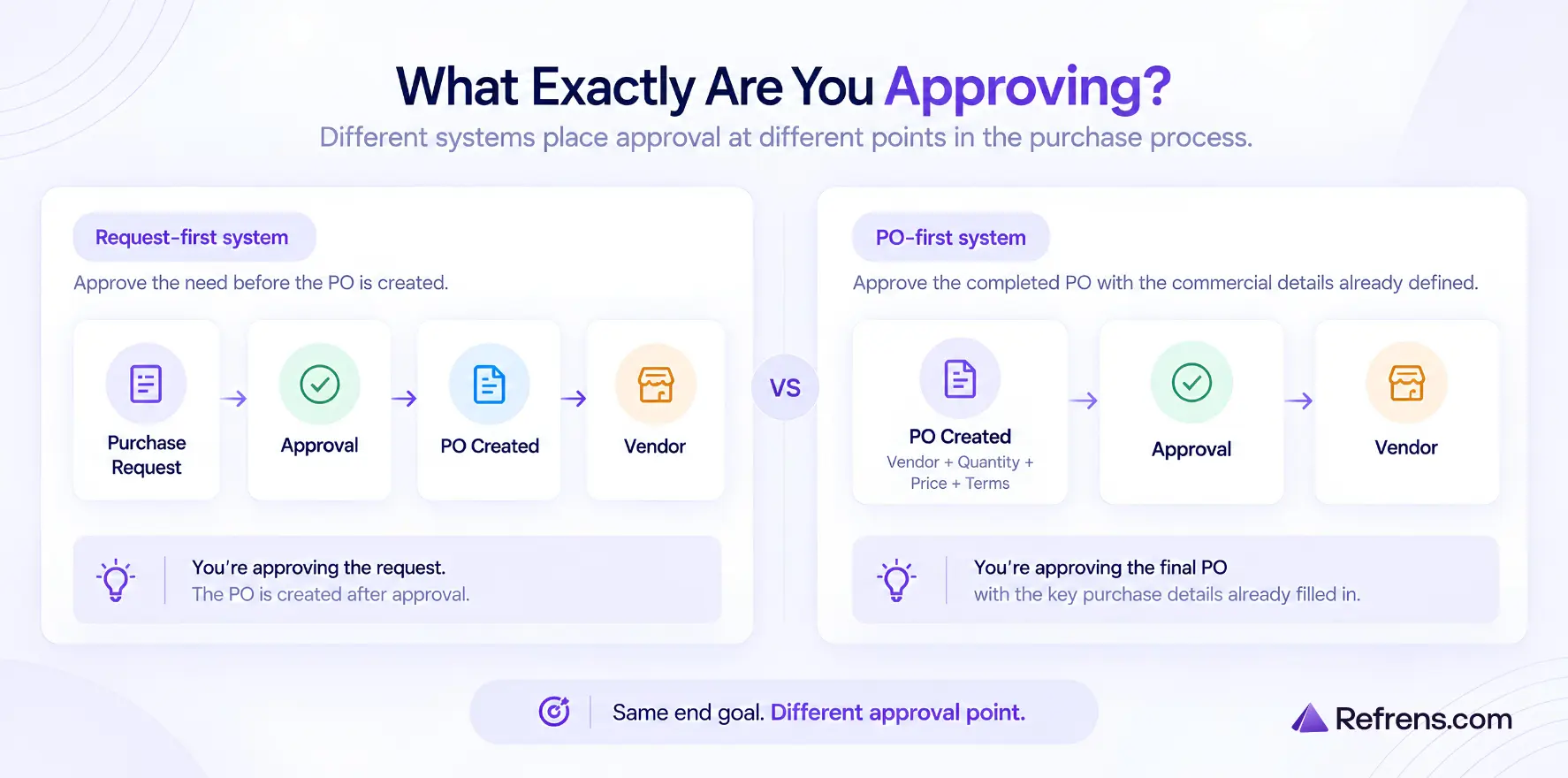
If you are choosing between them, start with one question: what exactly should be approved? Some products approve a request before the PO exists, while others let you approve the final PO with the vendor, quantity, price and terms already filled in. That difference will rule out several options quickly.
TL;DR: Best Purchase Order Approval Software
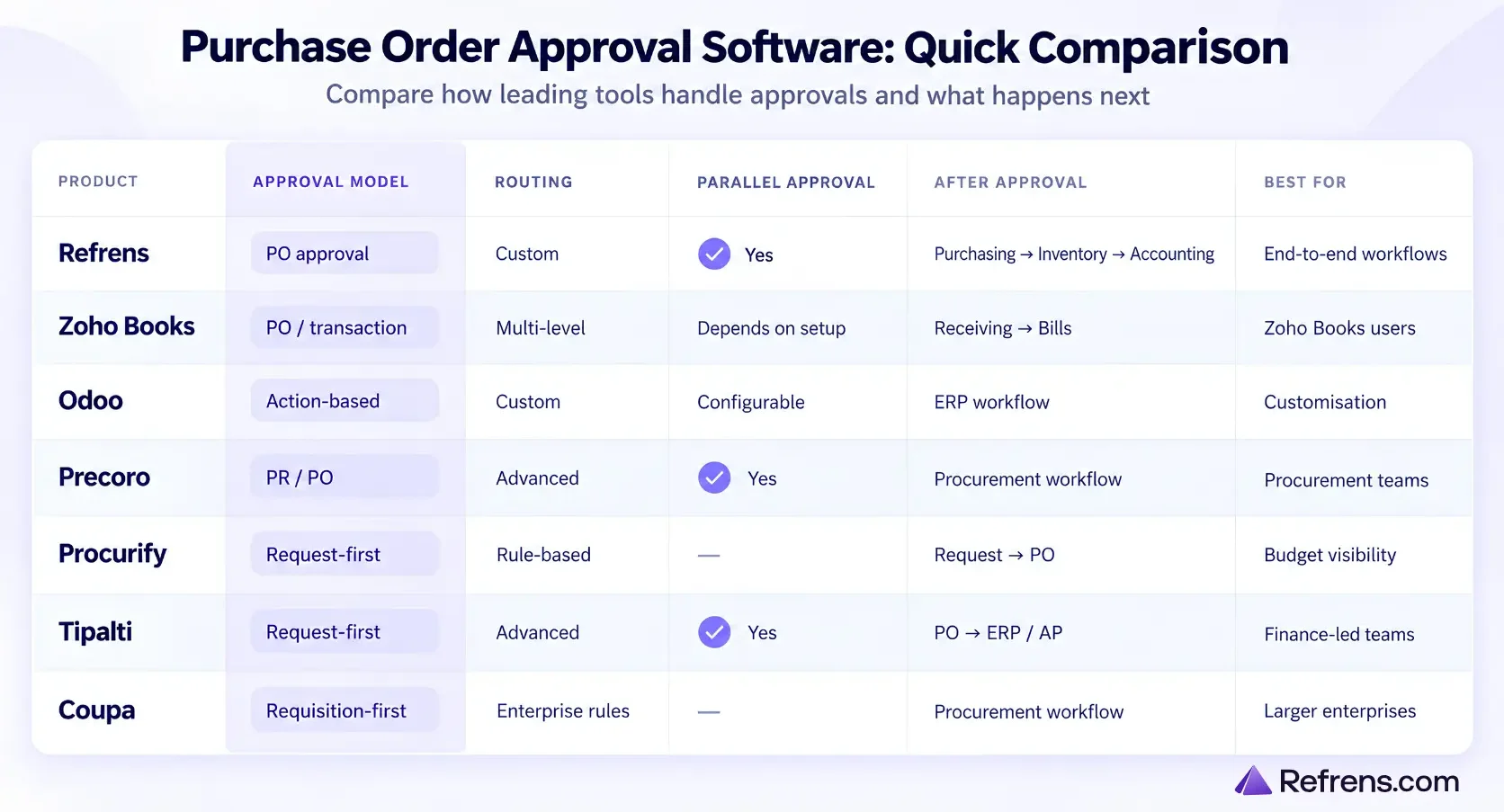
1. Refrens: Best for businesses that want PO approvals connected with purchasing, inventory, payables and accounting in one system.
2. Zoho Books: Best for businesses already using Zoho Books for purchasing and accounting and wanting approvals within the same setup.
3. Odoo: Best for businesses that want highly customisable approval rules inside a broader ERP.
4. Precoro: Best for procurement teams that need detailed approval workflows across Purchase Requests, POs, invoices and other purchasing documents.
5. Procurify: Best for businesses that want budget visibility and approval before an order is placed.
6. Tipalti: Best for finance-led teams that need purchasing approvals across departments, along with ERP and accounts payable connections.
7. Coupa: Best for larger organisations with formal requisition, procurement and Purchase Order control.
What should you look for in Purchase Order approval software?
Once you have ruled out products that do not fit your approval model, a few details matter more than the number of features on the pricing page.
1. How flexible are the approval rules, and how hard are they to manage?
Can you route purchases by amount, department, vendor, location, project or other fields? Can different purchases follow different paths? Can several people approve at the same time?
Also, look at how those rules are changed. If adding a department, approver or spending limit needs an administrator every time, that matters.
2. How easy is it for approvers to use?
Check what an approver can see without opening several screens, whether they can comment or ask questions, and whether they can approve from email, mobile or other places they already work. For teams handling a lot of purchases, bulk approval can matter too.
3. What happens when an approver is unavailable?
People go on leave. Managers change roles. Somebody may simply not respond. Check whether a pending approval can be delegated, reassigned or escalated instead of sitting with one person indefinitely.
4. How much control do you have over permissions?
You may want to decide who can create a PO, edit it, cancel it, convert it, send it to the vendor or approve their own purchase. This becomes more important once several people are involved.
If you are still deciding who should approve which purchases and what each approver should check, our guide to the Purchase Order Approval Process explains approval levels, approver responsibilities and approval matrices in more detail.
5. Can you see what happened later?
Months afterwards, you may need to know who approved the purchase, when they approved it, whether anything changed and why it was rejected or sent back. Check whether that history stays with the purchase.
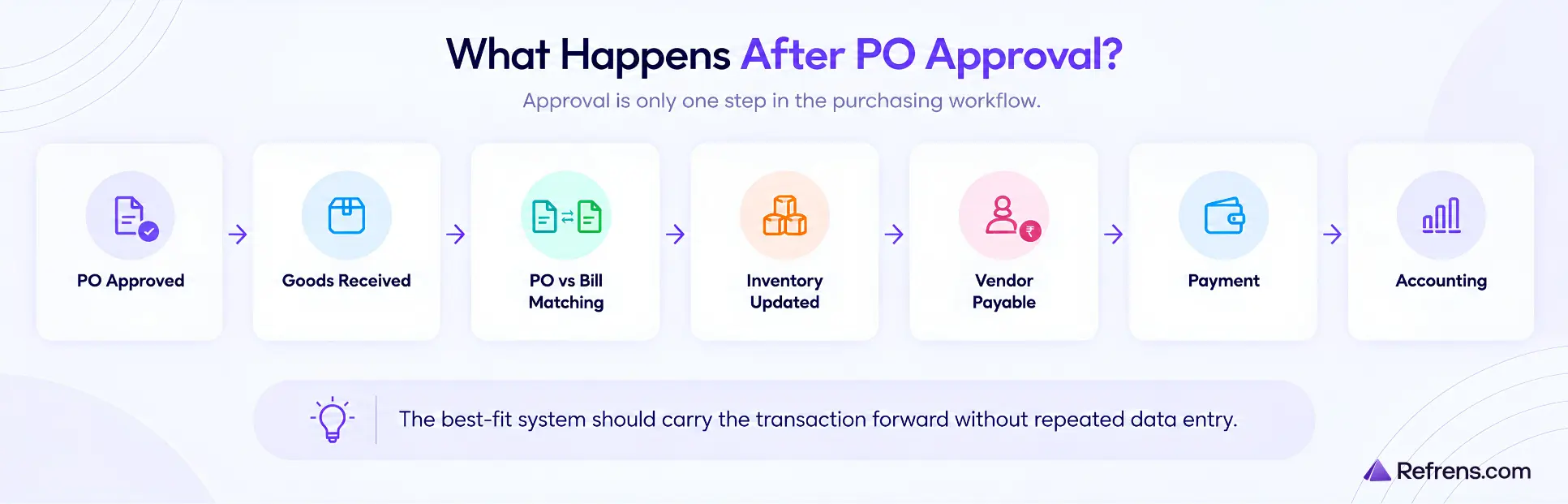
6. What happens once approval is complete?
Check what happens to the approved PO next. Can it continue into receiving, inventory, bills, payables or accounting, or does somebody have to enter the same transaction again elsewhere?
7 Purchase Order Approval Software Options Compared
The seven products below take different approaches to Purchase Order approval. Here is how each one handles approvals, what makes it different and what you should consider before choosing it.
1. Refrens: End-to-End PO Approvals from Purchasing to Accounting

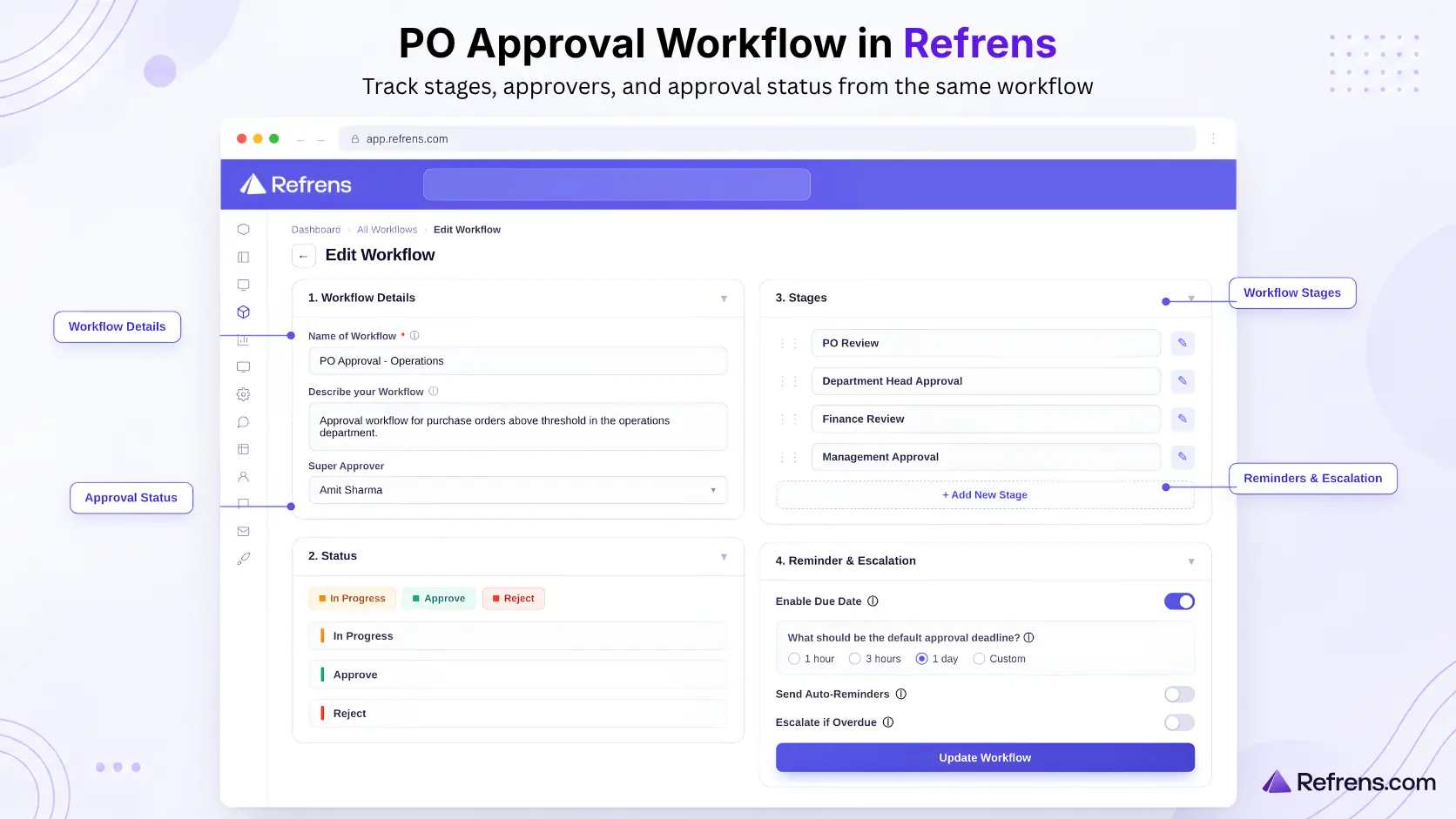
Refrens’ Purchase Order approval software lets businesses approve the completed PO itself before it is shared with the vendor, while keeping the transaction connected with the wider purchasing and accounting process.
Purchase Order approvals and controls
- Custom, multi-stage approvals: Create workflows for both Purchase Orders and Purchases. Add your own stages and status labels, and assign approvers, super approvers and assignees. Different purchases can follow different workflows.
- Automatic or manual routing: Send a PO for approval yourself or automatically move new POs into a set workflow, stage and assignee.
- Permissions and controls: Decide who can create, edit, approve, download, share, convert, cancel or close a PO. Certain actions can also be blocked until the required approval is complete.
- Notifications and follow-ups: Notify approvers, send reminders, escalate delays or reassign the purchase.
- Approval history: Keep a record of approvals, rejections, stage changes and reassignments. Approvers can also review POs and check their status from web or mobile.
Vendor sourcing and management
- Vendor onboarding and KYC: Collect business details, GST/PAN information, bank details and documents. Vendors can also go through a structured vendor approval process before you start buying from them.
- RFQ and quotation comparison: Send the same requirement to several vendors and compare prices, taxes, payment terms and delivery timelines.
- Quotation-to-PO conversion: Turn the selected quotation into a Purchase Order with the vendor and item details carried forward.
- Vendor Management: Check previous purchases, pricing, deliveries, payments and outstanding balances before placing another order.
Purchase Order management
- Detailed POs: Add the vendor, department, items, quantities, rates, taxes, terms, delivery details and supporting documents.
- Share with the vendor: Once the internal approvals are complete, send the PO through email, PDF or a link.
- PO-to-Purchase conversion: Convert the approved PO directly into a Purchase with the existing details carried forward.
Receiving, invoice matching and inventory
- Track what was ordered and received: See ordered, received and pending quantities.
- Compare the PO with the bill: Check what was ordered, what arrived and what the vendor finally invoiced, including quantity and amount differences.
- Inventory management: Keep received stock linked with the purchase and track available quantities and stock movement.
- Batch, serial and expiry tracking: Manage stock across multiple locations and track batches, serial numbers and expiry dates where needed.
For example, if you order 500 units and receive only 350, the remaining 150 can stay visible as pending instead of being tracked in a separate spreadsheet.
Vendor bills, payables and accounting
- Bills and vendor balances: Refrens also connects approved purchases with accounts payable automation, so vendor bills, advances, payments and outstanding balances stay linked with the purchase.
- Advances and payments: Record vendor advances, payments against Purchases and payout receipts.
- GST, ITC and TDS: Keep tax details and ITC eligibility linked with the purchase and track TDS where it applies.
- Accounting Software: Purchases, payables and payments can continue into the books and financial reports.
Other purchasing and automation capabilities
- RFI software: Vendors can submit invoice details and documents in a structured format. Your team can review the submission and turn an accepted invoice into a Purchase.
- Refrens Eagle: Bills received through WhatsApp or email can be read automatically and turned into Purchase or Expense drafts for review.
- Freya AI and Refrens MCP: Teams can ask questions about purchasing and accounting data or carry out permitted actions through ChatGPT or Claude, including creating POs, sending them for approval and working with inventory.
- Purchase and vendor reporting: Review PO and Purchase activity, vendor history, outstanding balances and ageing from the same system.
What to consider
If you only raise a few POs and one manager approves them, much of the wider purchasing setup may be unnecessary. Also, check which plan or add-on includes the workflow and AI features you need.
Build and automate Purchase Order approval workflows with Refrens
2. Zoho Books: Purchase Order and Transaction Approvals Across Accounting Workflows

Zoho Books includes Purchase Order approval in its accounting and purchasing software.
Key capabilities
- Simple, multi-level and custom approvals: Use one approver, set up as many as 10 approval levels in sequence, or define criteria that decide who should receive a transaction.
- Self-approval controls: Decide whether approvers can approve transactions they created themselves.
- Notifications: Alert approvers when something needs review and notify the person who submitted it when a decision is made.
- Purchase receiving: Record goods received against the PO.
- PO-to-Bill conversion: Turn the PO into a Bill instead of creating the vendor transaction from scratch.
- BillPay controls: BillPay adds vendor approval, advance payments against POs, PO matching and two-way or three-way bill reconciliation.
- Approvals across accounting transactions: Set separate approvals for Purchase Receives, Bills, Payments Made, Vendor Credits, Transfer Orders and Inventory Adjustments.
What to consider
The standard multi-level approval path is sequential. If several people need to approve at the same time or your routing is less conventional, check whether Custom Approval can handle it. Some more advanced purchasing controls require BillPay.
3. Odoo: Custom Approval Rules Across Purchasing Actions

Odoo is an ERP system that covers purchasing, inventory, accounting, manufacturing and other business operations.
Key capabilities
- Approval rules on actions: With Odoo Studio, require approval before an action such as confirming a Purchase Order.
- Conditional approvals: Decide when an approval step should apply and assign individual users or groups.
- Several approval steps: Add multiple steps and decide their order.
- Separate approvers: Exclusive Approval can stop the same person from approving more than one stage.
- Delegation and notifications: Approvers can temporarily pass approval rights to another user, while Odoo can create activities or notifications when action is needed.
- Approval history: Approval actions are kept in the record’s chatter.
- Purchasing after approval: Confirmed POs can continue into goods receiving and vendor billing.
What to consider
These rules are set up through Odoo Studio, so they require more configuration than a ready-made PO approval process. Adding Studio to a database on the Standard plan also moves the subscription to the Custom plan.
4. Precoro: Advanced Procurement Approvals Across PRs, POs and Invoices

Precoro is procurement software for managing Purchase Requests, Purchase Orders, invoices, receipts and other purchasing documents.
Key capabilities
- Approvals across purchasing documents: Set workflows for Purchase Requests, Purchase Orders, Invoices, Receipts and Warehouse Requests.
- Detailed routing rules: Route documents by department, project, location, spending threshold, requester or custom fields.
- Sequential and parallel approvals: Supports sequential, parallel and mixed approval chains.
- Email and bulk approvals: Approve or reject POs from email, or process several pending documents together.
- Reapproval after changes: Send a document back through approval when controlled details change.
- PO and invoice matching: Compare invoices or receipts with the related PO and flag differences in price, quantity or items.
- Avoid duplicate approvals: If a PO is created from an already approved Purchase Requisition and the important details have not changed, another approval can be skipped.
What to consider
There is quite a lot to configure. Document types, thresholds, custom fields, approval steps and parallel routes need to be set up carefully.
5. Procurify: Purchase Approvals with Budget Visibility Before Ordering

Procurify is procurement software for purchase requests, approvals, budgets, Purchase Orders and receiving.
Key capabilities
- Order requests: Employees submit what they need with details such as the vendor, department, account code, items and supporting documents.
- Approval routing: Route requests using departments, account codes, approval groups, levels, thresholds and custom fields.
- Delegation: Pass approvals to another person when the usual approver is unavailable.
- Mobile approvals: Review, edit, approve or deny requests from the mobile app.
- Email approvals: Requests can also be approved or denied from email when the feature has been enabled.
- Purchase-to-receive: Approved requests move into purchasing, where the team can create the PO and later record what was received.
- Live budget visibility: Approvers can see the effect of a request on the relevant budget while deciding whether to approve it.
What to consider
That request-first model is worth checking carefully if your business wants the completed Purchase Order itself to be approved before it is issued.
6. Tipalti: Cross-Team Purchase Approvals with Finance and ERP Integration
Tipalti combines procurement with accounts payable and supplier payments.
Key capabilities
- Custom approval rules: Route purchase requests using the organisation structure, budget information and other business rules.
- Approvals from different teams: Bring in Finance, IT, Legal, Security or other specialists.
- Parallel approvals: Let several people review the same request at the same time.
- Email and Slack approvals: Review and approve requests without opening Tipalti each time.
- Comments and approval history: Add notes, ask specialists for input and keep a record of decisions.
- Budget information: For NetSuite users, approvers can see real-time budget status while reviewing the purchase.
- PO creation and ERP sync: Once a request is approved, Tipalti can create the PO, send it to the supplier and sync PO information with supported ERP systems such as NetSuite, Sage Intacct and Xero.
What to consider
That request-first model is less aligned with businesses that want approval on the completed PO itself. Tipalti’s wider accounts payable and supplier-payment capabilities also make more sense when those processes are part of the evaluation.
7. Coupa: Enterprise Requisition Approvals with Strong PO Change Control

Coupa is a spend management platform that covers purchasing, suppliers, invoices and other areas of business spend.
Key capabilities
- Requisition-to-PO process: Employees raise a purchase request. Once the required approvals are complete, Coupa can create the PO and send it to the supplier.
- Approval chains: Route requests through managers or other approvers according to business rules.
- Approval records: Keep details of who approved or rejected a request, when they acted and where it sits in the chain.
- Supplier access: Suppliers can receive POs through the Coupa Supplier Portal, email or cXML and create invoices from them where enabled.
- Post-issue PO change control: Revised POs can go through approval again while the change request and revision history remain on record.
What to consider
Coupa covers a much wider spend-management process than PO approval. For a smaller team that only needs occasional PO sign-off, that may be more system than the team needs.
Final Takeaway
A feature list can tell you what a product supports, but it will not always tell you how well it fits the way your team actually buys.
Before choosing, take one or two recent Purchase Orders and run through the complete experience in each shortlisted product, from creating the PO and sending it for approval to reviewing it and moving it forward afterwards.
Pay attention to anything that requires a manual workaround, another system or repeated data entry.
The software that handles those everyday cases with the least workaround is usually a better fit than the one with the longest feature list.
If you already know which software you want to use and are deciding how the approval process itself should be set up, read our guide to How to Design, Automate, and Improve a Purchase Order Approval Workflow.
Build and automate Purchase Order approval workflows with Refrens
Related Posts:
 Why Your Accounting Software Should Have WhatsApp OCR Scanning
 Best Invoice OCR Software in India: Top 5 Tools Compared
 How to Design, Automate, and Improve a Purchase Order Approval Workflow
 Purchase Order Approval Process: Steps, Approvers, and Best Practices
 Accounts Payable OCR Software: What Happens Between Receiving a Bill and Recording It
 Top 15 Vendor Management Software in India for 2026: Features, Pricing, Ratings & Reviews
 Vendor Approval Process: Prequalification, Vetting, Due Diligence & Risk Checks
 Vendor Onboarding Process: Steps, Checklist & Documents
 Everything You Need to Know About Purchase Orders: A Complete Guide
 10 Best Invoice Approval Workflow Software
 A Complete Guide to the Types of Invoices
 The Ultimate Guide to Basics of Inventory Management
 Managing Custom Quotation Approvals for Robotics & Industrial Automation Company: Refrens x Suprak Technologies Case Study
 Centralising Multi-branch Quotation Approval for Machinery Manufacturing Company: Refrens x DOIT Industries Case Study
 Comprehensive Guide to Sales Orders
 Best Sales Purchase Invoice Software: A Detailed Guide
 Everything To Know About GSTR 3
 Everything to know about GSTR 9C: Eligibility, Filing Process, Amendments, and FAQS