
Purchase Order approvals usually start simply. A PO is created, somebody checks it, and it moves ahead.
Then the process gets more complicated. A higher-value PO may need an extra approval. A new vendor may require another check. A PO may also change after someone has already approved it.
Before long, someone has to keep track of who has approved what, what is still pending, and which POs need special handling.
That is usually the point where you need a proper approval workflow. This guide looks at how to build one, automate the routine parts, handle the awkward cases, and improve it as the way you buy changes.
What is a Purchase Order approval workflow?
Knowing who should approve a Purchase Order is one thing. Making sure every PO follows the right route is another.
A Purchase Order approval workflow is the set of rules that decides where a PO goes after it is created, which route applies when different conditions are met, and what should happen if something changes along the way.
Without a clear workflow, those decisions usually end up being handled through spreadsheets, email threads, or individual judgement.
If you need the basics of PO approval first, start with our guide to the Purchase Order Approval Process.
When is it worth automating Purchase Order approvals?
You do not need an automated workflow just because a PO needs approval.
If you only create a few POs each month, most follow the same route, and one or two people handle the approvals, a simple documented email process may be enough.
Automation starts becoming useful when someone has to keep deciding where each PO should go, chasing approvers, handling exceptions and tracking what is still pending.
Purchase Order approval software can automate that routing and coordination once the underlying approval rules are clear.
A complicated workflow is not automatically better. If the manual process is already simple and easy to follow, automating it may create more work than it removes.
The trouble starts when someone has to coordinate every PO
One PO may need only the department head. Another may also need Finance. A third may need a different route because of the purchase category. Then someone goes on leave.
Soon, someone is forwarding POs, updating a spreadsheet, sending reminders and checking which approval is still pending. None of those tasks is especially difficult on its own. The problem is having to do them again for every purchase.
Complexity matters more than company size
A large business may have a simple PO approval setup if most purchases follow the same route.
A 20-person company, on the other hand, can still have a complicated workflow if it buys across several locations, uses different spending limits, or applies different rules to certain vendors or purchase categories.
Simplify the workflow before you automate it
There is one trap worth avoiding: automating every manual hand-off exactly as it works today.
Map the current process first. Separate the decisions that actually need an approver from tasks such as forwarding the PO, updating its status, sending reminders and working out who comes next.
Those manual hand-offs are what automation should remove. You do not need to preserve a step simply because it has always been there.
How do you design a Purchase Order approval workflow?
Start with the purchase that happens most often. If you begin by designing for every exception, the workflow can become complicated very quickly.
- Start with the normal purchase
Take a typical PO and map what should happen from the moment it is created.
For example: PO created → Department Head → Finance → Approved
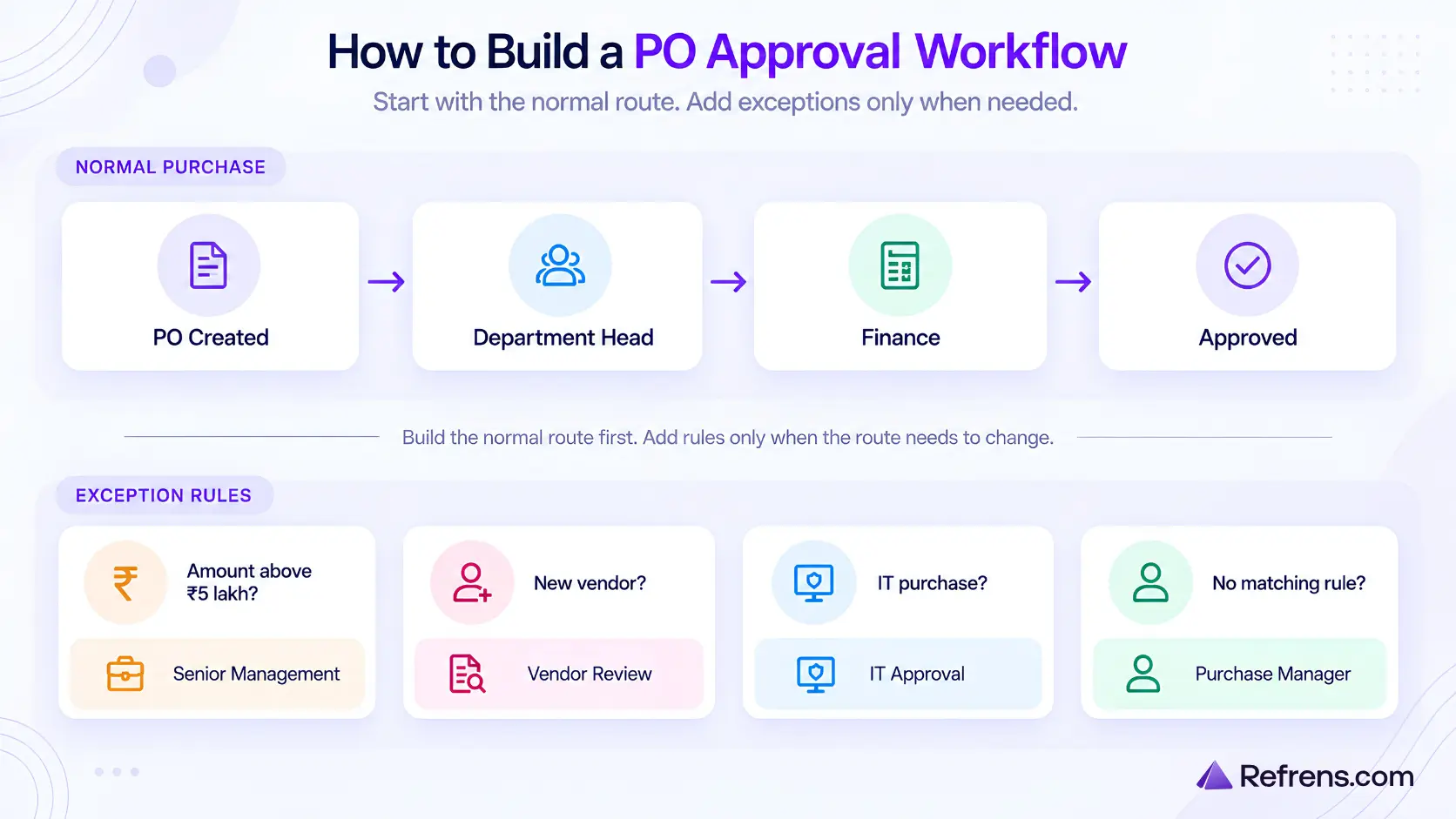
This becomes your base route. Get the normal route right before you start adding exceptions.
- Add a rule only when the route needs to change
Once the normal route is clear, add rules only for purchases that need to be handled differently. That could be because the amount crosses a spending limit, the vendor is new, the purchase belongs to a certain department or location, the item falls into a controlled category, the purchase is linked to a particular project, or extra information or documents are required.
If the exception exists because the vendor itself needs internal review, a separate vendor approval process may be more appropriate than adding another PO approver.
If none of those conditions apply, the PO should stay on the normal route.
- Decide what happens when several rules match
A single PO can trigger more than one rule. For example, a ₹6 lakh IT purchase from a new vendor might require Finance because the vendor is new, an IT reviewer because of the category, and senior approval because of the value.
You then need to decide how those approvals should work together.
Sequential: Department Head → Finance → IT → Senior Management
Each person approves after the previous stage is complete.
Parallel: Department Head → Finance + IT → Senior Management
Finance and IT can review the PO at the same time.
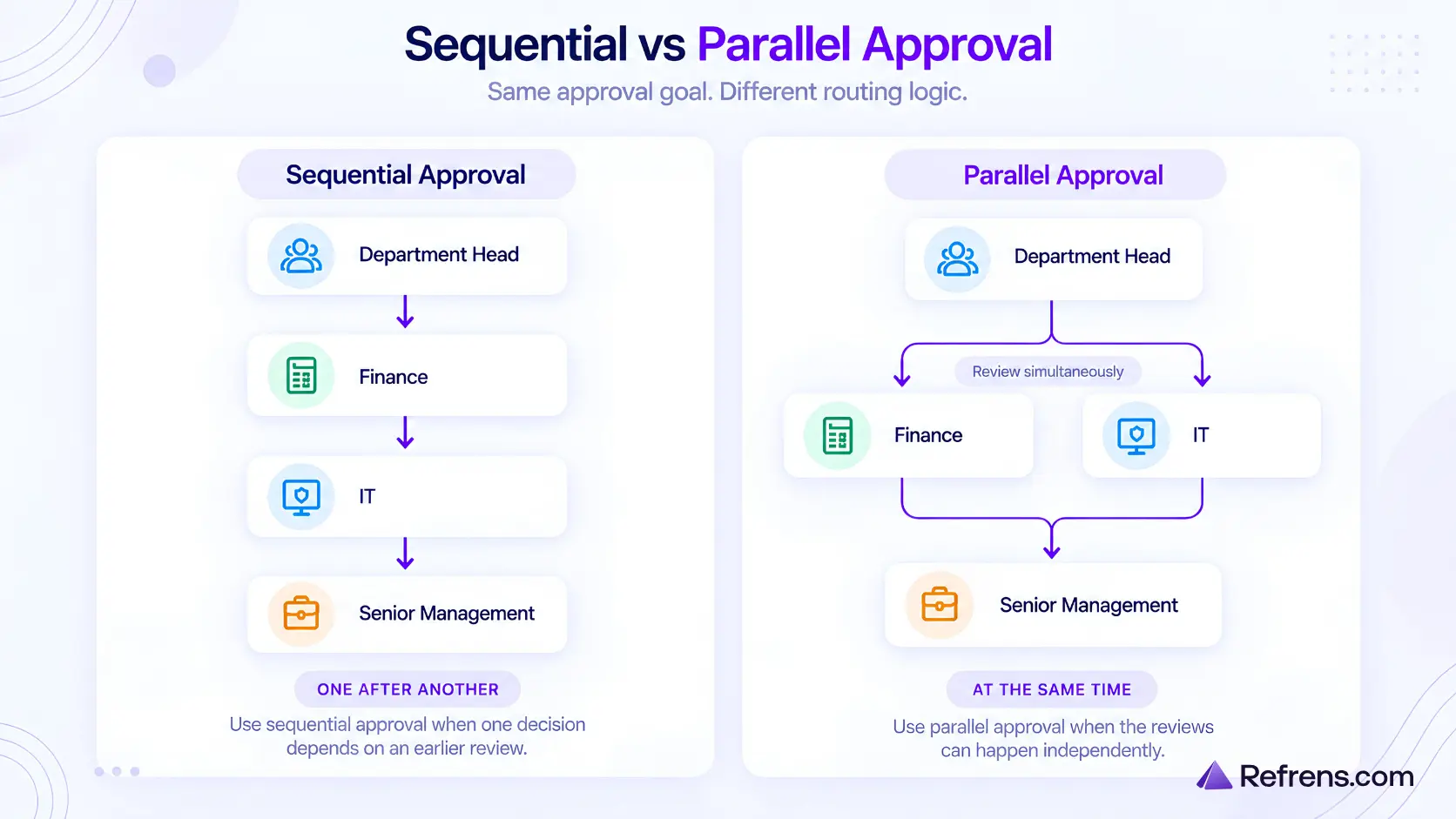
Use sequential approval when one decision depends on an earlier one. Use parallel approval when the checks can happen independently.
Also avoid duplicate approvals. If Finance is required by two different rules, it should not have to approve the same PO twice unless each stage has a different purpose.
- Not every exception needs another approver
When something unusual happens, the first response is often to add another approver. But sometimes the real issue is missing information.
A new vendor may need tax details, bank information and supporting documents collected through vendor onboarding before the PO moves ahead. A high-value purchase may need a business reason, quotations collected through RFQ software, a project reference or other supporting documents.
If the problem is missing information, collect that information instead of adding another approval stage.
- Make sure the workflow has the information it needs
Automatic routing only works if the PO contains the information the rule relies on.
For example, if purchases from the Mumbai location need to go to a specific approver, the location must be captured before the PO enters approval. The same applies to fields such as department, project, vendor type, purchase category and amount.
If those details are missing or entered inconsistently, the workflow will not route POs reliably.
Whenever you create a rule, check whether the required information is available before approval starts.
- Turn approval thresholds into exact rules
Once you have decided your approval limits, define them clearly enough for the workflow to apply without ambiguity.
For example, decide whether the limit is based on the pre-tax or final PO value, whether discounts or freight affect that value, and which approval band an amount exactly on the boundary should fall into.
These details seem minor until a PO lands right on the edge of a threshold.
- Decide what should trigger approval again
An approval applies to a particular version of the PO, so you need clear rules for what happens when that version changes.
Decide which changes should require fresh approval, whether small changes can be allowed without another approval, and where the PO should re-enter the workflow if it needs to be approved again.
A vendor change or increase in the PO value may need another review, while an internal note or minor correction may not.
Define this in advance so people are not making the decision manually each time.
- Build a fallback for cases the normal rules do not cover
Not every PO will fit the workflow perfectly. An approver may be unavailable, a PO may match no route, the same person may appear as both requester and approver, or two rules may conflict.
Roles and permissions can also help control who is allowed to create, edit or approve POs, and reduce inappropriate self-approval when responsibilities overlap.
Decide in advance where those POs should go. For example, an unmatched PO could be sent to the Purchase Manager, while an unavailable approver could be replaced by a designated backup.
For any fallback, make it clear who takes ownership, what needs to happen before the PO can move again, and whether it should return to the normal route afterwards.
- Tell the approver why the PO reached them
An approver should be able to understand why the PO needs their attention.
Instead of showing only “Pending Finance Approval,” give a little context, such as “Finance approval required because the PO value exceeds ₹2 lakh” or “Additional review required because this is a new vendor.”
That context helps the approver understand what they are expected to review without having to work it out themselves.
- Test the awkward cases before you go live
A workflow is not really tested if it only works for the normal case.
Try the situations most likely to expose weak rules: a PO exactly on the spending limit, one just above it, the same person appearing in two stages, an approver being unavailable, the vendor changing after approval has started, the amount increasing midway, a rejected PO being edited and resubmitted, two rules applying at once, or no rule applying at all.
These cases usually tell you more than testing several routine POs. Fix anything that creates duplicate approvals, unclear routing or unnecessary stages before the workflow goes live.
How do you automate a Purchase Order approval workflow?
Once the rules are clear, automation should handle the repetitive coordination work: sending the PO to the right approver, moving it to the next stage, tracking what is still pending, and sending reminders when something is delayed.
- Route the PO automatically
Once the rules are set, the person creating the PO should not have to choose approvers manually. The system should use the information on the PO to send it through the right approval path and move it to the correct stage.
In Refrens Purchase Order approval software, Purchase Orders can be assigned to workflows, stages and approvers so different types of purchases follow different approval paths.
The system should also enforce reapproval rules, either by restricting certain edits or by sending a changed PO back through the required stages.
- Keep the approval status with the PO
Anyone involved should be able to see where a PO currently stands without having to ask around.
For example:
PO #1842
Department Head: Approved
Finance: Pending
Senior Management: Not yet required
It should also be clear when the PO entered the current stage and who is expected to act next.
If someone still needs to check a spreadsheet or message another person to find out what is holding up the PO, part of the process is still being managed manually.
- Automate follow-ups, but do not overdo them
Reminders are useful when an approval is genuinely being missed. They are less useful when the system starts chasing someone before they have had a reasonable chance to respond.
A simple setup might notify the approver when the PO reaches them, send a reminder if it is still pending after one working day, and escalate or reassign it if the delay continues.
The timing should also depend on the purchase. A ₹20 lakh urgent equipment order may need a quicker follow-up than a routine office-supplies order.
The goal is to reduce manual chasing, not replace it with constant automated chasing.
- Handle leave without changing the whole workflow
Someone being away for a few days should not mean changing the approval rules for everyone. Use a temporary delegate or backup approver instead.
For example: Finance Head unavailable → Deputy Finance Head until 14 October
Once the Finance Head returns, the usual approval route can continue.
- Make rejection lead somewhere useful
A rejected PO does not always mean the purchase is finished. Sometimes the approver simply wants something corrected, such as the quantity, vendor, quotation, terms or amount.
Decide what happens next: whether the PO goes back to its creator, which details can be changed, and where it should re-enter the approval route after those changes are made.
Otherwise, people may create a new PO simply because the workflow does not make the next step clear.
- Automate the hand-offs, not every decision
Routing, reminders, status updates and delegation can all be automated.
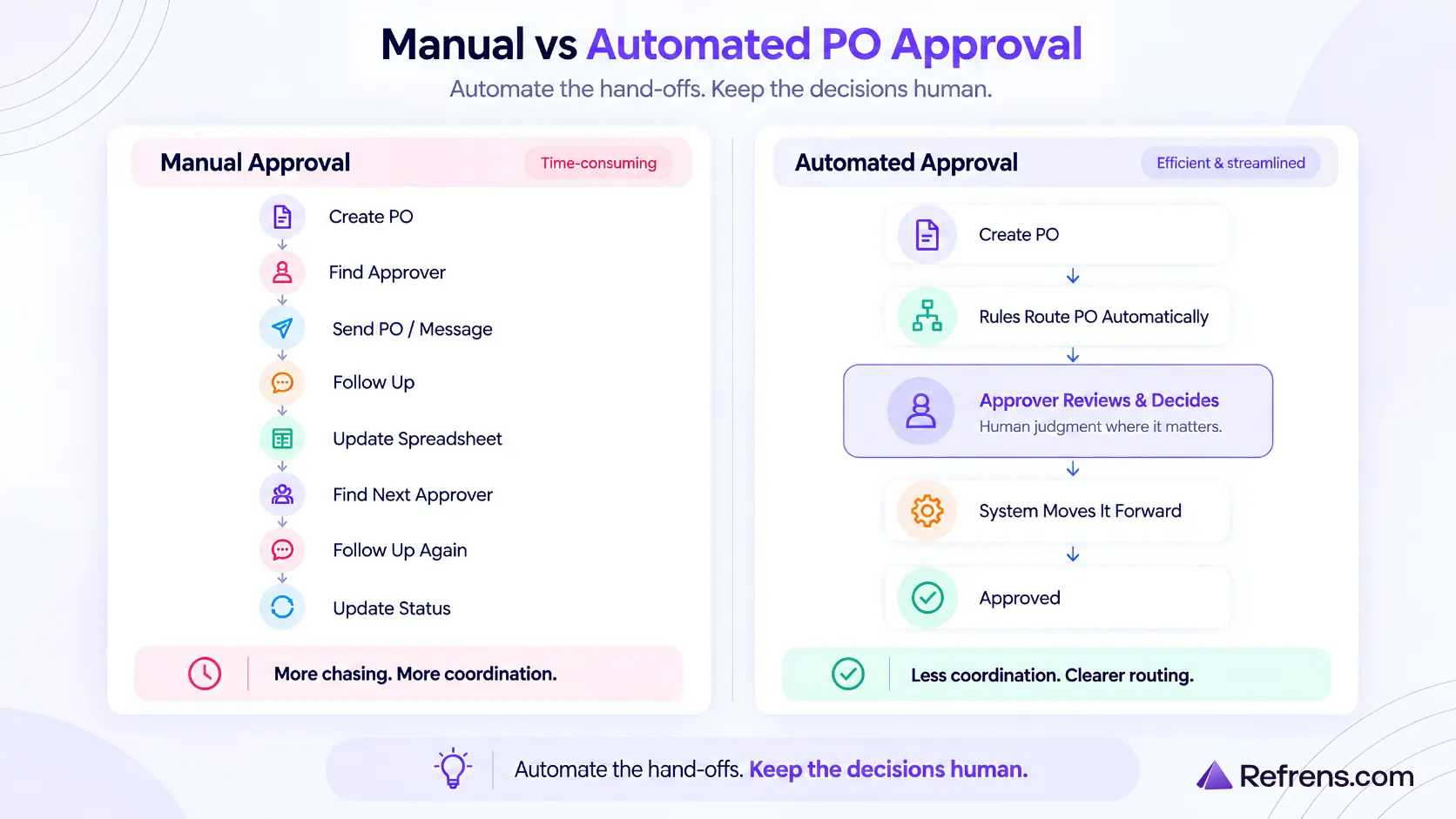
The approval itself may still require judgement. Someone has to decide whether the purchase is necessary, whether the terms are acceptable, or whether an unusual case should go ahead.
The workflow should make sure those decisions reach the right person without making people manage all the steps around them.
Once the PO is approved and the vendor bills the business, the transaction can continue into accounts payable automation for invoice review, payment tracking and vendor payables.
For stock purchases, receiving can also stay connected with inventory management so ordered, received and available quantities remain aligned.
Where do automated Purchase Order approval workflows still break?
Even a well-designed workflow can run into problems once people start using it day to day.
- Parallel approvers disagree
Parallel approval works well when different people can review the same PO independently. The problem comes when they reach different decisions.
For example, Finance may reject a PO while IT approves it. You need to decide whether one rejection stops the process, whether earlier approvals still count after the PO is corrected, and who needs to review the revised version.
Set those rules before parallel approvals go live, rather than deciding case by case when a disagreement happens.
- Delegation can accidentally weaken a control
A backup approver may solve the leave problem but create another one if the substitute is also the person who created the PO, already approves at another stage, or does not have the same approval authority.
Define who is allowed to act as a delegate and make sure the usual restrictions still apply while they are covering for someone else.
- Rules can change while POs are already moving through them
Approval rules may change while some POs are already in progress. For example, you might update a spending limit or replace an approver while a PO is still waiting with Finance.
Decide whether existing POs should finish the route they started or move onto the new one. Whichever approach you choose, keep a record of which rules applied at the time.
Otherwise, two similar POs created only a day apart may follow different routes with no clear explanation.
How do you know if your Purchase Order approval workflow is working?
A workflow can look tidy on paper and still be slow in practice. Look at what actually happens after POs enter approval.
- Measure approval time by route and stage
Start with the total time from PO submitted → PO fully approved, but also look at where that time is being spent.
If a PO takes 30 hours to approve and 28 of those hours are spent waiting with Finance, the total time alone does not tell you much. Breaking it down by stage shows where the delay actually is.
Compare similar POs as well. A routine repeat order should not be measured against a ₹20 lakh equipment purchase. Different routes can have different expected approval times.
It is also worth looking at unusually slow POs separately. One 60-hour approval can make the average look worse even if most similar POs are approved within four or five hours.
- Track why POs are sent back
A returned PO is not necessarily a problem. But if the same issue keeps causing returns, that usually points to a problem earlier in the process.
Common reasons include missing quotations, incorrect quantities, incomplete vendor details, unclear purchase reasons, wrong project or department information, and missing supporting documents.
If 25% of POs come back because the same field is missing, fix that step before approval instead of asking approvers to keep catching the same issue.
- Track what changes after approval
Look at how often approved or partly approved POs need to go through approval again, and what caused the change. Common reasons include an increase in amount, a vendor change, revised quantities, different payment terms, or an added line item.
Frequent reapproval may be a sign that POs are being submitted before important details are settled.
Also look for the opposite problem: meaningful changes happening without another approval. If the final purchase regularly differs from what people originally approved, the approval record stops being reliable.
- Watch how often somebody fixes the workflow manually
Track how often someone has to step in to change the approver, move a PO to another stage, fill in missing information, reassign an unmatched PO, or correct the route chosen by the system.
Occasional intervention is normal. If someone has to do this every day, part of the workflow is still being managed manually rather than being automated.
- Measure how often exception routes are used
Exception routes should stay unusual. If a large share of POs start using one, that route may need to become part of the normal workflow.
For example, a route created for occasional overseas purchases may no longer be an exception once international buying becomes common.
The goal is not to make every purchase equally fast. It is to find delays, corrections and manual work that keep happening when they do not need to.
How often should you review your Purchase Order approval workflow?
A workflow should not need constant attention, but it should not stay unchanged for years either.
A quarterly review is a sensible starting point. Review it sooner if approval limits, roles, locations, purchase categories or the way your business buys changes.
- Give someone ownership of the workflow
Departments change, approvers move roles, and new projects or locations get added. Without clear ownership, outdated rules can stay in place simply because nobody is sure who should update them.
The person responsible does not need to manage every PO. Their job is to make sure the workflow stays current and the rules still make sense.
- Keep a record of workflow changes
When you change an approval limit, approver, routing rule or fallback, note what changed, when it changed and why. This becomes useful when two similar POs follow different routes because the workflow was updated between them.
You do not need a detailed change-management process. A simple record is enough to show which rules were in place at the time.
- Record why important rules exist
When you add an important rule, note why it exists.
For example:
Rule: POs above ₹5 lakh need senior approval.
Reason: High-value purchases need senior review.
That note becomes useful later when someone asks whether the rule is still needed. If nobody can explain why a rule exists, it becomes much harder to decide whether it should stay, change or be removed.
- Give temporary rules a review date
If a rule is only meant to be temporary, give it a review date when you create it.
For example: Extra Finance approval for Project X → Review on 31 December
That is much safer than relying on someone to remember months later.
- Ask one question during every review
For each important rule or approval stage, ask: If we were setting up this workflow today, would we still add it? If yes, keep it. If no, change or remove it. If nobody knows, first find out why the rule exists before leaving it in place.
Final Takeaway
A good Purchase Order approval workflow should make routine purchases easy to process while ensuring unusual or higher-risk purchases receive the right level of review.
Once you have defined your approval rules, the next step is choosing a system that can manage routing, permissions, approvals, and automation. Compare the best Purchase Order approval software to find a solution that fits your purchasing process.
Start with the normal approval route, define when exceptions or reapprovals are needed, and automate the coordination work around approvals.
The best workflows do not add more approvals; they help the right people make better decisions with less manual follow-up.
Build and automate Purchase Order approval workflows with Refrens
FAQs
- How many approval levels should a Purchase Order workflow have?
There is no ideal number. Use the fewest approval stages needed to make the required decisions.
A routine purchase may need only a department or budget owner, while a larger or unusual purchase may also need Finance, Procurement or senior management. If an approval stage does not have a clear purpose, it is worth asking whether that stage needs to exist at all.
- How do you prevent people from splitting Purchase Orders to avoid approval limits?
Approval limits can be bypassed if one purchase is divided into several smaller POs. For example, someone could split a ₹6 lakh purchase into three ₹2 lakh POs if additional approval starts above ₹2 lakh.
If this is a realistic risk, do not look only at individual PO value. You may also need to flag related purchases based on the same vendor, project, requester, category or a short time period.
- Should PO approval rules consider total project or vendor exposure?
Sometimes the value of the current PO does not tell the whole story. A ₹1 lakh PO may be routine on its own, but five similar POs against the same project or vendor represent a much larger commitment.
Reviewing historical purchases, vendor balances and related financial records in your accounting software can provide additional context when assessing cumulative exposure.
Depending on the business, approval rules may therefore consider project budgets, vendor exposure, or cumulative spend over a defined period, not just the value of a single PO.
- How should recurring or blanket Purchase Orders be approved?
If the same purchase happens regularly under agreed terms, it may not make sense to approve it from scratch every time.
You can approve the overall commitment first and define limits around the vendor, amount, period, quantity, or purchase category. If the purchase later moves outside those limits, it can go through approval again.
- What should happen when an approved Purchase Order is cancelled?
Keep the original approval history, record who cancelled the PO and why, and make the cancelled status clear.
If a replacement PO is created with a different vendor, pricing, quantity, or commercial terms, it should follow the appropriate approval route rather than automatically inheriting the previous approval.
Related Posts:
 7 Best Purchase Order Approval Software
 Why Your Accounting Software Should Have WhatsApp OCR Scanning
 Best Invoice OCR Software in India: Top 5 Tools Compared
 Purchase Order Approval Process: Steps, Approvers, and Best Practices
 Top 15 Vendor Management Software in India for 2026: Features, Pricing, Ratings & Reviews
 Vendor Approval Process: Prequalification, Vetting, Due Diligence & Risk Checks
 Accounts Payable OCR Software: What Happens Between Receiving a Bill and Recording It
 Vendor Onboarding Process: Steps, Checklist & Documents
 Everything You Need to Know About Purchase Orders: A Complete Guide
 10 Best Invoice Approval Workflow Software
 A Complete Guide to the Types of Invoices
 Centralising Multi-branch Quotation Approval for Machinery Manufacturing Company: Refrens x DOIT Industries Case Study
 Everything To Know About GSTR 3
 Comprehensive Guide to Sales Orders
 The Ultimate Guide to Basics of Inventory Management
 Everything To Know About GSTR-3A: Issuance, Actions to Take, and Consequences of Non-Compliance
 How to Build a Production-Ready AI Voice Calling Workflow for Sales Qualification
 From Invoices to Insights: How AI Data Integration Services Improve Financial Visibility