
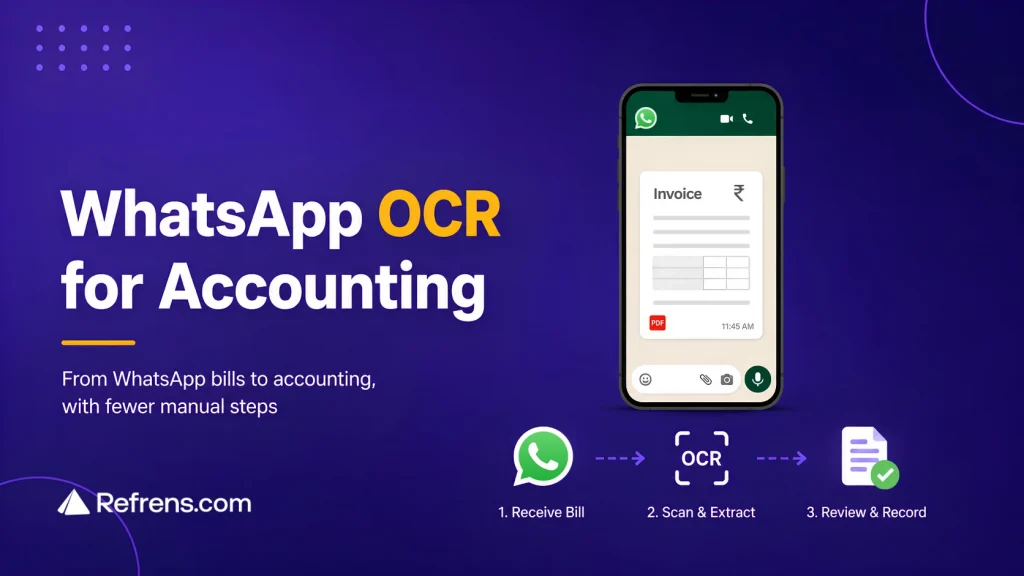
For many businesses, invoices no longer arrive neatly in the accounts inbox.
A vendor sends a PDF on WhatsApp. Someone in operations gets a purchase bill while discussing an order. An employee takes a photo of a restaurant receipt after a client meeting.
The document has reached the business, but the accounts team may still have no idea it exists. Someone then has to download it, save it, forward it, and upload the same file into accounting software before it can be recorded.
The invoice was digital from the start. It should not need so many manual steps just to reach accounts.
WhatsApp OCR scanning shortens that journey. The person who receives the document can send or forward it directly from WhatsApp, allowing the bill to enter the scanning and accounting workflow without being passed around first.
TL;DR: What You Need to Know
Bills often reach WhatsApp before accounts. WhatsApp OCR reduces that handoff, but the bigger difference is what happens after scanning: does the bill become an accounting record, an expense claim, a spreadsheet row, or another dashboard entry?
1. Refrens Eagle: Best for businesses that want the bill to become a review-ready purchase or expense inside the same accounting system, with vendor matching and connected workflows.
2. HelloBooks (Munimji): Best for WhatsApp-first bookkeeping, where scanned bills become draft entries in the HelloBooks ledger.
3. REME: Best for employee expenses and reimbursements that need checks, approvals, and accounting integration.
4. Querygen: Best for teams that still manage expenses in Google Sheets and want easier receipt capture through WhatsApp.
5. Gennai: Best for businesses using external accounting software that want a separate invoice-capture layer before syncing data onward.
The key test: don’t just compare OCR accuracy. Send one real bill through each workflow and see where it lands, what still needs manual work, and how close it gets to the books.
Why Bills Get Stuck on WhatsApp
Receiving an invoice on WhatsApp feels convenient because the document is already on someone’s phone. But that does not mean it has reached accounts.
A supplier may send the bill in the middle of a conversation about an order or delivery. A few messages later, it is buried between product photos, payment screenshots, follow-ups, and everyday chat.
Unless the person who received it remembers to pass it on, the accounts team may never see it. That is how a bill can reach the business without reaching the books.
Most businesses try to solve this with simple instructions:
“Send every bill to accounts.”
“Upload your receipts.”
“Email invoices you receive on WhatsApp.”
The problem is that someone still has to remember to do it.
With a WhatsApp OCR workflow, the instruction becomes much simpler: send or forward the bill when you receive it. The sooner that handoff happens, the less likely the accounts team is to spend time chasing the document later.
Why WhatsApp Works Well for Document Collection
The accounts team may work in the accounting software every day. The people receiving bills across the business usually do not.
Take a warehouse manager who submits only a few purchase bills each month. Asking them to remember a password, open the accounting software, find the right section, locate the file on their phone, and upload it is a lot of effort for something they do occasionally.
WhatsApp keeps that part simple: receive the bill and send or forward it.
The employee does not need to know which ledger account it belongs to or how the purchase will be recorded. Their job is simply to get the document to the accounts team.
This is why WhatsApp works well as a collection channel for occasional users: it asks them to do something they already know how to do.
Where This Helps Most
WhatsApp OCR is most useful when the person receiving the document is not the person who records it.
- Purchase and operations teams may already be talking to suppliers on WhatsApp about prices, orders, dispatches, or deliveries. If the supplier sends an invoice in the same chat, the employee can forward it right away instead of remembering to send it later.
- Site, warehouse, and field teams may receive bills while handling deliveries, coordinating materials, or working away from the accounts team. They should not have to open accounting software to submit a document they receive occasionally.
- Employee expenses often start on a phone too. Hotel bills, food receipts, transport bills, travel expenses, and reimbursement documents can easily get buried in chats, inboxes, or camera rolls if they are not submitted quickly.
Refrens supports vendor invoices, supplier bills, purchase bills, employee expense receipts, travel bills, food bills, reimbursement receipts, and other supported purchase or expense documents through WhatsApp.
Across all these cases, the situation is the same: one person has the document, and someone else needs it for accounting. WhatsApp makes that handoff easier.
What WhatsApp OCR Scanning Changes
Take a supplier invoice received by an employee on WhatsApp.
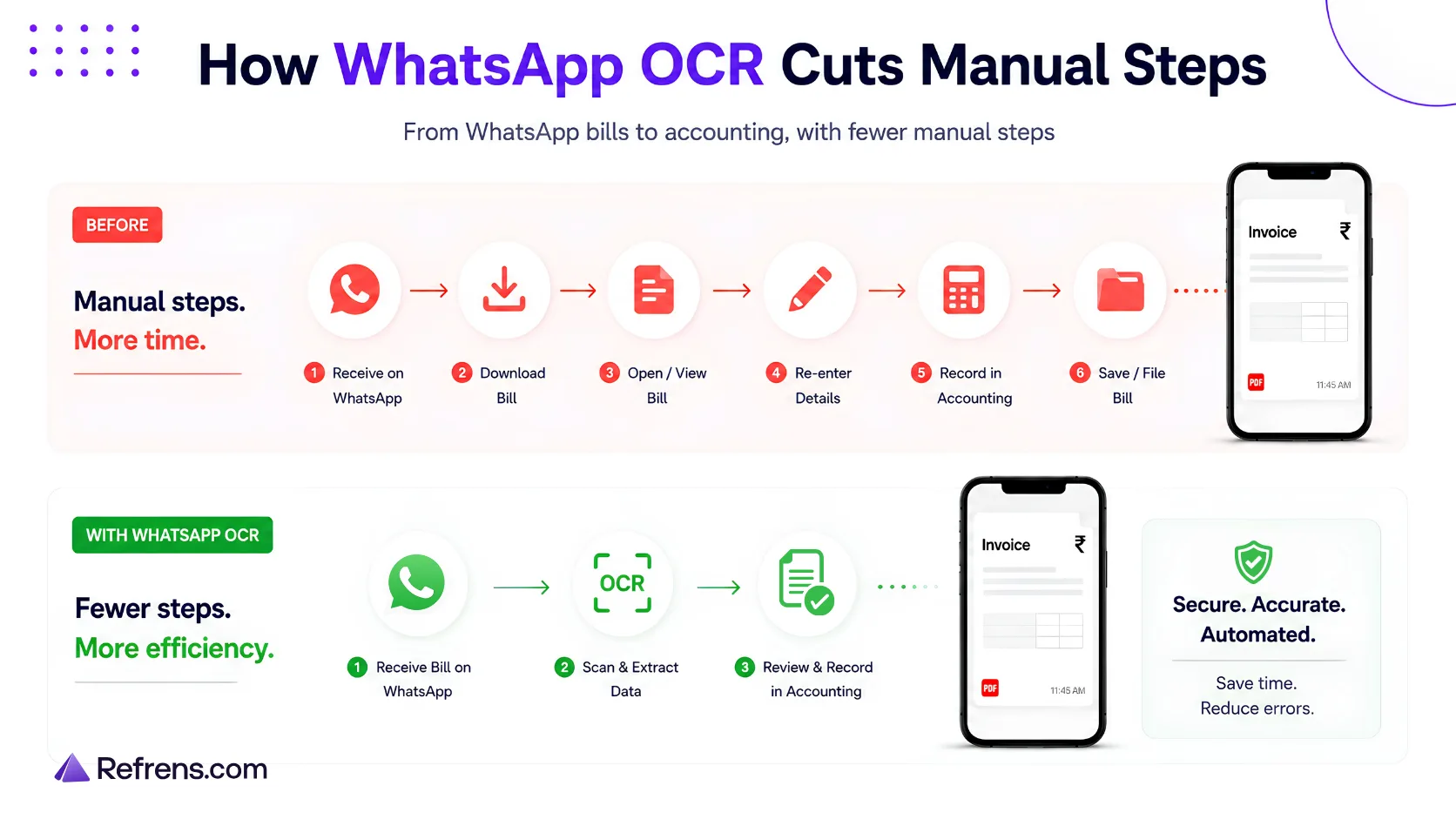
Without a direct capture workflow, the employee may have to download the file, save it, forward it to accounts, and then someone in accounts uploads the same document into the accounting software before it can be scanned, reviewed, and recorded.
The invoice was already digital. Most of that process is simply moving the same file from one place to another.
With Refrens Eagle, an approved team member can send or forward the document to the business’s dedicated Refrens WhatsApp number. Eagle scans the bill, extracts the invoice details, matches the vendor where possible, and prepares a purchase or expense for review.
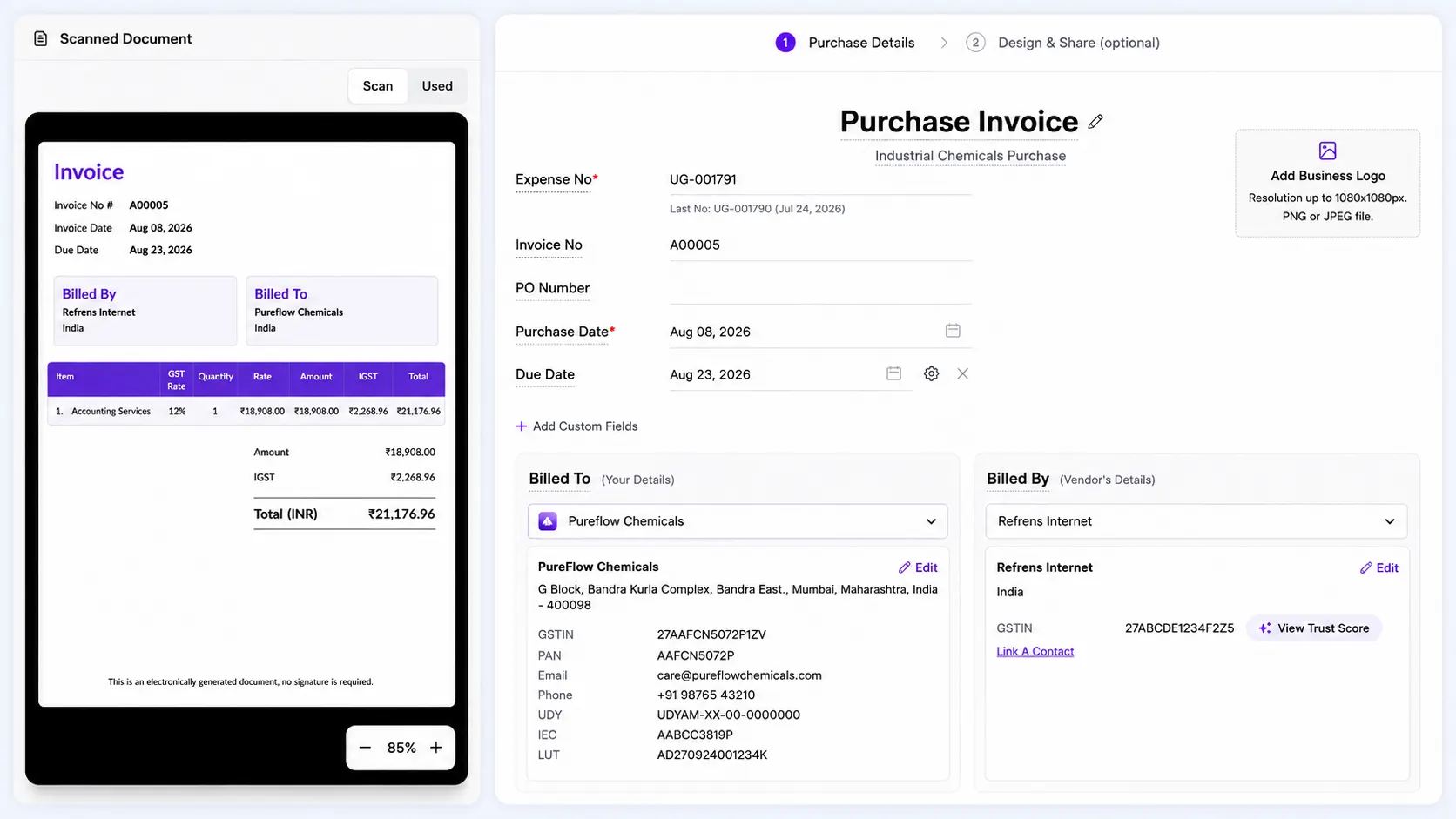
The accounts team can see the original bill alongside the prepared entry, check the details, make any corrections, and save it.
The document reaches accounts with fewer handoffs, while the review and accounting continue inside Refrens.
What Happens After the Bill Is Scanned?
Different WhatsApp OCR tools can take the same bill in very different directions.
A scanned receipt may become a row in Google Sheets. Another tool may turn it into an employee expense claim. Some send the invoice to a separate dashboard, while accounting software may prepare a purchase, expense, or bookkeeping entry for review.
For the accounts team, that difference matters because it decides how much work is still left.
If the document ends up in a spreadsheet, someone may still need to create the accounting entry. If it goes to another dashboard, the team may still have to move it into the accounting system. If it is already prepared as a purchase or expense, accounts can move straight to review.
So when comparing WhatsApp OCR tools, follow the bill one step further: Where does it end up, and what does the accounts team still have to do before it reaches the books?
Five Accounting and Expense Tools Using WhatsApp OCR
These tools all use WhatsApp and OCR, but the document can end up in very different places. Some take it into accounting, some into an expense workflow, and others into a separate capture system.
The clearest comparison is: what happens to the document after you send it?
1. Refrens Eagle: WhatsApp to Purchase or Expense

Refrens is an accounting and business management platform. Refrens Eagle helps businesses collect and scan vendor bills, purchase documents, receipts, and expenses coming through WhatsApp, email, direct upload, or bulk upload.
Best suited for: Businesses receiving bills across employees, vendors, and different channels that want those documents to move into the same purchase, expense, and accounting workflow.
How WhatsApp Scanning Works
Each business gets a dedicated Refrens WhatsApp number. Approved internal team members can send or forward supported documents to it.
Refrens Eagle:
- scans the document,
- extracts the document details,
- matches an existing vendor where possible,
- and prepares a purchase or expense for review.
The accounts team sees the original document alongside the prepared entry and can correct anything before saving it. The scan is reviewed before it becomes an accounting entry.
What Happens After Review
Once saved, the purchase or expense becomes part of the wider Refrens purchase approval and accounting workflows. Payments, approvals, reconciliation, reporting, vendor management, and inventory management, where relevant, can continue from the same record.
The original document stays linked to the transaction for future reference.
Other Ways to Send Documents
WhatsApp is one intake route. Businesses can also use a dedicated Refrens email address, direct upload, or bulk document scanning.
Vendors and other approved external senders can submit bills through the dedicated email route, while WhatsApp submissions are limited to approved internal numbers.
Key Refrens Eagle Capabilities
- 99% OCR scanning accuracy on supported invoices
- PDF, PNG, and JPEG support for WhatsApp scanning
- Automatic vendor matching where an existing vendor is available
- Scanned, Failed, and Added statuses to show what has been processed and what still needs attention
Why Refrens Eagle Stands Out
The bill stays in Refrens from scanning through accounting. Once reviewed, the same purchase or expense can continue into payments, reconciliation, reporting, and other accounting work.
The accounts team does not have to take OCR data from one tool and recreate the transaction somewhere else.
General workflow: WhatsApp → OCR → Vendor matching → Review → Purchase or Expense in Refrens
Let Refrens Eagle bring bills from WhatsApp and email into your Purchase & Expense workflow for review.
2. HelloBooks (Munimji): WhatsApp to Bookkeeping

HelloBooks is an AI accounting and bookkeeping platform with a WhatsApp assistant connected to its ledger. In India, it offers Munimji, its WhatsApp bookkeeping experience.
Best suited for: Businesses that want to use WhatsApp for everyday bookkeeping as well as submitting bills.
Users can send or photograph supplier bills and expense receipts through WhatsApp. HelloBooks reads details such as vendor, amount, tax, and date and prepares a draft bookkeeping entry for the user to confirm before it reaches the ledger.
Munimji adds GST-related bill capture along with Hindi, English, Hinglish, and voice-note support.
General workflow: WhatsApp → OCR and categorisation → Draft entry → Confirmation → HelloBooks ledger
3. REME: WhatsApp to Expense Claim and Approval

REME is an expense management platform built around employee expenses, reimbursements, checks, and approvals.
Best suited for: Businesses where employees regularly submit travel, food, client, field, or other work-related expenses.
An employee sends a receipt photo through WhatsApp. REME extracts the expense details and lets the employee confirm or correct them in the chat. It can also run duplicate and policy checks before sending the claim through the approval process.
Approved expenses can then move into connected accounting systems.
General workflow: WhatsApp → Receipt OCR → Checks → Expense claim → Approval → Accounting integration
4. Querygen: WhatsApp to Google Sheets

Querygen helps teams capture expenses through WhatsApp and record them in Google Sheets.
Best suited for: Teams that already track expenses in spreadsheets and want an easier way for employees to submit receipts.
A team member sends a receipt photo through WhatsApp. Querygen extracts details such as amount, vendor, date, category, currency, and payment method and adds them to a connected Google Sheet. If something is incorrect, the user can correct it through WhatsApp.
General workflow: WhatsApp → Receipt OCR → Google Sheets
5. Gennai: WhatsApp to External Accounting Software

Gennai is an AI invoice-capture platform that collects invoices before passing them into external accounting software.
Best suited for: Businesses already using systems such as Xero, QuickBooks, or Holded that want a separate place to collect and process incoming invoices.
Users can send invoice PDFs or receipt photos through WhatsApp. Gennai extracts the invoice details, checks for duplicates, and places the document in its dashboard for review. From there, it can be exported or synced to supported accounting software.
Gennai can also collect invoices through email and other channels.
General workflow: WhatsApp → OCR → Gennai dashboard → Accounting software
Why the Destination Matters
The five tools all start with a document coming through WhatsApp. What happens after that is quite different.
- Refrens Eagle turns the bill into a draft purchase or expense for review and approval. Once approved, accounting entries are created automatically, and the record continues through connected workflows within Refrens.
- HelloBooks turns it into a bookkeeping entry in its own ledger.
- REME turns an employee receipt into an expense claim that moves through approval.
- Querygen records the expense in Google Sheets.
- Gennai brings the invoice into its own dashboard before passing it to external accounting software.
For the accounts team, the destination determines how much work is still left.
A document that is already prepared for accounting review is much closer to being recorded. A document sitting in a spreadsheet or separate dashboard may still need another step before it reaches the books.
For a broader comparison, see our guide to the best OCR software for invoice processing in India. For a closer look at the full journey from receiving a bill to recording it, see our guide to the accounts payable OCR workflow.
What to Check Before Choosing a WhatsApp OCR Workflow
Once the scanning itself works, a few practical details decide whether the workflow actually saves time.
- Check Which Way the WhatsApp Integration Works
A “WhatsApp integration” can mean two very different things.
Some accounting software lets you create an invoice, payment reminder, or report and then share it with a customer on WhatsApp. Accounting software → WhatsApp
The accounting record already exists. WhatsApp is simply being used to send it.
Incoming bill capture works the other way: WhatsApp → OCR → Accounting workflow
Here, the bill or receipt arrives first and still needs to become an accounting record.
So if your problem is supplier bills getting stuck in chats, check whether the software can actually bring incoming WhatsApp documents into OCR and accounting. Being able to send an already-created invoice on WhatsApp solves a different problem.
- Check Who Can Submit Documents
Making submission easy should not mean that anyone can send documents into your accounting workflow.
With Refrens, businesses approve the internal WhatsApp numbers that are allowed to submit documents for scanning. Documents sent from other numbers are not scanned, and access can be removed when required.
Vendors can continue sending invoices to the employees they normally deal with. The employee then sends or forwards the document to Refrens.
The vendor does not have to change how they work, while the business still controls what enters accounts.
- Check What Happens When a Scan Fails
Not every bill will arrive as a perfect PDF. A photo may be blurry. Part of the invoice may be cropped. A figure may simply be unreadable. What matters is whether the accounts team can see that something went wrong.
In Refrens, scanned documents can appear as Scanned, Failed, or Added. If a scan fails, the document remains visible so someone can check it and resend it if needed.
That is much safer than assuming a bill has been processed when it never made it through scanning.
A simple question to ask any provider is: If a document fails to scan, how will the accounts team know?
- Check Whether WhatsApp and Email Can Work Together
Bills rarely arrive through one perfectly organised channel.
One supplier may email a PDF automatically every month. Another may send an invoice to an operations employee on WhatsApp. Sometimes the accounts team already has the file.
The easiest route depends on where the document arrives first.
With Refrens:
- Bill received on WhatsApp: an approved employee can send or forward it to the dedicated Refrens WhatsApp number.
- Vendor sends invoices by email: an approved vendor can send them directly to the dedicated Refrens email address.
- The accounts team already has the document: it can be uploaded directly.
Whichever route the bill takes, it can continue into the same purchase or expense review workflow.
Trying to force every supplier and employee through one submission method often creates more work. It is usually easier to accept documents through the channels people already use and bring them together once they reach accounting.
The channel can change. The accounting process does not have to.
Test the Workflow With One Real Bill
Take a bill your team actually receives on WhatsApp and run it through the software from start to finish.
Send it the way an employee normally would, then see what happens at each step.
| Check | What to look for |
| Can the bill be sent directly from WhatsApp? | The sender should not have to download and upload the same file again. |
| Does the sender need another app or login? | Occasional users should be able to submit a document without learning another system. |
| Who can submit documents? | There should be clear control over who can send bills into the workflow. |
| Are your usual documents supported? | Test the PDFs, invoice photos, receipts, and expense documents your team actually receives. |
| What details are extracted? | Check whether it captures the vendor, invoice number, date, tax, amount, and line items you need. |
| Does it recognise existing vendors? | Otherwise the accounts team may still have to find and link the supplier manually. |
| Can accounts compare the scan with the original? | The source document should be easy to check before anything is recorded. |
| What happens if OCR fails? | Failed documents should remain visible and easy to retry. |
| Where does the bill end up? | See whether it becomes a spreadsheet row, expense claim, dashboard entry, or accounting record. |
| What work is still left afterward? | Check whether someone still has to recreate the transaction or whether approvals, payments, reconciliation, and reporting can continue from the same record. |
Pay particular attention to what work is still left after the scan. A bill may take only a few seconds to send through WhatsApp and still leave the accounts team with several manual steps afterward.
Follow one real invoice from chat to books and count what still needs a person. That gives you a much clearer picture of whether the workflow is genuinely saving time for accounts.
From WhatsApp to the Books
A WhatsApp OCR workflow should make things easier for both the person sending the bill and the accounts team receiving it.
The employee should be able to send or forward the document without learning another system. Accounts should receive a purchase or expense they can review, rather than having to recreate the same transaction somewhere else.
With Refrens Eagle, the route can be: Send or forward the bill → Scan → Review the Purchase or Expense → Continue with accounting
The bill still has to reach the books. Getting it there should not require three people and two systems.
Let Refrens Eagle bring bills from WhatsApp and email into your Purchase & Expense workflow for review.
FAQs
- Should WhatsApp OCR automatically post invoices, or should accounts review them first?
For accounting, faster is not always better if it removes the chance to catch a wrong invoice number, tax amount, vendor, or line item.
A stronger workflow lets OCR do the data entry while keeping the final check with accounts. In Refrens Eagle, the original document appears alongside the prepared purchase or expense so the extracted details can be checked before saving.
The useful distinction is automated data capture vs automated accounting entry. They are not the same thing.
- What if the same invoice reaches the system through WhatsApp and email?
This can happen easily. A supplier may email an invoice to accounts and also send it to an employee on WhatsApp.
That makes duplicate handling an important part of evaluating any OCR workflow. Check what happens when the same invoice enters twice and whether the system helps prevent two accounting entries from being created.
A multi-channel capture system is only useful if adding more ways to submit documents does not create more cleanup for accounts.
- Does an OCR tool need to extract line items, or are invoice totals enough?
It depends on what happens after scanning.
For simple expense recording, vendor, date, tax, and total amount may cover most of the work. For purchases involving inventory, item-level reporting, quantities, rates, or detailed accounting, capturing only the invoice total can still leave substantial manual entry.
Refrens Eagle extracts invoice details into the Purchase or Expense draft. So when evaluating OCR, compare the fields it captures with the fields your team actually enters today.
- What matters more than an OCR accuracy percentage?
Accuracy is useful, but it does not tell you how much accounting work disappears.
Two tools could scan the same invoice accurately but create very different workloads afterward. One may leave the data in a separate dashboard; another may prepare the actual purchase or expense for review.
Also look at vendor matching, field coverage, failed-scan visibility, review experience, and what happens to the data after extraction.
A better measure is: How much manual work remains between the scan and the books?
- What happens if the vendor on the scanned bill is new?
Refrens first tries to match the vendor information from the scanned document with an existing vendor. If a match is found, the accounts team can confirm it before continuing.
If the vendor does not already exist, a new vendor can be created before saving the Purchase or Expense.
This is useful because the scanning workflow does not stop simply because the supplier is new.
- What should happen to the original invoice after OCR extracts the data?
The original document should remain easy to trace back to the accounting transaction. OCR converts the document into structured data, but accounts may still need the source invoice later to verify a figure, investigate a discrepancy, reconcile a transaction, or review supporting documentation.
In Refrens, the original document remains linked to the saved purchase or expense. That creates a useful evaluation question for any OCR product: Can you get from the accounting entry back to the exact document that created it?
Related Posts:
 Best Invoice OCR Software in India: Top 5 Tools Compared
 Accounts Payable OCR Software: What Happens Between Receiving a Bill and Recording It
 10 Best AI OCR Invoicing Software for Invoice Scanning and Accounting Automation
 A Complete Guide to the Types of Invoices
 Top 15 Vendor Management Software in India for 2026: Features, Pricing, Ratings & Reviews
 The Ultimate Guide to Bill of Supply Under GST
 Practice Management for CA Firms: Why WhatsApp Automation Is Becoming the Missing Layer
 Everything You Need to Know About Purchase Orders: A Complete Guide
 Best Accounting Software in India: Features, Pricing, Reviews, and more (Updated 2026 List)
 Top 9 Expense Management Software in India
 10 Best Invoice Approval Workflow Software
 Top AI accounting Software in India
 How To Create An Invoice?
 Everything To Know About GSTR 3
 Top 11 Invoicing Software For Contractors (Updated 2024 List)
 Best Supplier Invoice Software
 Everything To Know About GSTR-3A: Issuance, Actions to Take, and Consequences of Non-Compliance
 Best Sales Purchase Invoice Software: A Detailed Guide