
Choosing AI accounting software is not really about choosing the “smartest AI.”
It is about choosing the system that gives your business the best mix of accuracy, control, speed, compliance, and decision-making support.
That is where many businesses go wrong.
They compare AI features, assistant demos, and automation claims, but forget to ask the harder question:
Will this software actually make my books cleaner, my finance workflows faster, and my business decisions better – without creating new risk?
That is the lens you should use.
Because the accounting software market is no longer one straight line from “old” to “new.” It now exists in layers. Some tools are still offline. Some are offline but trying to add AI. Some are cloud-first. Some are cloud software with AI built into actual workflows. Some are AI-native from day one. And some are not accounting systems at all, but AI tools built around accounting tasks like AP, receipt extraction, reconciliation, or close automation.
If you do not separate these categories first, you can end up comparing products that are solving completely different problems.
That is how bad buying decisions happen.
The first principle: do not buy “AI accounting software.” Buy the right financial operating system for your stage.
A business owner should not start with:
“Which AI accounting tool is best?”
They should start with:
- What kind of accounting complexity do I have?
- What finance work is consuming time today?
- Where do errors happen?
- What do I need faster visibility into?
- How much control and auditability do I need?
- Am I replacing a system, or adding intelligence to one?
That matters because a freelancer, a service agency, a retailer with inventory, a SaaS company, and a multi-entity business do not need the same kind of accounting software.
The right choice depends on five things:
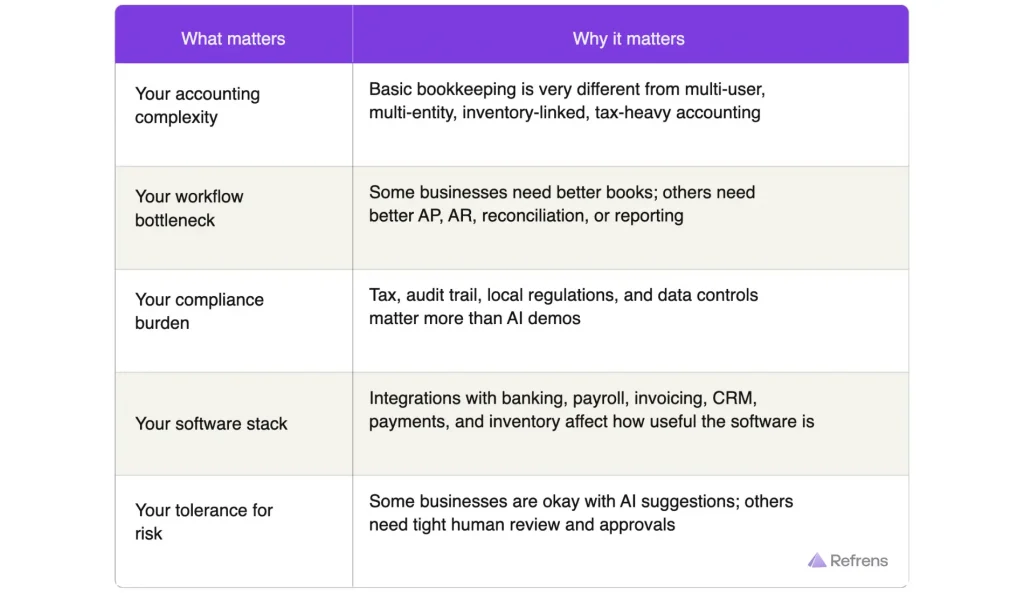
So the right question is not:
“Which software has AI?”
It is:
“Which kind of accounting software fits my business, and which product within that category uses AI in a way that improves real work?”
The six categories of accounting software today:
This is the clearest way to think about the market.
1. Traditional accounting software (offline)
This is the classic desktop or offline-first category.
These are systems that are installed locally, often used on one machine or inside a fixed office setup, and built around traditional bookkeeping workflows. They are usually strong on familiarity, control, and accountant comfort — but weaker on collaboration, remote access, and modern automation.
Best for
Businesses that are comfortable with legacy workflows and do not yet feel strong pressure to modernize access or collaboration.
Main limitation
Too much depends on manual work, local setup, and finance people doing repetitive tasks themselves.
Examples
TallyPrime
A well-known example of traditional accounting software with strong roots in bookkeeping, inventory, compliance, and business management. It is trusted and familiar, especially for businesses that are already used to structured accounting processes.
Sage 50 Desktop
A desktop-rooted accounting product with invoicing, payroll, inventory, job costing, and reports. It represents the classic “installed accounting software” mindset: stable, detailed, but not built around modern collaboration.
This category still works for some businesses. But once more people need access, workflows become more connected, or real-time visibility matters more, offline systems start to feel heavy.
2. Traditional accounting software (offline) with AI capabilities
This is a transitional category.
The accounting foundation is still legacy-oriented or desktop-rooted, but the vendor has started adding some AI-assisted features on top. In most cases, this means limited AI help rather than a full AI-driven experience.
This category exists, but it is thinner than people think. Most visible AI investment today is happening in cloud software and specialist finance tools, not in traditional offline products.
Best for
Businesses that want to stay close to their existing system, but still want some automation or AI-assisted support.
Main limitation
The AI often feels like an add-on, while the core workflow still remains manual and legacy-heavy.
Examples
Sage 50 Accounts with AI
A good example of a long-running accounting product being modernized with AI capabilities rather than rebuilt from scratch. This is useful for businesses that want gradual evolution, not a full platform shift.You can think of this category as legacy software trying to get smarter rather than AI reshaping the accounting experience itself.
3. Cloud accounting software
This category changed the market by solving one big problem first: access.
Cloud accounting software lets owners, accountants, and staff work from anywhere, collaborate in real time, and reduce dependency on one computer or office setup. It is often the most important step for businesses moving off desktop software.
But cloud alone does not mean “intelligent.” Many cloud tools still leave a lot of categorization, follow-up, reconciliation, and interpretation to humans.
Best for
Businesses moving away from desktop/manual systems and wanting easier access, collaboration, and visibility.
Main limitation
It may still require significant manual work if AI and automation are limited.
Examples
FreshBooks
A cloud-based accounting platform known for invoicing, expense tracking, payments, reporting, and ease of use. It fits the classic cloud-accounting model: more accessible, simpler to adopt, and designed for modern small businesses.
Wave
Another strong example of cloud accounting software focused on simplicity. It combines accounting, invoicing, and payments in a way that is easy for small businesses to manage.
This category is often the first modern step for a business. But cloud accounting without meaningful automation can still leave finance teams doing too much repetitive work.
4. Cloud accounting software with AI capabilities
This is the category that matters most for many modern SMBs.
It combines the accessibility and collaboration of cloud software with AI-driven support inside actual finance workflows. That can include transaction categorization, invoice assistance, reconciliation help, insights, reminders, forecasting prompts, report summaries, or anomaly detection.
This category is often the most practical middle ground.
Best for
Most small and mid-sized businesses that want modern accounting software with increasing automation, but do not want to jump straight into a fully AI-native finance stack.
Main limitation
AI depth varies a lot between products. Some tools offer meaningful workflow intelligence. Others offer only light assistance or a chatbot layer.
Examples
QuickBooks
A strong example of mainstream cloud accounting software layering AI into bookkeeping, cash flow, tax assistance, invoicing, and workflow automation. It fits businesses that want familiarity plus smarter support.
Xero
Another strong example, especially for businesses that value collaboration, reporting, and ecosystem integrations. Its AI direction is less about gimmicks and more about embedded help across workflows like forecasting and recommendations.
Zoho Books
Fits this category because it is a cloud accounting platform that also benefits from AI capabilities inside the larger Zoho ecosystem. It is relevant for businesses already operating across multiple connected business tools.
Refrens
Refrens combines cloud-based accounting with AI-supported workflows such as OCR Scanning, automated bookkeeping, reconciliation support, journal updates, and connected business operations. It is particularly relevant for businesses that want accounting software to be modern, collaborative, and operationally useful – without needing to move to an AI-native platform.
For many businesses, this category is the sweet spot:
- modern access
- shared visibility
- better collaboration
- meaningful automation
- lower learning curve than AI-native systems
5. AI-native accounting software
This is not just cloud software with “more AI.”
This is software designed from the beginning around AI-assisted accounting workflows. The goal is not only to digitize accounting, but to reduce the month-end burden itself by making bookkeeping, categorization, and reconciliation more continuous and proactive.
Best for
Digital-first businesses, startups, and companies that want more real-time financial visibility instead of waiting for traditional month-end reconstruction.
Main limitation
These products may require a mindset shift, may be newer, and may not always have the ecosystem depth or edge-case maturity of older accounting platforms.
Examples
Puzzle
A very good example of AI-native accounting software. It is designed around continuous reconciliation and faster close, making it attractive for startups and finance teams that want current numbers instead of delayed bookkeeping cleanup.
Digits
Another strong example. It positions itself as an AI-native general ledger with real-time books, automated close processes, and AI financial assistance. It is clearly trying to rethink the accounting experience itself.
Docyt
Especially relevant for multi-entity or operationally complex businesses. It uses AI to automate repetitive bookkeeping work and improve consolidated visibility.
AI-native tools are strongest when the business wants accounting to feel more like a live system and less like a monthly reconstruction exercise.
6. AI-assisted tools around accounting
This final category is important because not every business needs a new accounting system.
Sometimes the real problem is not the ledger. It is the workflow around it.
This is where specialist AI tools are seeing some of the clearest real-world traction.
These tools sit around the accounting system and solve one painful finance workflow: AP automation, receipt extraction, bill coding, expense processing, or close support.
Best for
Businesses with one expensive finance bottleneck that needs solving fast.
Main limitation
These tools can create tool sprawl if they are not tightly integrated with the core accounting system.
Examples
Dext
A strong example of AI being useful in a narrow, practical way. It extracts data from receipts, invoices, and statements, categorizes it, and syncs it to accounting software. It reduces admin without replacing the accounting core.
Vic.ai
A specialist AP automation tool built for invoice-heavy finance teams. It shows where AI is commercially successful today: repetitive, document-heavy finance work.
BILL
A good example of AI applied to financial operations like invoice coding, AP automation, and approvals. It is useful for businesses that want process efficiency more than a full accounting replacement.
Ramp Bill Pay
Relevant for finance teams dealing with AP approvals, OCR, payment workflows, and ERP syncing. Again, this is AI solving a specific accounting-adjacent pain point.
This category proves an important point:
AI succeeds fastest where the workflow is repetitive, high-volume, document-heavy, and expensive to do manually.
Where real industry success is actually happening
If you look at the market honestly, the clearest success is happening in three places.
A. Cloud accounting software with AI capabilities
This is where many SMBs are landing.
Why it is working:
- businesses want modern access and collaboration
- they still want a familiar accounting structure
- AI can improve real workflows without forcing a total mindset shift
- the balance between control and automation is easier to manage
This is where tools like QuickBooks, Xero, Zoho Books, and Refrens become relevant.
B. AI-assisted tools around accounting
This is where ROI is often easiest to measure.
Why it is working:
- invoice processing time reduces
- data extraction becomes faster
- AP workflows become cleaner
- finance teams feel relief quickly
This is why products like Dext, Vic.ai, BILL, and Ramp are compelling.
C. AI-native accounting software
This is where businesses are going when they want more than automation around the edges.
Why it is working:
- finance teams want current numbers
- startups want better burn and runway visibility
- businesses want continuous accounting, not just month-end cleanup
- integrations make live finance workflows more possible
This is where Puzzle, Digits, and Docyt stand out.
What a business owner should actually evaluate
Now let’s get into the decision framework.
1. Is the accounting foundation strong even without the AI?
This is the first filter.
If the ledger, reconciliation, reporting, tax handling, controls, and audit trail are weak, the AI will not save you.
A strong AI accounting tool should still be a strong accounting tool when you switch the AI off.
Check for:
- chart of accounts flexibility
- invoicing and billing flows
- bank reconciliation
- audit trail
- permissions and approvals
- reporting depth
- inventory or project accounting, if needed
- multi-user or multi-entity support, if needed
2. Is the AI embedded in the workflow, or is it just a chatbot on top?
Weak accounting AI gives you a chat box.
Strong accounting AI changes the work.
A good system should do things like:
- draft categorization
- extract fields from invoices and receipts
- auto-match transactions
- flag anomalies
- improve follow-ups
- assist with reconciliation
- summarize financial changes
- surface exceptions
That is the benchmark: Does the AI reduce real finance work and take action?
There is another distinction becoming important: Can the AI only answer questions, or can it also carry out authorized actions inside the system?
Asking: “Which invoices are overdue?” is useful. But being able to follow that with: “Record ₹20,000 against the oldest invoice.” is a different level of workflow integration.
Some platforms are already moving in this direction. For example, Refrens MCP connects Refrens with ChatGPT and Claude so users can perform supported actions across invoicing, payments, expenses, CRM, inventory, and approvals through natural-language commands.
When evaluating this kind of capability, ask:
- Can the AI access live business context?
- Can it take actions, not just suggest them?
- Can I control what it is allowed to access or change?
- Is the action recorded properly inside the accounting system?
That is the real test.
3. Can the AI explain what it did?
You should not trust finance AI that behaves like a black box.
You should be able to ask:
- Why was this categorized this way?
- What document was used?
- Can a human review and correct it?
- Is there a clear trail of what happened?
In accounting, explainability is part of trust.
4. Does it keep humans in control?
The best finance AI products today do not replace accountants. They make accountants and operators faster.
AI should:
- suggest
- draft
- summarize
- flag
- automate repetitive steps
Humans should still:
- review
- override
- approve
- lock periods
- manage permissions
- correct exceptions
5. Is the software right for your hardest workflow?
The smartest buying decision is usually workflow-first.
Ask:
What is the costliest finance problem in my business today?
Examples:
- Too much receipt or invoice data entry → specialist tools may help most
- Too many vendor invoices → AP automation may matter most
- Too much month-end cleanup → AI-native tools may help more
- Need modern accounting plus practical automation → cloud + AI may be the best fit
- Need familiar structure with gradual modernization → offline + AI may be enough for now
6. How good are the integrations?
For many businesses, the real product is not the dashboard. It is the data flow.
Check connections with:
- banks
- payment gateways
- payroll
- expenses
- ecommerce
- CRM
- inventory
- spreadsheets
- accountant workflows
Without strong integrations, the AI will always be working with incomplete context.
7. Does it match your compliance and geography?
A tool may look impressive in a demo and still be a poor fit in your real market.
Ask:
- Does it support local tax logic?
- Does it fit audit expectations?
- Can my accountant work comfortably in it?
- Does it handle my invoicing and accounting requirements properly?
8. Are the insights actually useful for decision-making?
A business owner does not need AI that only writes pretty summaries.
They need AI that helps answer:
- Am I collecting cash slower?
- Which customers are becoming payment risks?
- Why did margins change?
- Which costs are rising abnormally?
- What should I focus on this week?
That is where real value shows up.
A practical buying framework by business type
If you are a very small business
Start by deciding whether you simply need cloud accounting software or whether you would benefit from cloud accounting software with AI capabilities.
If you are a growing SMB
This is usually where cloud accounting software with AI capabilities makes the most sense. It gives you a practical mix of accessibility, collaboration, automation, and control.
This is also the category where Refrens can naturally enter the evaluation set.
If you are a startup or digital-first company
Look harder at AI-native accounting software if you want real-time visibility, faster close, and less manual cleanup.
If you are drowning in invoices, bills, or receipts
You may not need a new accounting system at all. You may need an AI-assisted tool around accounting.
If you are attached to desktop workflows
A transitional traditional accounting software with AI capabilities option may be the right bridge.
Questions every business owner should ask on a demo
These questions separate serious products from AI theater.
- What finance workflow does your AI improve the most today?
- Which actions are fully automated, and which are only suggested?
- How does the user review or override the AI?
- What happens when the system is wrong?
- Is there an audit trail for AI-assisted actions?
- Is the AI useful in reconciliation, AP, AR, reporting, and close — or mainly in chat?
- Which integrations are native?
- How long does implementation usually take?
- What measurable outcomes do customers typically see in 30, 60, or 90 days?
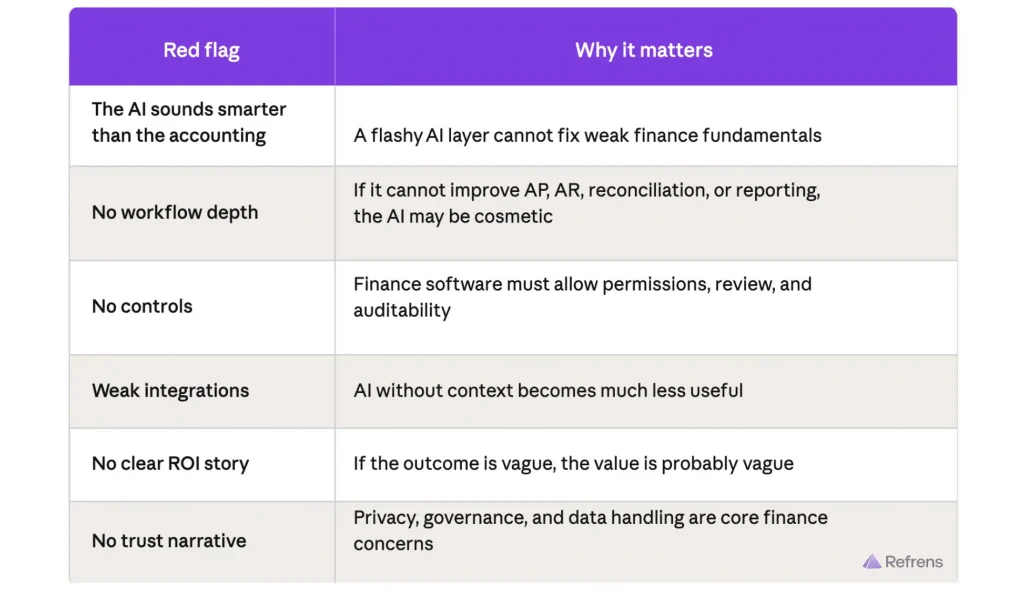
Red flags to watch for
Do not ignore these.
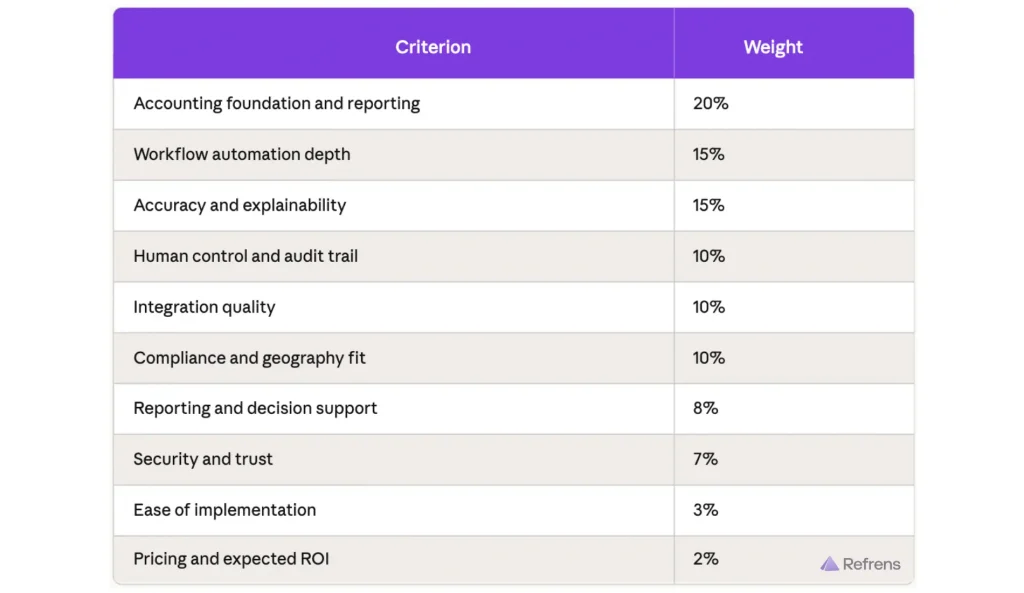
A simple scorecard you can include in the blog
The conclusion that matters
The best AI accounting software is not the one with the most AI.
It is the one that solves your most expensive finance problem without reducing trust.
In practice, that usually means:
- choose traditional offline software only if familiarity and existing process comfort matter more than access and automation
- choose offline software with AI capabilities if you want gradual modernization without changing everything
- choose cloud accounting software if your first need is accessibility and collaboration
- choose cloud accounting software with AI capabilities if you want the best balance of usability, automation, and control
- choose AI-native accounting software if your business wants continuous finance visibility and a more modern operating model
- choose AI-assisted tools around accounting if one painful workflow is where the money and time are being lost
And that is the real decision framework.
So do not ask:
“Which accounting software has AI?”
Ask:
“Which category of accounting software fits my business today, and which product in that category uses AI to improve actual work?”And for many businesses, the answer will not be an AI-native platform. It will be a strong cloud accounting software with meaningful AI capabilities – where products like QuickBooks, Refrens, Xero, and Zoho Books become part of the evaluation set.
Recommended Reads:
How Suprak Technologies Managed Custom Quotation Approvals with Refrens
How DOIT Industries Leveraged Refrens to Centralise Quotation Approval Across Branches
Vendor Approval Process: Prequalification, Vetting, Due Diligence & Risk Checks
Vendor Onboarding Process: Steps, Checklist & Documents You Need
Related Posts:
 Top 15 Vendor Management Software in India for 2026: Features, Pricing, Ratings & Reviews
 10 Best AI OCR Invoicing Software for Invoice Scanning and Accounting Automation
 Top 10 Accounting Software in Malaysia: A Detailed Analysis (Updated 2026 List)
 Best Accounting Software in India: Features, Pricing, Reviews, and more (Updated 2026 List)
 Vendor Onboarding Process: Steps, Checklist & Documents
 Top AI accounting Software in India
 Top 10 Accounting Software in Saudi Arabia: Features, Benefits, and Pricing
 Zoho Books vs. Tally: Detailed Comparison For Accounting Software (Updated 2026)
 The Ultimate Guide to Choosing the Right Accounting Software
 10 Best Invoice Approval Workflow Software
 Best Sales Purchase Invoice Software: A Detailed Guide
 Best International Payment Gateway That Supports Recurring billing for Indian SaaS companies
 Top 15 Critical Tools to Set Up Your New Business for Success
 Zatca Compliant E-Invoices: A Detailed Guide for Businesses in Saudi Arabia
 10 Best Invoicing Software in Malaysia: A Detailed Analysis (Updated 2026 List)
 Best Invoice OCR Software in India: Top 5 Tools Compared
 Top 8 VAT Invoicing Software In UAE: A Detailed Comparison
 10 Best Accounting Software in the USA