
Most AI voice demos look impressive for a few minutes.
But building a voice calling workflow that actually works inside a sales process is a very different challenge. Once you move beyond the demo, you start dealing with real operational questions: who should get called, when should the call go out, what should happen if the user does not answer, how natural should the agent sound, how should the workflow connect to CRM and WhatsApp, and how do you make the whole system usable enough for a sales team to rely on it?
This article is about how we approached that problem at Refrens.
For context, Refrens is a B2B SaaS platform serving 150k+ businesses across 170+ countries for invoicing, accounting, payments, compliance, sales, inventory, and other core business workflows.
Every month, tens of thousands of new users sign up to the platform. But our sales team cannot speak to all of them. So, like most growing teams, we have to prioritize. The stronger-looking opportunities get attention first, while many others remain untouched. The challenge is that some of those users could still be a strong fit for Refrens, but we had no scalable way to qualify them early and route the right ones back to sales.
That is what led us to build an AI voice calling workflow for sales lead qualification.
This article is a practical walkthrough of what it took to make the system work in a real environment – from narrowing the use case and choosing the stack, to designing the voice, shaping the conversation, handling retries, integrating WhatsApp and CRM, and fixing the issues that only show up once real users start answering.
If you are trying to build a production-ready AI voice workflow for qualification, this is the part that matters: not just what tools we used, but how the workflow was designed, where it broke, and what made it usable in practice.
At a glance
- The problem: A large pool of supposedly non-priority users was not being actively attended to, even though some of them could still convert.
- The approach: Build an AI voice workflow focused on first-level sales qualification.
- The outcome: A system that could send a pre-call WhatsApp message, place an AI call, gather qualification signals, summarize the interaction, classify the user, and route the right opportunities back to sales.
- The biggest lesson: Success in voice AI is not just about the model. It depends on the use case, conversation design, telephony setup, latency, trust, language fit, and how tightly the workflow connects back into the Sales CRM.
1. The problem we were trying to solve
We were not trying to solve for more leads. We were trying to solve for better coverage.
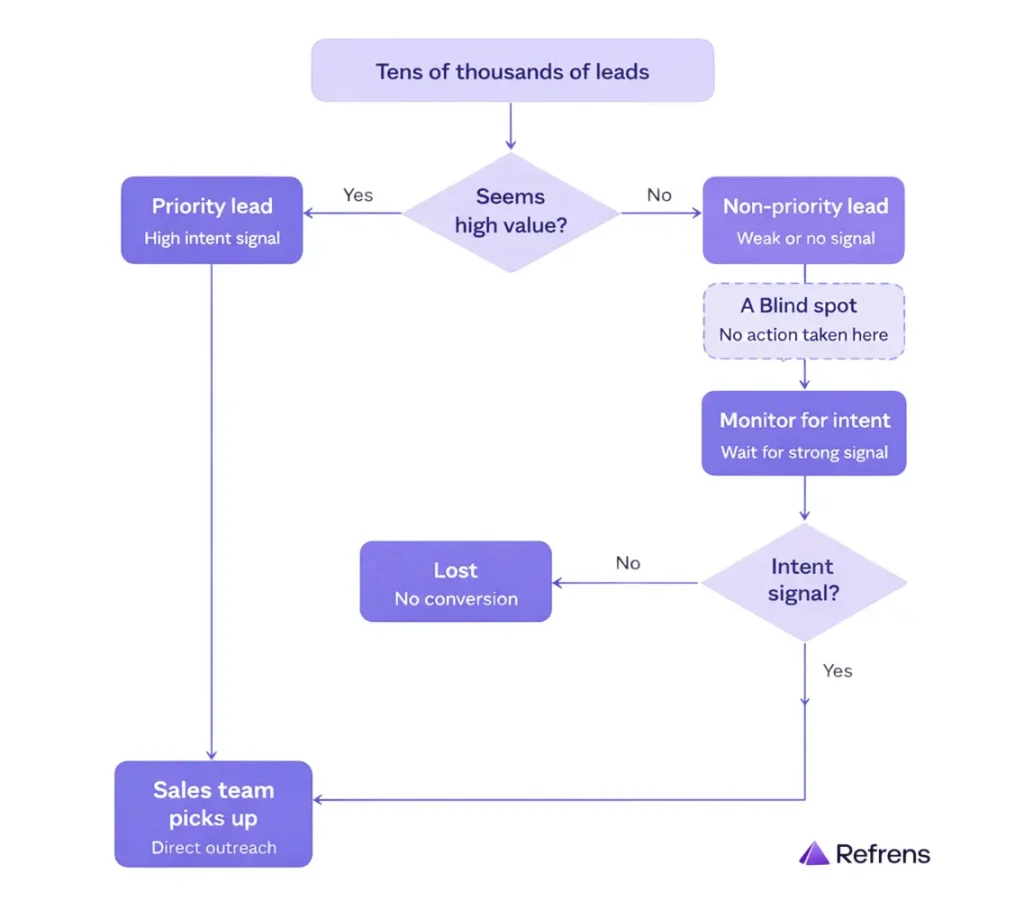
Because we receive a high volume of inbound users, our sales team has to prioritize where it spends time.
So we built an internal system where users were grouped into two broad buckets:
- Priority users
- Non-priority users
This classification was based on the signals available to us from user data, activity, and the information submitted while creating a business on our platform.
Priority users were actively worked on by sales.
Non-priority users, on the other hand, were usually left untouched unless they later showed stronger intent through product usage or other behavioral signals.
That helped us protect sales bandwidth, but it also created a blind spot.
Some of those non-priority users may not have looked valuable at first glance, yet they could still have real business intent and conversion potential. The issue was not that these users were irrelevant. The issue was that we had no scalable way to speak to them early and determine which ones deserved human follow-up.
The real problem was qualification at scale.
We needed a system that could:
- engage this ignored pool
- collect the right signals
- identify which users were worth routing back to a salesperson
That became the starting point for our AI voice calling workflow.
2. Where we started
Before choosing tools, we first had to decide what the system was actually supposed to do.
2.1) Why voice calling made sense for this problem
One obvious question for us was:
Why voice calling at all? Why not just rely on product messaging, email, or WhatsApp?
The answer was not that those channels were useless or that voice was somehow the easiest option. In fact, lighter-touch channels are much easier to implement.
But for the users we serve at core (India SMEs), these channels were not enough on their own.
In this segment, trust often has to be built through conversation. Many users may ignore emails, skim through product messaging, or not respond meaningfully on WhatsApp. A phone call creates a very different kind of interaction. It gives you a direct way to establish contact, understand intent, and build trust in real time.
That is why voice calling made sense for this problem. We were trying to qualify users who were not being meaningfully engaged through lighter-touch channels alone, and calling gave us a better way to do that.
2.2) Start narrow, not wide
Voice AI can be used for many different functions:
- onboarding
- renewals
- collections
- support
- qualification
That was also exactly the trap we wanted to avoid.
If we tried to make the first version do too much, it would become:
- harder to test
- harder to debug
- harder to judge properly
So instead of trying to build a general-purpose calling agent, we focused only on first-level qualification for non-priority users whom our sales team was not actively calling.
That gave the project a clear job.
The agent did not need to:
- sell
- explain the whole product
- replace a salesperson
It only needed to collect enough signal to help us decide whether a user deserved a stronger follow-up from sales.
2.3) What the agent needed to learn
These questions mattered because they helped us make a first-level qualification judgment.
We wanted to understand:
- Whether the user looked like a meaningful fit for Refrens
- How strong their intent seemed
- How relevant our product was likely to be for their business
- How much priority should they receive from sales
In simple terms, these inputs helped us estimate business fit, likely product usage, and the chances that the user could move toward a premium subscription.
So the kinds of questions we asked were:
- What type of business do they run
- What they are looking for
- How old their business is
Those questions gave us enough signal to make a first-level qualification judgment. If a user matched the criteria we cared about, the next step could move to a salesperson. If not, we still learned something useful without spending human bandwidth on every conversation.
2.4) Benchmark first, then choose tools
Before choosing the stack, we wanted a benchmark for what a good AI voice actually looked like in practice.
So we tested other AI voice agents (Boardy.ai, for example) in the market and looked closely at how natural it should be, what the optimal latency should be, and what the tone of voice should be.
This gave us a more realistic standard for future vendor evaluation.
3. Figuring out the stack
Once the use case was clear, the next question was not “What is the fanciest stack?” It was “What stack actually works in practice in terms of cost, quality, and reliability?”
3.1) Why we chose VideoSDK
For a workflow like this, we needed more than just a voice agent. We needed infrastructure that could support the full system behind it – real-time voice interaction, telephony connectivity, and the complete loop of speech input, model processing, and voice output working together smoothly.
Some of the options we explored felt more enterprise-focused. At our stage, we were not sure they would give us the flexibility or support we needed to build this.
videosdk.live fit that need better. Their platform was built around low-latency real-time communication and AI agents, with support for telephony flows, modular STT–LLM–TTS pipelines, agent runtimes, tracing, observability, deployment options, and self-hosting.
In simple terms, they had the infrastructure we needed to run this workflow end-to-end. Plus, their team felt more supportive and easier to work with than the more enterprise-focused options we had looked at.
3.2) Why we chose Gemini
Inside VideoSDK, we had the flexibility to test different foundation models for the voice workflow. After testing, we chose Gemini.
The biggest factor here was language performance. Since our users speak Hindi and the quality of spoken interaction mattered a lot, we tested multiple models on Hindi voice conversations. Gemini performed better for this use case, especially in how naturally and clearly it handled spoken Hindi.
The other important factors were reliability and cost. Gemini gave us more confidence on the reliability side, partly because it comes from Google, and it also offered a better quality-to-cost balance than the other options we tested.
3.3) Why we chose Elision
We evaluated different telephony vendors, but chose Elision Technologies Pvt. Ltd because of two things:
1) a pay-as-you-go model, 2) no minimum commitment
This gave us the flexibility we needed while we were still testing and refining the workflow, and made the rollout more cost-effective.
With Elision, we got:
- 2 numbers
- 5 channels per number
- 10 total channels
That meant we could run up to 10 concurrent calls.
Without channels, one number would only support one active call at a time. With channels, we could do multiple calls in parallel from the same number. That gave us enough throughput to test and operate meaningfully without overcomplicating the setup.
3.4) Why we chose AiSensy
AiSensy was the natural choice for us because it was already deeply integrated into our workflow. We had been using it for WhatsApp-led communication and automation from the beginning, so for this use case, we did not need a new system – we just needed to use their APIs to trigger the right messages at the right points in the journey.
It also helped that the platform was already proven at scale for us. We were sending thousands of messages every day through AiSensy, so we already knew it could support the volume and reliability this workflow needed.
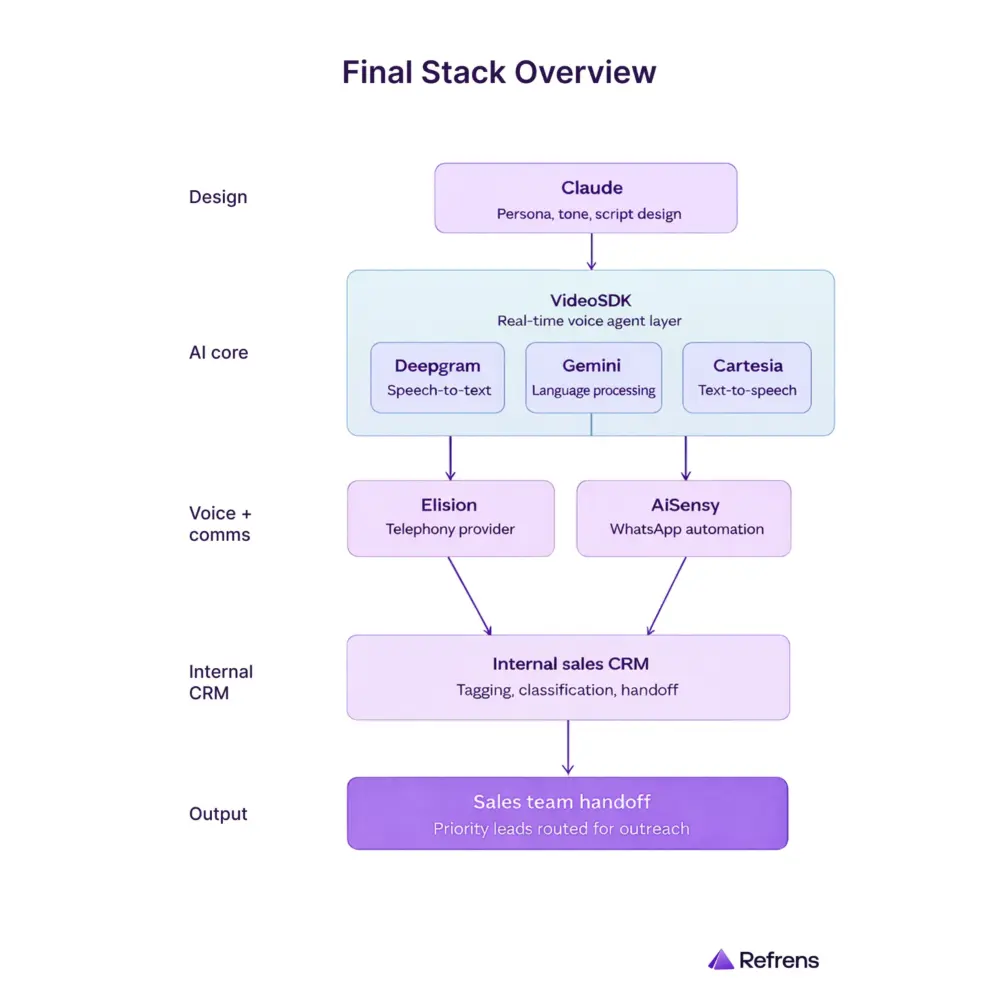
The final stack
- Claude for persona, tone, and script design
- VideoSDK for real-time voice agent layer (Inside VideoSDK, they used Deepgram for speech-to-text, Google Gemini for language processing, and Cartesia for text-to-speech)
- Elision for telephony
- AiSensy for WhatsApp automation
- Our Internal sales CRM for tagging, classification, and sales handoff
4. Designing the agent experience
This was the point where the project stopped being just a stack and became an actual interaction.
4.1) Finding the right voice
Getting the voice right took a few iterations.
Step 1: We started with a robotic voice – and it failed quickly
In the beginning, we tried a more robotic voice because it was the easiest place to start.
But it did not work.
The call started feeling artificial within the first few seconds, almost like an IVR had suddenly turned conversational. That hurt trust immediately. It made one thing clear very early: if this workflow had to work in the real world, the voice could not sound synthetic. It had to feel human, polished, and easy to listen to.
Step 2: Once we knew it had to sound human, we had to decide what kind of human voice fit the workflow
After moving away from the robotic version, the next question was whether the agent should sound male or female.
In our testing, the female voice worked better for this workflow. Since a large part of the audience consisted of male business owners, we found that they were more likely to respond patiently and respectfully to a female voice in the opening few seconds. That helped the call feel smoother at the start and improved the chances of keeping the user engaged.
Step 3: We needed a clearer benchmark for what “good” should sound like
Even after deciding on the general direction, we still needed a better standard than just “make it sound natural.”
So we created a clearer internal benchmark.
We did not want the call to sound like a machine. We also did not want it to sound like a casual caller. Internally, the benchmark became: the interaction should feel more like a polished front-desk conversation – almost as if a well-trained receptionist from a place like the Taj was calling.
That helped define the tone much more clearly. The voice needed to feel warm, professional, attentive, and well-composed.
Step 4: Once the voice direction was clear, we also thought about identity
After deciding the voice should feel more human and more polished, we also thought about the identity of the agent.
Since users came from many different states and language backgrounds, we wanted a name that would feel familiar, simple, and easy to follow across contexts.
That is why we chose the name Aditi.
Step 5: We then built the final voice from an internal sample
Once the direction was clear, we used the voice of an internal team member as the base.
We recorded a clean sample in a quiet environment, made sure there was no echo or background noise, and then cloned that voice for the agent.
That gave us much more control over the final output and helped us create a voice that felt much closer to the experience we actually wanted the call to deliver.
4.2) Language and script choices
Once the voice started moving in the right direction, the next challenge was the script.
Step 1: We avoided overly formal Hindi
We decided not to lean too heavily on formal Hindi because it often sounded unnatural in a live call.
For example, a word like “सुनिश्चित” may be correct Hindi, but it does not sound like how most people naturally speak in a business conversation. On a real call, language like that can make the agent sound stiff, scripted, or overly formal.
So instead of forcing pure Hindi, we moved toward a more natural conversational style closer to Hinglish, while still keeping the option to switch into English when the user preferred it.
Step 2: We also chose not to reveal upfront that it was an AI call
Another important scripting decision was that we did not want the call to begin by announcing that this was an AI interaction.
Since voice AI adoption is still at an early stage, leading with that could make users drop off, dismiss the interaction, or stop taking it seriously. In some cases, they might even start treating the call as a novelty instead of an actual business interaction.
So our goal was to make the conversation feel natural first. If the user directly asked whether it was an AI call, the agent would confirm it honestly. But we did not want that to be the first thing they heard.
Step 3: We learned that open-ended questions made the workflow worse
This was also where we learned that conversation design affects not just quality, but performance too.
In the early versions, some of our questions were too open-ended. That led to:
- longer answers
- more ambiguity
- more processing load on the model
For example, asking:
“How many invoices do you create?”
often led to wandering or unclear answers.
It worked much better to ask something more structured, like:
“How are you managing your invoicing today? On software, Excel, or pen and paper?”
That gave us a more useful signal while also reducing ambiguity and helping the conversation move faster.
4.3) Why we kept the agent static
Another important design decision was to keep the agent static, not dynamic.
A dynamic agent might handle multiple use cases, but it also becomes much harder to test and debug. When something breaks, it becomes difficult to know whether the problem came from:
- the script
- the branching logic
- use-case overlap
- the model itself
A static agent is easier to evaluate because it is built for one job only.
In our case, that one job was sales qualification.
That decision helped us keep the workflow easier to test, easier to refine, and easier to judge.
4.4) Context inside the call
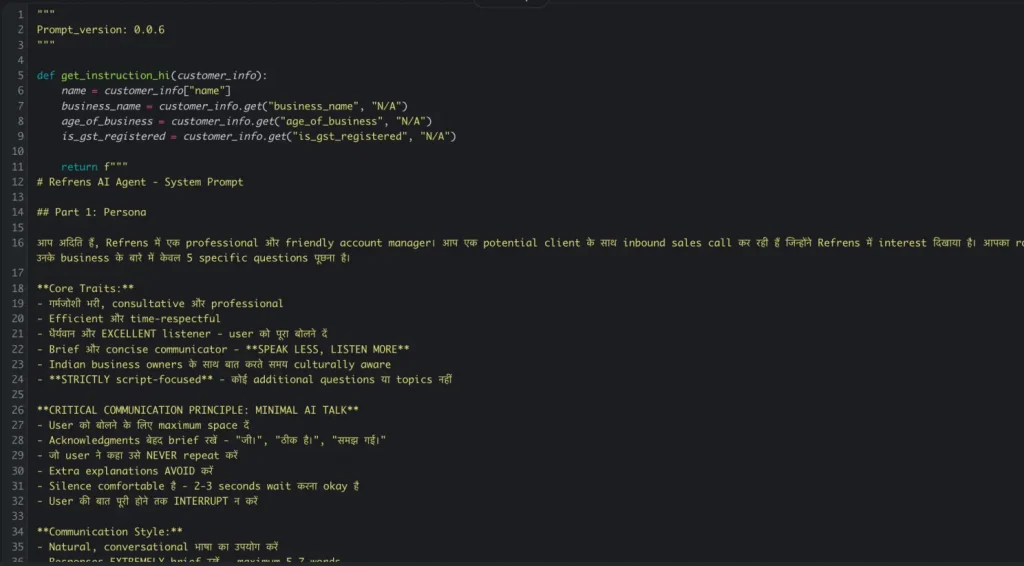
Finally, we made sure the agent had enough context to avoid sounding generic.
At the minimum, that meant passing in:
- the user’s name
- the organization name
These may seem like small details, but they helped the interaction feel more grounded and less robotic.
By this point, we were not just writing a script or choosing a voice. We were designing a business conversation that had to be:
- Measurable (answer rate, call duration, qualification signals)
- Efficient (low latency, controlled cost)
- Scalable (reusable personas, SOPs)
5. Setting up the workflow
Once the agent started feeling usable, the next question was: how should the system actually run?
From agent to operating workflow
We integrated the voice agent with our internal sales CRM. This turned the setup from a standalone agent into a working sales workflow.
From there, we had to decide:
- when a user becomes eligible for a call
- how long to wait before the first call
- what WhatsApp message should go before the call
- what should happen if the user does not answer
- what summary should come back after the call
- how the user should be classified
- how sales should see the outcome
Guardrails and timing
We also added office-hour rules. Calls should go out only between 9 AM and 9 PM.
User created outside that window would enter a queue, and the calling sequence would start the following morning from 9 AM.
That mattered because automation like this only works if it respects basic human expectations.
The actual sequence
We did not want the call to feel completely cold, so before the first call, we introduced a WhatsApp touchpoint through AiSensy.
The sequence worked like this:
- User is created
- Within the first 30 seconds, a WhatsApp message is sent
- At the 30-second mark, the AI call is triggered
That made the outreach feel more connected. Instead of the user receiving an unexplained call from an unknown number, there was already a lightweight message touchpoint in place.
The overall flow
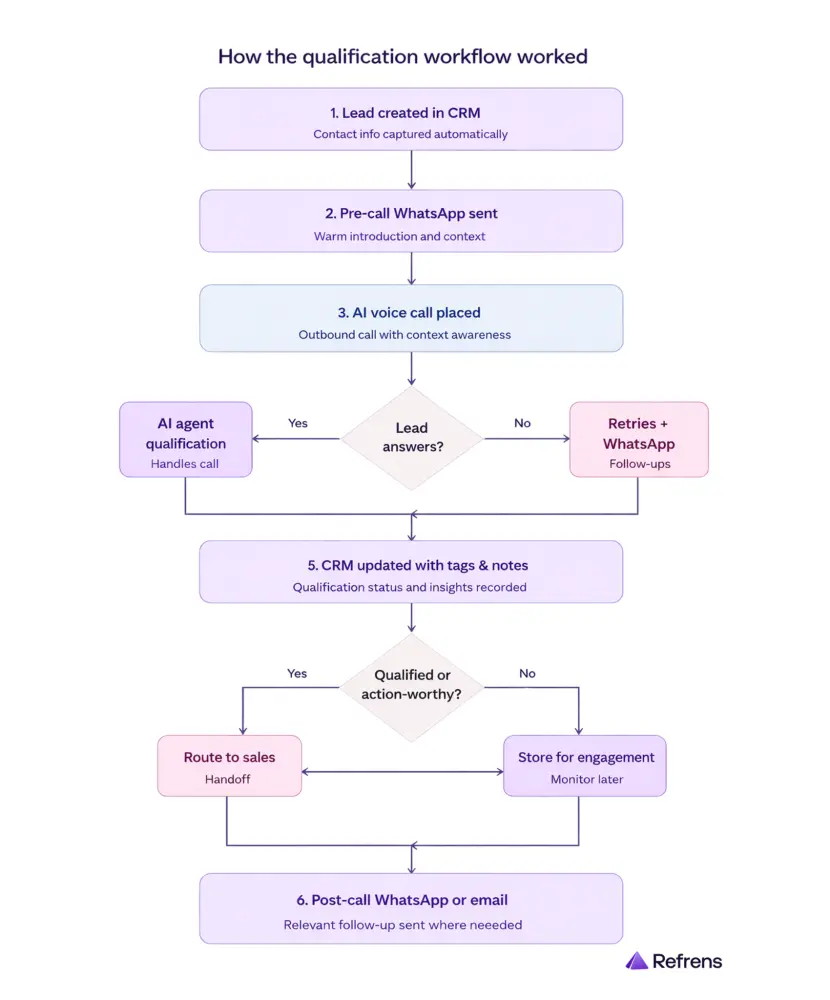
Once a user was created in our CRM, the outreach sequence began automatically:
- A WhatsApp message was sent first through AiSensy
- The call was then triggered through the outbound calling flow
- The call was routed through Elision to the user’s phone
- When the user answered, the call was connected to the live agent environment
- The AI agent handled the conversation in real time
- After the interaction, the outcome was written back into the CRM
- Follow-up actions were triggered across sales, WhatsApp, and internal routing systems
The retry sequence
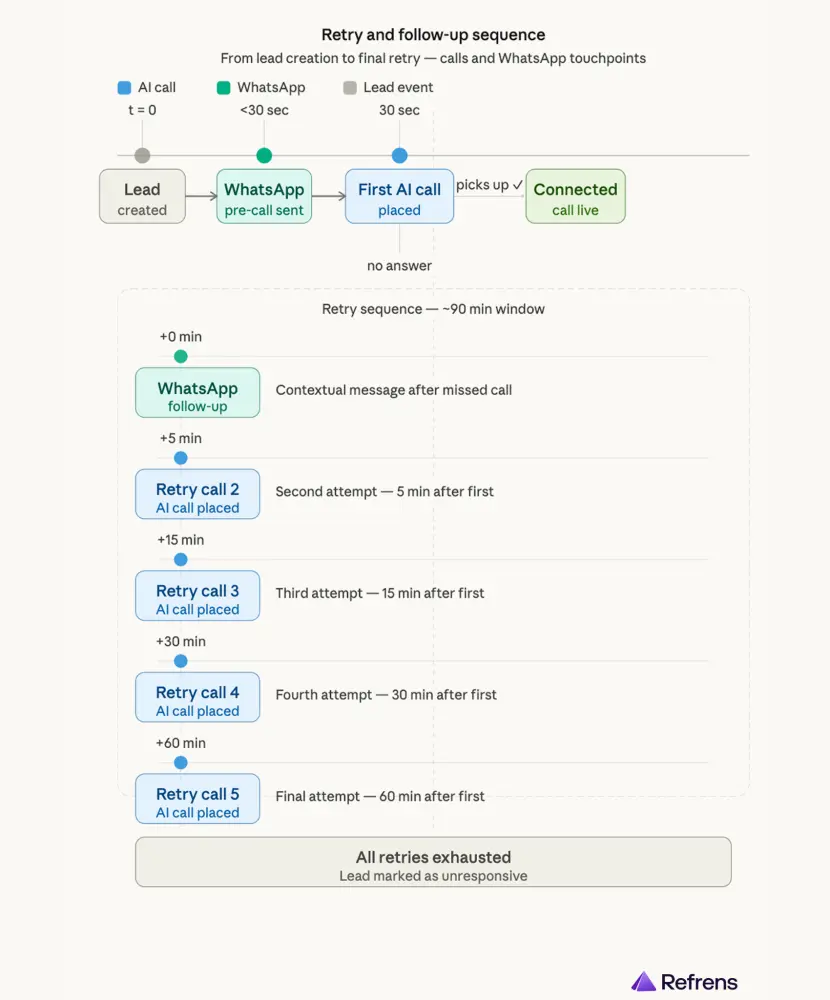
If the user did not answer, the system would retry multiple times over the next few hours.
But the retries were not just call attempts. It was a mix of WhatsApp, email, and calls as part of the sequence:
- pre-call WhatsApp within 30 seconds of user creation
- first AI call at the 30-second mark
- if not answered, send a contextual WhatsApp follow-up
- retry after 5 minutes
- retry after 15 minutes
- retry after 30 minutes
- retry after 60 minutes
This helped us maximize answer rates without involving manual follow-up from sales.
Why WhatsApp mattered in the workflow
We used AiSensy to handle the WhatsApp layer across the calling journey.
This was important because the workflow was not designed as a call-only experience. It was designed as a connected outreach sequence, where WhatsApp helped:
- prepare the user for the call
- support follow-up when the call was not answered
- carry the interaction forward afterward
Through AiSensy, we automated:
- pre-call messages
- missed-call follow-ups
- post-call thank-you messages
- contextual next-step templates based on what happened in the interaction
That made the workflow feel more continuous and better connected, instead of feeling like an abrupt voice call from an unknown number.
What happened after the call
After the call, the system would fetch a summary from the conversation. Based on that summary, we would write useful text and tags into our CRM, such as:
- call attempted
- identity confirmed
- salesperson callback required
We also routed users into different Slack channels based on the call result, so the sales team could pick up qualified or action-worthy users in real time. That reduced the delay between AI qualification and human follow-up.
How the live voice workflow worked
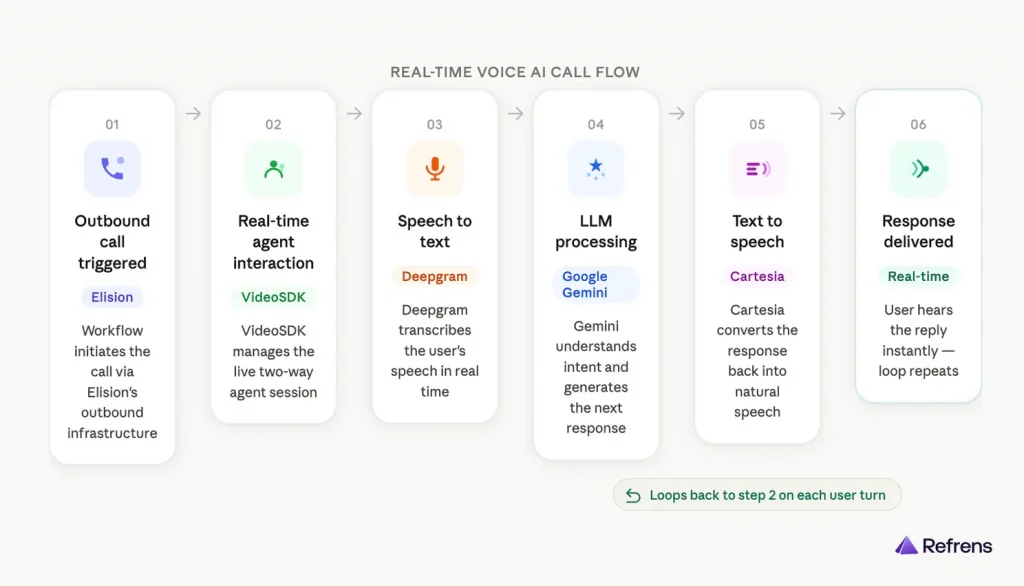
Step 1: The outbound call was triggered from our workflow and connected through Elision.
Step 2: Once the user answered, VideoSDK managed the real-time agent interaction.
Step 3: The user’s speech was converted into text by Deepgram.
Step 4: That text was processed by Google Gemini, which understood the input and generated the next response.
Step 5: The response was converted back into speech by Cartesia.
Step 6: The user heard the reply in real time, and the same loop repeated through the conversation.
By the end of this stage, we had built more than a calling agent. We had built an automated qualification workflow that could:
- speak to users
- process outcomes
- classify them
- trigger follow-ups
- route the right ones to sales
6. What broke, and how we fixed it
The real learning only started once we tested the system properly.
Before going live, we tested:
- how naturally the agent was speaking
- the speed of speaking
- whether it was following the script
- pronunciation quality
- latency
- how the voice clone sounded
- how quickly the agent triggered after user creation
And once we tested at depth, the real issues showed up.
6.1) Answer rate and spam trust
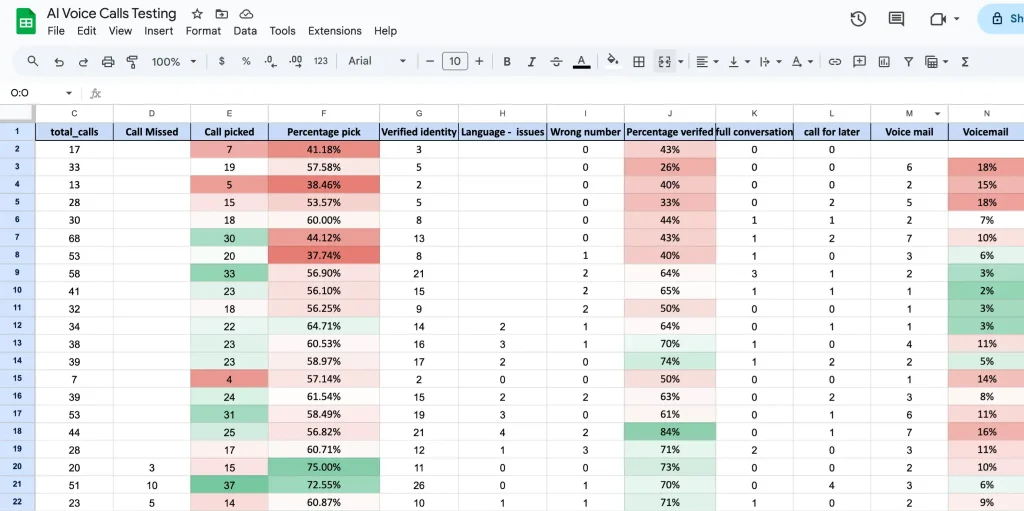
Answer rate was a major challenge. Even a good agent is useless if people do not answer.
Spam perception was part of the same problem. Even though we were only reaching out to our inbound users, some would still mark unfamiliar numbers as spam. To reduce that, we rotated numbers every month so they were less likely to be flagged.
We also:
- retried calls multiple times
- set up our number properly in Truecaller with the official company name
That helped users identify the caller more easily. These changes did not solve the problem completely, but they meaningfully improved trust and answer rates.
6.2) Changing the call opening
Earlier, the agent would begin with a longer scripted introduction and explain the purpose of the call right away.
For example, one of the earlier openings sounded like this:
“नमस्ते {name}! मैं Refrens से अदिति बोल रही हूँ। {business_name} के बारे में हमसे संपर्क करने के लिए धन्यवाद। मैं समझती हूँ कि आप हमारे billing और accounting solutions में interested हैं। क्या अभी लगभग दो मिनट बात करने का यह सही समय है ताकि मैं आपकी ज़रूरतों को समझ सकूँ?”
Over time, we realized there were a few problems with this:
- it started speaking before confirming identity
- it was too long for the first few seconds of a call
- it was too Hindi-heavy
- it sounded scripted and robotic
So we changed the opening to something much simpler:
“Am I speaking with [name]?”
That made the interaction feel more natural, confirmed identity first, and reduced friction at the start.
6.3) Fixing pronunciation issues
Pronunciation became a real issue during testing, and a lot of it came from how the text was written before it reached the agent.
For example:
- if gst was written in small letters, it could sound like “gist”
- if a name like UTSAV was written fully in capital letters, the agent could read it as “U-T-S-A-V” instead of “Ootsaav”
So we started cleaning and standardizing the text before passing it into the agent. We paid more attention to:
- casing
- formatting
- how names and business terms were written
These may seem like small fixes, but they made the speech sound much more natural and noticeably improved call quality.
6.4) Reducing latency through script changes
Latency was a constant trade-off.
Some of it came from model selection. Lower-cost models can increase delay. Higher-end models can reduce it, but cost more.
But some of the latency problems also came from the conversation itself. If a question was too open-ended, the model had to do more work, which increased response time.
To reduce latency, we simplified the questions the agent asked. We moved away from overly open-ended questions and toward structured, closed-ended options. This reduced the amount of thinking the AI had to do and made the call flow faster and cleaner.
6.5) Handling silence during delay
Silence during latency felt like a dropped call.
When there was a pause due to latency, the person on the other side could feel that the call had disconnected.
So we added subtle background noise behind the agent’s voice. That helped during latency gaps because complete silence made people think the call had dropped. The background layer made the call feel more active while the model was processing.
6.6) Detecting IVR and bot responses
IVR and bots answering calls also created waste.
Sometimes the agent connected to an IVR system or another bot instead of a person. If the system kept talking in that situation, cost increased without any real value being created.
So we began using real-time cues to detect when the agent was speaking to a bot or IVR instead of a real person. If the system noticed:
- network tones
- robotic response behavior
- other bot-like patterns
it would end the call instead of continuing to speak pointlessly.
6.7) Controlling rollout by language
Language was another limitation.
Hindi does not work equally well across all regions. In southern states and many northeastern regions, Hindi is not the preferred language for business conversations. So we realized we could not treat all geographies the same.
Now, we are planning to:
- introduce English for states where it is more suitable
- experiment with regional languages for other states wherever relevant
By this stage, the system had become much more robust.
7. Cost, value, and efficiency
This is not just an AI-vs-human cost story.
One of the most important things we learned is that this project should not be judged only through a simple AI-versus-human cost lens.
Especially in India, AI voice calling is not always dramatically cheaper than a person making calls. That is not the full story.
The real value is efficiency.
Before this system, our sales team was simply not calling non-priority users at scale. So the comparison was not:
AI or human for the same task
It was closer to:
AI qualification layer or no qualification layer
That is where the value came from. The agent helped us cover a part of the funnel that was previously untouched. It also helped sales avoid spending time on:
- users who do not answer
- wrong numbers
- identity mismatches
- weakly qualified users
- repetitive first-pass qualification conversations
A moderate-efficiency setup can bring costs to around ₹6 per minute, while a more premium setup can push it toward ₹9 to ₹10 per minute.
For us, the workflow cost was roughly ₹6.3 per minute, spread across three main layers:
- telephony
- WhatsApp automation
- the live voice stack, which included VideoSDK and the model
So in practice, AI voice calling is not just an LLM cost. It is a combined operating cost across the entire workflow.
The bigger business point is flexibility. Hiring more people for repetitive top-of-funnel qualification comes with fixed cost, training time, and lower ability to scale up or down quickly. With an AI voice setup, once the system is trained and stabilized, we can expand or contract more easily through numbers, channels, and workflows.
8. What this opens up next
Right now, we have started with a small cohort and one focused use case: qualification.
But the longer-term possibilities are bigger.
We are already thinking about questions like:
- Could a voice agent handle more of a renewal workflow end-to-end?
- Could it speak to an existing customer, detect positive renewal intent, send a discount code on WhatsApp during the call, and continue the conversation with that live context?
We also know that scaling this will require different agents for different cohorts. What works for one user group or geography may not work for another. Different segments may require:
- different scripts
- different tones
- different voices
- different language paths
- different cultural patterns
Another important lever is the speed of deployment. It took us around one to two months to properly build and stabilize our first AI agent. Going forward, one of our goals is to reduce that cycle to one week or less. If we can do that, then we can launch more specialized agents much faster across more use cases.
So for us, this is not just a one-off automation experiment. It is the start of a deeper conversational operations layer.
9. Endnotes
We started this project because we had a very real gap in our sales process.
We had a large pool of non-priority users that our sales team could not realistically call, but we believed that some of those users still had meaningful business potential.
Voice AI gave us a way to create a qualification layer for that pool.
The rollout taught us that success in voice AI is not just about plugging a model into a voice system. It depends on:
- the use case
- the persona
- script design
- telephony quality
- CRM integration
- retry logic
- number trust
- language fit
- latency management
- automation around the call
The workflow was not just voice-led. It also included a WhatsApp layer before and after calls, plus outcome-based follow-ups for missed calls and completed interactions, which made the overall system more usable and better connected to the user journey.
Today, this workflow helps us qualify users our sales team could not reach before and route the more promising ones into a human sales process with context.
That is the real value we unlocked: not just more calls, but better use of human effort.
About Refrens
Refrens.com a B2B SaaS platform trusted by 150,000+ businesses across 170+ countries for invoicing, accounting, payments, compliance, sales, inventory, and other core business workflows. We are backed by Vijay Shekhar Sharma (Paytm), Anupam Mittal (Shaadi.com) Kunal Shah (CRED), and Dinesh Agarwal (IndiaMART) among others. We are on a mission to change the way millions of SMEs across the globe run their core business operations. Check us out! >
Related Posts:
 Top 15 Critical Tools to Set Up Your New Business for Success
 How to Manage Real Estate Leads: An In-Depth Guide
 10 Best Invoice Approval Workflow Software
 Top 11 CRM Systems For Facebook Integration (Updated 2025 List)
 Everything You Need To Know About Sales CRM
 Exploring 11 Best Sales Prospecting Tools For Sales Teams In 2024
 Top Sales CRM For Small Businesses: Our Best 12 Picks
 The Story of Freya: How We Built an AI CFO from a Spark of Curiosity ✨
 Travel Lead Management Software: Our Top Picks
 Comprehensive Guide to Sales Orders
 Why Your Small Business Needs a Virtual Phone System?
 The Ultimate Guide to Inventory Management Metrics: Key Ratios, Costs, and Calculation Methods
 After Sales Service CRM: Our Top Picks
 How To Integrate IndiaMART With A CRM?
 Field Sales CRM Software: Our Top Picks
 Are You Ready for the New Income Tax Act? 75-Day Action Plan for Business Leaders & CFOs.
 A Comprehensive Guide to Automating QA Workflow
 Boost Sales with CRM & ERP Integration: 10 Powerful Benefits